Fiverr vs Upwork vs LinkedIn 2026 is the biggest question for beginners trying to get their first AI freelance client.
Choosing the wrong platform can cost beginners weeks of effort — especially when they don’t yet understand how the client-acquisition process works (see the step-by-step guide on getting your first AI freelance client in 2026).
A common pattern: beginners create generic gigs on Fiverr, spend Connects on poorly matched Upwork jobs, and post randomly on LinkedIn — then can’t tell which effort is working.
This guide doesn’t rely on anecdotes or invented success rates. Instead, it compares the three platforms on how they actually work — fees, how clients find you, and the kind of effort each one rewards — so you can match a platform to your skills, schedule and goals.
Below you’ll find a factor-by-factor comparison, a decision framework, and practical workflows for each platform. Where we cite numbers, they come from the platforms’ own published help pages and are linked.
Fiverr vs Upwork vs LinkedIn: Which Platform Is Best for Beginners in 2026?
The short answer: It depends on your personality, time, and goals. Each platform rewards a different kind of effort, and the right choice for your first client is the one whose model fits how you prefer to work.
If you’re still unsure what kind of work to offer, this usually comes down to choosing the right niche and service combination (this breakdown shows what actually works in 2026).
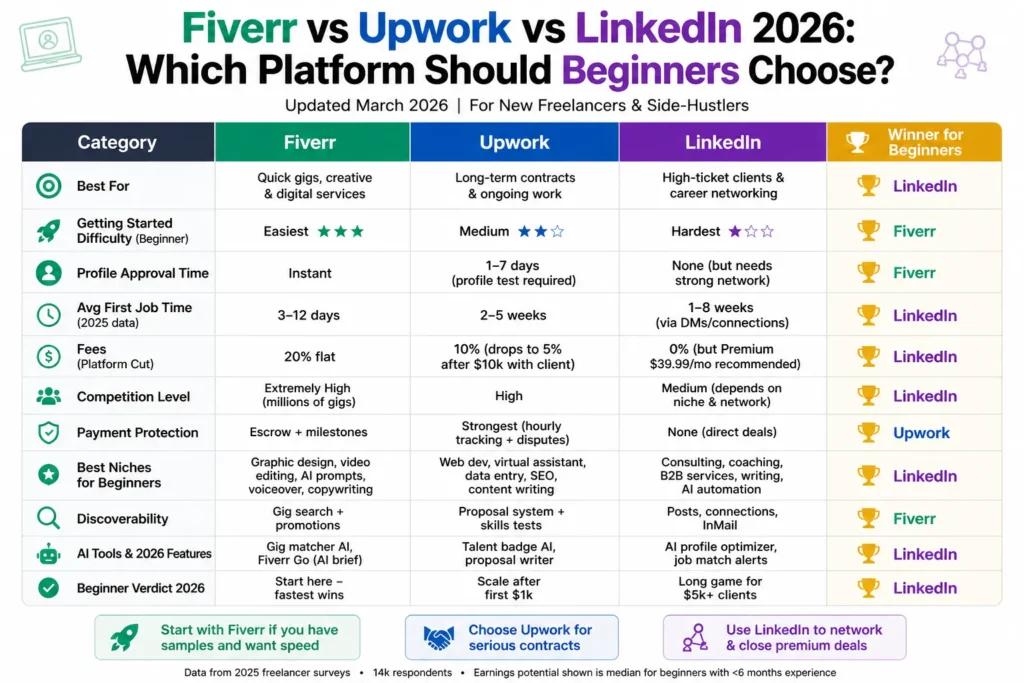
Here’s the complete head-to-head comparison:
| Factor | Fiverr | Upwork | Who It Tends to Suit | |
|---|---|---|---|---|
| How clients find you | Buyers search and browse your gigs | You send proposals to client job posts (clients can also invite you) | You start conversations through your profile, posts and outreach | Fiverr: passive sellers; Upwork: proposal writers; LinkedIn: relationship builders |
| Platform fees | Sellers earn 80% of the order value (see Fiverr’s Earnings page help article) | Variable freelancer service fee of 0–15% (see Upwork’s Freelancer Service Fee article) | No platform commission on deals you agree and invoice directly | Factor fees into your pricing on every platform |
| Cost to pitch | No cost to publish gigs | Most proposals require Connects, sold at $0.15 each (see Upwork’s guide to Connects) | Free to message connections; Premium is optional | Low-budget starters: Fiverr or LinkedIn |
| Pricing control | Packages you set, inside a crowded marketplace | Fixed-price or hourly bids against other proposals | Fully negotiated with the client | LinkedIn if you’re comfortable negotiating |
| Payment protection | Built into the order system | Built into contracts and milestones | None by default — you set terms and invoicing | Fiverr/Upwork if you want platform-managed payments |
| Daily effort style | Gig optimization, fast replies, delivery | Selective, tailored proposals | Consistent outreach and content | Depends on the work you prefer doing |
| Ease of getting started | Very high | Medium (profile approval and Connects) | Medium (profile and offer clarity needed) | Fiverr for the simplest setup |
Fiverr vs Upwork vs LinkedIn: What Actually Differs
Instead of quoting unverifiable beginner success rates, here are the structural differences that shape your first-client experience:
- Fiverr: Buyers come to you, so your gig title, packages, samples and reviews do the selling. Sellers earn 80% of each order’s value (Fiverr’s Earnings page help article), and early orders are often small, one-off jobs.
- Upwork: You compete through proposals. A freelancer service fee of 0–15% applies (Upwork’s Freelancer Service Fee article), and most proposals cost Connects, so targeting matters more than volume.
- LinkedIn: There’s no bidding or commission on deals you arrange directly, but you must generate your own opportunities through a clear profile, relevant outreach and follow-up.
These differences explain why the “best” platform changes based on what you value most — speed of setup, pricing control, or long-term relationships.
Fiverr vs Upwork vs LinkedIn: Myth-Busting Common Lies in 2026
Myth 1: “Fiverr is the best and easiest starting point for beginners.” Truth: While it’s the easiest to set up, the extreme saturation in AI categories makes it very difficult to stand out and earn meaningful money quickly.
Myth 2: “Upwork has the highest paying clients so I should start there.” Truth: Upwork is great for quality work, but new accounts face serious barriers with limited connects, slow visibility, and tough competition from established freelancers.
Myth 3: “LinkedIn is only suitable for experienced professionals and networkers.” Truth: LinkedIn doesn’t require years of experience. It requires a clear offer, a credible profile and relevant, value-first outreach — all things a beginner can build.
Where Fiverr Gets Hard for Beginners in 2026 (Fiverr vs Upwork vs LinkedIn)
Fiverr remains one of the most popular platforms, but popular AI categories are crowded, so generic gigs struggle to stand out.
Detailed Pros:
- Extremely simple gig creation process
- Buyer Requests section gives you direct project opportunities
- Built-in payment protection and dispute system
- Great for building initial reviews and testimonials
Detailed Cons:
- Massive competition especially in AI writing, content, and design categories
- Heavy downward pressure on prices
- Algorithm strongly favors sellers with high order completion rates and many reviews
- Most orders tend to be small, one-time gigs
Practical Fiverr Strategy: Create 3–5 highly specific gigs instead of generic ones. Examples of specific positioning:
- “I will write 1,500-word SEO-optimized blog posts for real estate agents”
- “Create 30 days of engaging Instagram and Facebook content for local service businesses”
- “Design professional AI-generated visuals and banners for coaches and consultants”
Choosing the right service matters more than the platform itself — here are the best AI freelance services beginners are using right now.
Plan for fees and timing: Fiverr states that sellers earn 80% of each order’s value (Fiverr’s Earnings page help article), so price your packages with that in mind. How quickly a first order arrives depends on your niche, gig quality and demand — no one can honestly promise a timeline or first-month income.
Pro Tips to Succeed on Fiverr Even in a Saturated Market
If you still want to use Fiverr as your starting point, here’s what actually works in 2026:
- Use hyper-specific gig titles instead of broad ones.
- Add a short video intro to make your gig more personal and easier to trust.
- Offer “packages” instead of single services (Basic, Standard, Premium).
- Respond to relevant buyer messages and briefs quickly and specifically — speed and relevance both matter.
- Set delivery times you can reliably meet or beat, and communicate proactively to earn strong reviews.
Treat Fiverr like a small business: test titles, refine packages, and review which gigs get impressions and clicks before adding more.
When Upwork Makes Sense for Beginners in 2026 (Fiverr vs Upwork vs LinkedIn)
Upwork suits structured, proposal-based projects, but new profiles need to be selective because pitching has a cost.
Detailed Pros:
- Higher average project budgets
- Milestone payment system that protects both parties
- Excellent for turning one-time projects into long-term clients
- Detailed client feedback and job success score help build credibility
Detailed Cons:
- Most proposals cost Connects, which Upwork sells at $0.15 each (Upwork’s guide to Connects), so untargeted applying gets expensive
- New profiles get very low visibility initially
- High competition from freelancers with hundreds of reviews
- A variable freelancer service fee of 0–15% applies to your earnings (Upwork’s Freelancer Service Fee article)
Upwork’s own Upwork vs Fiverr resource describes its model as built around client job posts, proposals and contracts — a structure that suits milestone-based projects.
Practical Upwork Strategy: Because proposals cost Connects, favor fewer, highly tailored proposals over volume. Use outcome-based language like “I will create 10 SEO blog posts that drive more traffic to your website” instead of “I offer AI writing services.”
Set realistic expectations: New profiles often need time to build visibility and reviews. Track proposals sent, replies and interviews so you can see what’s working, rather than relying on promised timelines or earnings.
Common Upwork Mistakes That Kill Beginner Accounts
These mistakes commonly weaken new profiles:
- Sending generic copy-paste proposals
- Using AI-generated proposals without heavy editing
- Applying to jobs outside their actual skill level
- Not completing profile 100% (including certifications and overview)
Fix: Write every proposal as if you’re talking directly to the client. Mention something specific from their job post. Specific proposals are easier for clients to evaluate than generic ones.
Why LinkedIn Can Work Well for Beginners (Fiverr vs Upwork vs LinkedIn)
LinkedIn works differently from marketplaces: there’s no bidding war on a job post and no platform commission on deals you arrange directly — but you have to create your own opportunities.
If you want outreach message templates and profile setup, it’s broken down step-by-step here (how beginners can approach getting clients on LinkedIn in 2026).
Why LinkedIn can work:
- You get direct access to business owners and decision-makers
- No bidding against a stack of proposals on a single job post
- Higher trust level because it’s a professional network
- Easier to demonstrate value with free samples and audits
- Direct relationships can lead naturally to ongoing work
Illustrative scenario (hypothetical, not a real client result): Imagine a beginner who offers AI-assisted blog content for local real estate agents. She updates her headline to name that niche, connects with a small number of relevant agents each day with a personalized note, and offers a short sample or content audit to those who engage. Many won’t reply; a few may ask questions. The goal of the workflow is to create relevant conversations — it can’t guarantee a number of clients or a timeline.
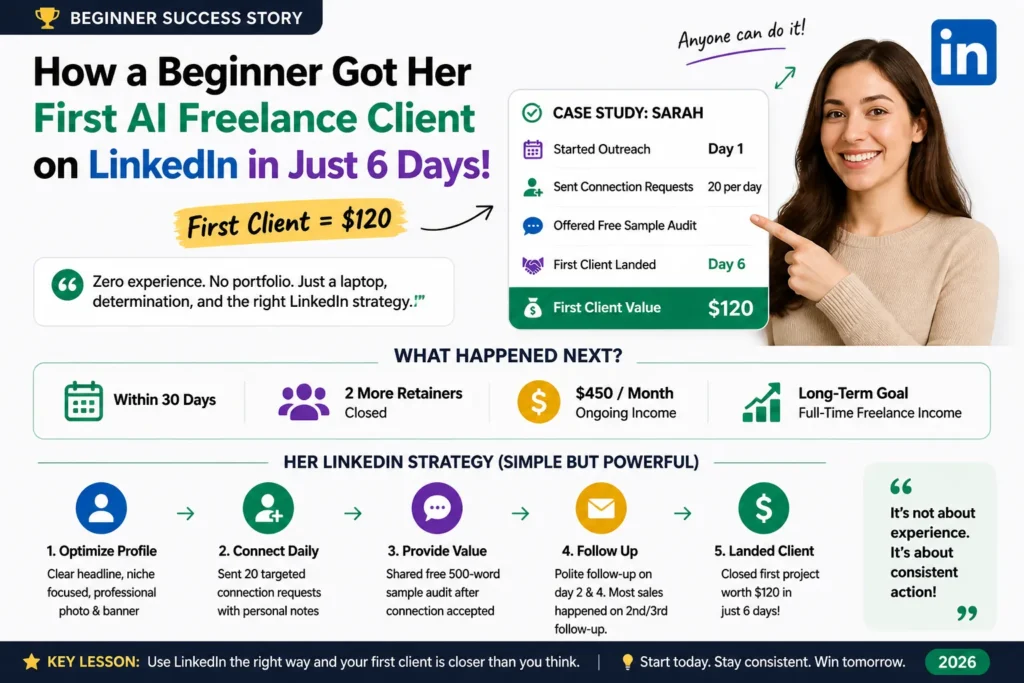
Here’s a simple LinkedIn workflow you can adapt:
- Profile Optimization — Use a professional photo, banner mentioning “AI Freelancer | Helping Businesses Save Time”, and headline: “I Help [Niche] Businesses Create High-Converting Content Using AI | Open to Work”.
- Daily Connection Strategy — Send a manageable number of personalized connection requests each day to relevant small business owners, marketing managers and coaches. Add a short note: “Hi [Name], I saw your recent post about [topic]. I help businesses like yours with AI content. Would love to connect.”
- Value-First Approach — After they accept, wait 24–48 hours then send a short message with a free sample or quick audit.
- Follow-up Sequence — Follow up politely once or twice; many conversations need more than one touchpoint.
Track connections, replies and calls in a simple sheet so you can see which messages and offers resonate.
A Hybrid Strategy: The Smartest Way to Use Fiverr vs Upwork vs LinkedIn
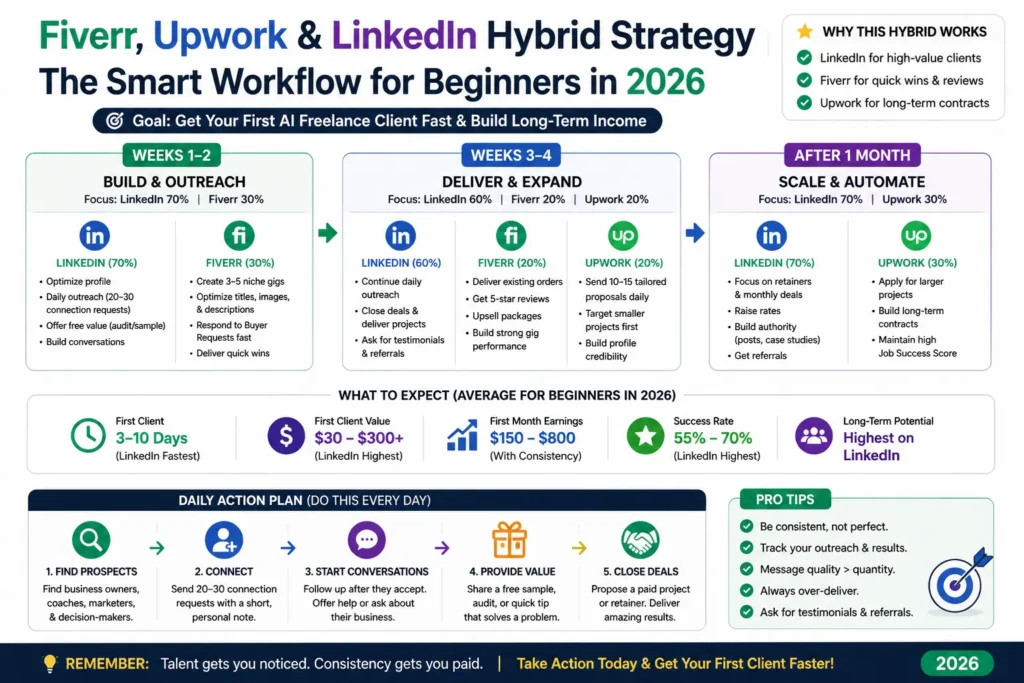
A sensible default for many beginners: If you’re comfortable with outreach, use LinkedIn as your primary channel and Fiverr as a secondary marketplace for inbound orders.
Detailed 30-Day Hybrid Strategy:
- Weeks 1–2: Spend 70% of your time on LinkedIn outreach and 30% optimizing and promoting Fiverr gigs.
- Weeks 3–4: Focus on delivering excellent work to your first clients while slowly adding selective Upwork proposals.
- After 3–5 clients: Shift focus toward raising your rates and converting clients into monthly retainers.
Adjust the split based on where you actually get responses — this is a starting framework, not a guaranteed result.
Tools That Help You Get Clients Faster in 2026
- ChatGPT + Claude — For drafting content, proposals, and client communication
- Canva + Midjourney — For creating professional samples and visuals quickly
- Google Sheets — To track daily outreach, responses, and follow-ups
- LinkedIn Premium (optional) — Useful after your first few clients for better search and InMail
The right tools can speed up drafting and help you stay organized — but always review AI output before it reaches a client.
How to Decide Which Platform to Start With (Decision Framework)
Ask yourself these 5 questions:
- Do you want the fastest possible first client? → Go with LinkedIn
- Do you hate daily outreach and want passive orders? → Start with Fiverr
- Do you prefer structured projects with milestones? → Choose Upwork
- How much time can you dedicate daily? (Less than 1 hour → Fiverr)
- Are you comfortable talking to clients directly? → LinkedIn wins
If you’re unsure, pairing one outreach channel (LinkedIn) with one marketplace (Fiverr or Upwork) gives you two different ways to find a first client.
14-Day Action Plan to Get Your First AI Freelance Client
Week 1: Foundation Building
- Day 1–2: Choose your main platform and fully optimize your profile or gigs
- Day 3–4: Create at least 3 high-quality samples
- Day 5–7: Start daily outreach (minimum 15–25 actions per day)
Week 2: Consistent Execution & Momentum
- Send targeted messages and proposals every day
- Follow up politely with warm leads
- Track all activity and refine your approach based on responses
- Deliver your first projects with excellence to earn great reviews
Important Note: Consistency and a simple feedback loop (track, review, adjust) matter more than any single platform choice.
Frequently Asked Questions
What is the best freelancing platform for beginners in 2026? There’s no single best platform. Fiverr is the easiest to set up, Upwork suits structured proposal-based projects, and LinkedIn suits people comfortable with direct outreach. Use the decision framework above.
Should I use Fiverr, Upwork, and LinkedIn at the same time? No. Start with a maximum of two platforms. Focus and consistency produce much better results than spreading yourself too thin.
How much can a beginner realistically earn in the first month? There’s no reliable universal figure — it depends on your niche, pricing, skills, time invested and demand. Budget for platform fees (Fiverr sellers earn 80% of order value; Upwork charges a 0–15% freelancer service fee) and treat early earnings as uncertain.
Is Fiverr still worth it in 2026? Yes, but treat it as a supplementary platform for reviews and quick wins rather than your main source of income.
Which platform has the highest long-term potential? Long-term potential depends more on the relationships you build than on the platform. LinkedIn enables direct relationships, Upwork supports ongoing contracts, and Fiverr supports repeat buyers.
Final Verdict on Fiverr vs Upwork vs LinkedIn
In 2026, LinkedIn is a strong option for beginners comfortable with direct outreach, because there’s no bidding and no platform commission on deals you arrange yourself.
Fiverr remains useful for building momentum and collecting testimonials quickly. Upwork works well once you have some proof and reviews.
The platform you choose is important — but consistent daily action is what gives you the best chance of progress.
Start Here Today: Pick the platform that matches your answers in the decision framework above, set up your profile or gigs, and begin taking consistent action.