
By Omar Yousaf, Founder of Digital Solo Hub · Last updated: October 12, 2026
AI freelance proposal templates can dramatically improve your chances of landing clients in an increasingly competitive AI freelancing market.
Most AI freelancers underestimate the power of a strong proposal. They believe winning clients depends mainly on technical skills or low prices. In reality, the proposal is often the deciding factor between getting ignored and securing paid work.
On Upwork, clients first see only the opening lines of your cover letter in the proposal list before deciding whether to open the rest (Upwork cover letter guide). Generic, buzzword-heavy openers get skipped. The ones that win are clear, personalized, outcome-focused, and reduce risk for the client.
This guide gives you copy-paste AI freelance proposal templates for six services, plus platform versions for Upwork, Fiverr, LinkedIn and cold email, a fill-in-the-blanks structure, do/don’t examples and a follow-up template. You’ll also get a customization framework, pricing guidance, design tips and a practical execution system.
These templates are built for beginners — clean, professional, and low-pressure. Use them alongside the strategies from my previous guide on closing clients for the best results.
📌 KEY TAKEAWAYS
In this guide, you’ll learn:
✓ 6 copy-paste AI freelance proposal templates, plus Upwork, Fiverr, LinkedIn and cold email versions
✓ Why prospect quality often matters more than proposal quality
✓ How to customize proposals in 15 minutes or less
✓ Beginner-friendly pricing frameworks for AI freelance services
✓ How to build credibility even if you have no testimonials or client results
✓ A proposal tracking system that helps improve conversion rates over time
✓ A practical 30-day action plan for landing your first AI freelance clients
AI freelance proposal templates help freelancers communicate value clearly, reduce client risk, and increase response rates.
Where this guide fits: this page is the writing kit: the templates and wording. To find prospects, see how to get your first AI freelance client. Once someone replies, how to close your first AI freelance client covers calls and the close. To design what you’re selling, see how to package AI freelance services.
The Current Reality of AI Freelance Proposals
The AI freelancing market has changed significantly. What worked a couple of years ago no longer performs the same way.
Clients have grown sophisticated. They can easily spot generic AI-generated proposals. They care less about your tool knowledge and more about whether you can deliver measurable business results — saving time, reducing costs, increasing revenue, or improving efficiency.
A strong proposal in today’s market must do three things well:
- Show you understand their specific situation
- Present a clear, realistic solution
- Make saying “yes” feel safe and logical
Why Most AI Freelance Proposals Fail
Common reasons proposals get ignored:
- Overuse of buzzwords like “AI-powered”, “revolutionary”, and “game-changing”
- Too much focus on the freelancer instead of the client
- Vague deliverables and unrealistic timelines
- No risk reduction for the client
- Poor formatting and readability
- Lack of personalization
The harsh truth is this: Even a mediocre proposal sent to the right prospect often beats a perfect proposal sent to the wrong one. Targeting and volume still matter tremendously.
The reality is that proposal quality becomes much more important after you’ve sent enough volume. In the beginning, your main goal should be sending 10–15 well-personalized proposals every day. Once you start getting replies, then you refine the proposal itself.
Even major freelance platforms such as Upwork emphasize that effective proposals focus on the client’s needs, expected outcomes, and clear communication rather than lengthy descriptions of skills or tools.
Many beginners waste weeks perfecting one template while sending almost nothing. This is one of the most common reasons they stay stuck at zero clients for months.
Related Reading: Most AI Freelancers Choose the Wrong Niche — Here’s What Actually Works
Run the automation discovery call checklist first; these proposal templates work best when the workflow, exclusions and next step are already clear.
The Biggest Proposal Mistake Isn’t Your Proposal
Most freelancers assume their proposal template is the reason they aren’t getting clients.
In reality, proposal quality often matters less than prospect quality.
A mediocre proposal sent to a business actively experiencing a problem will usually outperform a perfect proposal sent to a prospect with no urgency, budget, or clear need.
This explains why some freelancers close clients with simple emails while others get ignored despite beautifully designed PDFs.
Before refining your proposal, ask:
- Does this prospect genuinely need my service?
- Can they afford a solution?
- Is solving this problem a priority right now?
The highest-performing freelancers spend as much time choosing prospects as they do writing proposals.
Hard Truth
Most AI freelancers do not fail because their proposals are weak.
They fail because they send too few of them.
Many beginners spend weeks polishing a proposal template while sending only a handful of outreach messages.
Meanwhile, another freelancer sends 150–200 personalized proposals and gains real-world feedback, discovery calls, and clients.
Execution almost always beats perfection.
The Current AI Freelance Market
Before jumping into templates, it’s important to understand the market environment.
Businesses are increasingly adopting AI tools internally. This creates two opposing forces: increased competition and increased demand for implementation help.
Here’s a clear overview of popular AI services for freelancers:
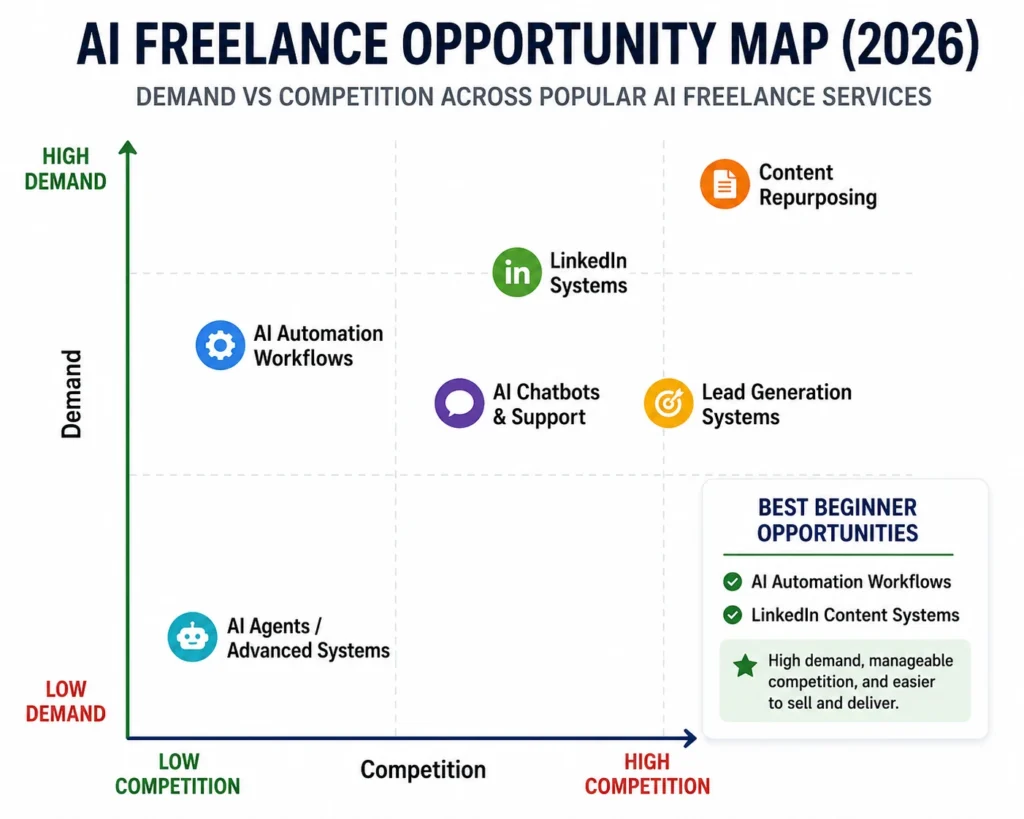
| Service | Difficulty | Demand | Competition | Beginner Friendly |
|---|---|---|---|---|
| Content Repurposing | Low | High | High | Excellent |
| LinkedIn Content Systems | Low | High | Medium | Excellent |
| AI Automation Workflows | Medium | Very High | Medium | Good |
| AI Chatbots | Medium | High | Medium | Good |
| Lead Generation Systems | Medium | High | Medium | Good |
| AI Agents / Advanced Systems | High | Growing | Low | Advanced |
For beginners, content repurposing and LinkedIn systems often provide the fastest path to first revenue.
This table is my illustrative read of the market, not survey data. Content repurposing performs especially well because most businesses are already creating content — they just need help multiplying its reach without spending more time. LinkedIn systems are also beginner-friendly because many professionals understand the platform’s power but lack the consistency to maintain it.
These services have another big advantage: they are easy to demonstrate with before-and-after examples, which helps build trust faster than more technical offerings.
Why Businesses Still Hire AI Freelancers
Many beginners assume AI tools have reduced demand for freelancers.
The opposite is often true.
Businesses do not struggle with access to AI.
They struggle with implementation.
Most business owners want:
- More leads
- Faster customer support
- Better content distribution
- Improved operational efficiency
They do not want to spend months learning prompts, automations, integrations, and workflows.
This implementation gap is where AI freelancers create value.
Market Saturation Analysis
The AI freelance market is saturated with generic service providers.
It is not saturated with problem solvers.
Most freelancers sell tools.
Successful freelancers sell outcomes.
Clients rarely buy technology.
They buy:
- Time savings
- Revenue growth
- Cost reduction
- Operational efficiency
That distinction creates opportunity even in a competitive market.
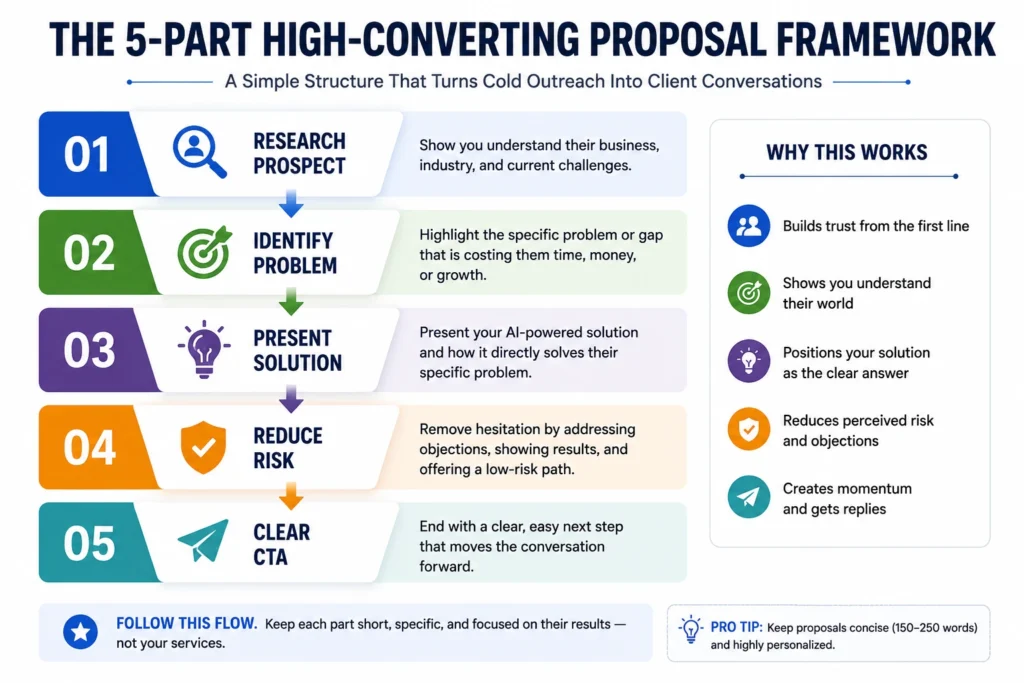
Core Structure Behind High-Converting AI freelance proposal templates
All effective proposals follow this 5-part framework:
- Personalized Opening – Reference something specific about their business
- Problem Identification – Mirror their challenge using their language
- Proposed Solution – Clear deliverables and expected outcomes
- Risk Reduction & Timeline – Remove fear with milestones or pilot options
- Investment & Next Steps – Transparent pricing and a simple call-to-action
Note on prices: every price in these templates is an illustrative placeholder to show structure, not market data. Replace it with your own number. See AI freelancing rates for how to set one.
Template 1: AI Chatbot & Customer Support Automation
Best For: E-commerce stores, SaaS companies, service businesses
Subject Line: Proposal: Reduce Customer Support Workload at [Company Name]
Hi [First Name],
While reviewing your website, I noticed several common customer questions still require manual replies — especially around shipping, returns, and product specifications.
As order volume increases, this creates longer response times and higher support costs.
Proposed Solution I will develop a custom AI support assistant trained on your specific data that can handle a large share of your repetitive inquiries automatically (we will measure the real share during the pilot) while maintaining your brand voice.
Key Deliverables:
- AI chatbot trained on your knowledge base
- Integration with your existing support system
- Analytics dashboard for performance tracking
- Team handover and training session
Project Timeline Week 1: Discovery & Training Week 2: Development & Testing Week 3: Deployment & Optimization
Investment Pilot Version: $450 Full Implementation: $1,250 (includes 30 days support)
We can begin with the pilot to prove results before scaling.
Would you be available for a quick 15-minute call next week?
Template 2: AI Content Repurposing System
Best For: Coaches, content creators, agencies, podcasters
Subject Line: Proposal: Multiply the Value of Your Existing Content
Hi [First Name],
Your recent [specific content piece] contains valuable insights that could reach a much wider audience with proper repurposing.
Proposed Solution I will build a complete AI-powered content repurposing system that turns one long-form asset into multiple high-performing formats.
Deliverables:
- 15–20 LinkedIn posts
- 8–10 Twitter/X threads
- Blog versions
- Email newsletter sequences
- Short-form video scripts
Investment One-Time System Setup: $950 Monthly Retainer: $650–$1,200
Related Reading: Best AI Freelance Services to Offer
Template 3: AI Video Editing & Short-Form Content
Best For: YouTubers, coaches, personal brands
Subject Line: Proposal: Turn Your Long Videos Into Consistent Short-Form Content
Hi [First Name],
Your long-form videos contain excellent value, but manually creating short-form content from them is extremely time-consuming.
Proposed Solution I will create an efficient AI-assisted workflow that transforms your long videos into 25–40 high-performing short videos per month.
This is one of the fastest-growing opportunities covered in How to Start an AI Video Editing Side Hustle (Beginner Roadmap).
Investment First Batch (15 videos): $850 Monthly Package: $1,750
Template 4: LinkedIn Authority & Lead Generation System
Best For: Consultants, B2B professionals, agency owners
Subject Line: Proposal: Build LinkedIn Authority and Generate Consistent Leads
Hi [First Name],
Your expertise is clear, but your LinkedIn profile is not currently generating the opportunities it should.
Proposed Solution I will implement a complete LinkedIn content and outreach system including profile optimization, content strategy, and targeted outreach.
Investment One-Month Package: $1,350 Three-Month Package: $3,450
Template 5: Low-Risk Pilot Project Proposal
Best For: Hesitant prospects and first-time clients
Subject Line: Low-Risk Pilot Project for [Company Name]
Hi [First Name],
I understand hiring someone new involves risk. That’s why I suggest we start with a small pilot project.
Pilot Scope One focused automation or content batch with clear, measurable outcomes.
Investment: $250 – $450
This allows you to evaluate results with minimal commitment.
Fill-in-the-Blanks Proposal Structure (Copy This)
Every template on this page follows the same skeleton. When a job doesn’t match any of them, fill this in instead. It keeps you at roughly the 200–300 words Upwork recommends for a cover letter (source).
Line 1 (their world): "I read [specific detail: job post line / recent post / page on their site]."
Line 2 (the problem): "It sounds like [problem in their words], which costs you [time / leads / money]."
Line 3-4 (the fix): "I'd [one concrete deliverable] using [tool], so that [outcome]."
Line 5 (proof): "Here's a [sample / case study / Loom] of something similar: [link]." (If it's a sample project, say so.)
Line 6 (risk reducer): "We can start with [small pilot / first milestone] for [price]."
Line 7 (one question): "[One question only they can answer, e.g. which tool holds your leads today?]"
Sign-off: "[Name] | [one-line specialty]"
Proposal Templates by Platform: Upwork, Fiverr, LinkedIn and Cold Email
The same offer needs a different shape on each platform. Upwork lets you add a cover letter, answer screening questions and attach work samples (Upwork Help). LinkedIn DMs need to be short. Cold email has legal rules. All examples below are illustrative.
Upwork Proposal for AI Services
Hi [Name],

You need [restate their goal from the post in one line], and you mentioned [specific requirement].

I've built [sample project / similar workflow] that [what it does]: [portfolio link]. For your project I'd:
1. [step 1]
2. [step 2]
3. [step 3: test and hand over]

To answer your screening question: [direct answer].

One question before I quote a final number: [question about data, tools or volume].

[Name]
Answer the screening questions properly; clients often read them before the cover letter (Upwork freelancer advice). For automation work specifically (which posts to skip, pricing after Upwork’s fee and the new Work Now toggle), see how to win AI automation jobs on Upwork.
Fiverr Buyer Message and Custom Offer
Hi [Name], thanks for reaching out.

To make sure I quote the right package: is the goal [option A] or [option B]? And roughly how many [items / videos / workflows] per month?

Based on what you've shared, my [Basic/Standard] package fits: [deliverables], delivered in [X] days. I'll send a custom offer once you confirm the two points above.
LinkedIn DM Pitch (Under 80 Words)
Hi [Name], I liked your post on [topic], especially [specific point].

I help [type of business] [outcome] with [service]. I put together a quick [example / 3-idea teardown] for [their company]. Want me to send it over?

No pitch deck, just the example.
For finding the right people first, see getting AI freelance clients on LinkedIn.
Cold Email Pitch Template
Subject: [Company] + [specific process]

Hi [Name],

I noticed [observable detail, e.g. your contact form replies take a day / your podcast has no short clips].

I set up [service] for [type of business] so that [outcome]. Here's a short sample: [link] (sample project, not a client).

Would a free 3-point teardown for [Company] be useful?

[Name]
[Business address] | Reply "no thanks" and I won't email again.
In the US, commercial email must include a valid physical postal address and a clear way to opt out, and you must honour opt-outs promptly (FTC CAN-SPAM compliance guide). Check the rules where your prospect is based too.
Proposal Do’s and Don’ts: Side-by-Side Examples
| Don’t write | Do write instead | Why |
|---|---|---|
| “I am an expert in AI, ChatGPT, Make and Python.” | “You’re answering the same shipping questions by hand; I’d automate those first.” | Starts with their problem, not your tool list |
| “I can handle 80% of your tickets.” | “We’ll measure how many tickets the assistant resolves during the pilot.” | No invented numbers |
| “Dear Sir/Madam” | “Hi Sarah,” or “Hi [Company] team,” | Shows you read the post |
| Three paragraphs about your background | One link to a relevant sample | Proof beats claims |
| “Let me know if interested.” | “Which tool holds your leads today?” | A specific question gets a reply |
| A 4-page PDF for a $300 job | A 150–250 word message | Match length to the job size |
Follow-Up Template (Two Short Nudges)
Most of my early replies came from a follow-up, not the first message. That’s my own experience, not a statistic. Keep each nudge short and add something new each time. For the full follow-up system after a call, see closing your first client.
Follow-up 1 (3–4 days later):
Hi [Name], quick follow-up on [project]. I sketched how I'd handle [one specific part]: [link or 2-line idea]. Happy to adjust if your priority is different.

Follow-up 2 (7 days after that):
Hi [Name], I'll close this out on my side so I'm not filling your inbox. If [problem] comes back up, just reply here and I'll pick it up.
Once a client says yes to an automation proposal, turn it into a build spec before you start. The automation scope of work template covers exclusions, acceptance criteria and a change-request process that keeps a pilot from quietly growing.
Before you send any of these proposals, make sure you have something to link to. Our guide on how to build an AI freelancing portfolio with no experience covers sample projects and a case-study template.
Template 6: AI Automation Workflow (n8n, Make or Zapier)
Best For: small agencies, clinics, real-estate teams, any business copying data between tools by hand
Subject: Quick idea to remove [manual task] at [Company]

Hi [First Name],

You mentioned [quote from job post / something on their site]. Right now it looks like someone copies [data] from [Tool A] into [Tool B] by hand.

I'd build one automation that does this when [trigger], with an error alert to [owner] if a step fails. You'd get a short Loom walkthrough and a one-page handover doc.

Scope: 1 workflow, 2 tools, up to [X] steps.
Timeline: [X] working days after access.
Investment: [your price] (fixed).

Could you share which tools you use for [A] and [B]? I can then confirm the scope in one message.

[Your name]
Pair this with the Zapier vs Make vs n8n comparison so you name the right tool for the client’s budget.
When to Use Each Template
Not every template fits every situation. Here’s a quick decision guide:
- Use Template 1 (Chatbot) when the prospect mentions support, customer service, or FAQ issues.
- Use Template 2 (Content Repurposing) when they talk about content creation, marketing workload, or social media.
- Use Template 3 (Video) when they have existing long-form videos but struggle with short-form distribution.
- Use Template 4 (LinkedIn) for consultants, coaches, and B2B professionals seeking more visibility and leads.
- Use Template 5 (Pilot) with hesitant, price-sensitive, or first-time prospects.
Matching the right template to the right prospect can significantly increase your close rate.
The Proof Gap Problem
One of the biggest challenges for new AI freelancers is a lack of proof.
Clients naturally want reassurance before spending money.
If you don’t yet have testimonials or client results, follow this progression:
Stage 1: Build a Personal Project
Create a real example showcasing your service.
Stage 2: Build a Sample Case Study
Document the process and results.
Stage 3: Offer a Pilot Project
Reduce risk with a smaller engagement.
Stage 4: Collect Testimonials
Even one quality testimonial can dramatically increase trust.
If you’re still struggling to find prospects, this guide on AI freelance clients on LinkedIn can help you start conversations even with zero experience.
Stage 5: Increase Pricing Gradually
As proof grows, your pricing should grow with it.
This approach builds credibility honestly without pretending to have experience you don’t possess.
Proposal Pricing Framework for Beginners
One of the biggest mistakes beginners make is copying the pricing of established freelancers. Work out your own floor instead with the free freelance rate calculator, then put that number into whichever template you send.
Pricing should reflect experience, proof, and confidence.
| Experience Level | Typical Project Range |
|---|---|
| Beginner (0–3 Clients) | $100–$500 |
| Emerging (3–10 Clients) | $500–$1,500 |
| Established (10+ Clients) | $1,500–$5,000+ |
Your goal is not to charge the highest possible rate immediately.
Your goal is to gain proof, improve delivery, and increase pricing over time.
Strategic Customization Framework
Follow this 15-minute system to customize any template:
- Research the prospect’s website and recent activity
- Identify one specific pain point
- Replace all placeholders with real details
- Adjust pricing based on project scope
- Add one relevant outcome metric
- End with a low-pressure CTA
Design and Professional Presentation Tips
- Keep total length to 1–2 pages
- Use clean fonts and plenty of white space
- Include subtle branding
- Export as PDF
- Recommended tools: Canva, PandaDoc, Google Docs
Related Reading: Best AI Tools for Freelancers
Common Proposal Mistakes to Avoid
- Sending overly long documents
- Focusing on features instead of outcomes
- Using too much technical jargon
- No clear pricing
- Poor personalization
- No risk reduction
This is why many experienced freelancers successfully close deals using simple, well-written emails rather than fancy PDF proposals. The proposal is important, but it is only one piece of the overall client acquisition process. Strong targeting, consistent follow-up, and clear communication often matter more than beautiful design. To run all of those on a schedule, use the 30-day calendar for landing your first AI freelance clients, which sets outreach quotas and weekly checkpoints.
30-Day Proposal Execution Blueprint
Week 1: Choose your main service and build 2–3 portfolio samples Week 2: Send 10–15 personalized proposals daily Week 3: Run discovery calls and refine templates Week 4: Close your first pilot project and collect feedback
Related Reading: How to Close Your First AI Freelance Client
Tracking and Improving Your Proposal Performance
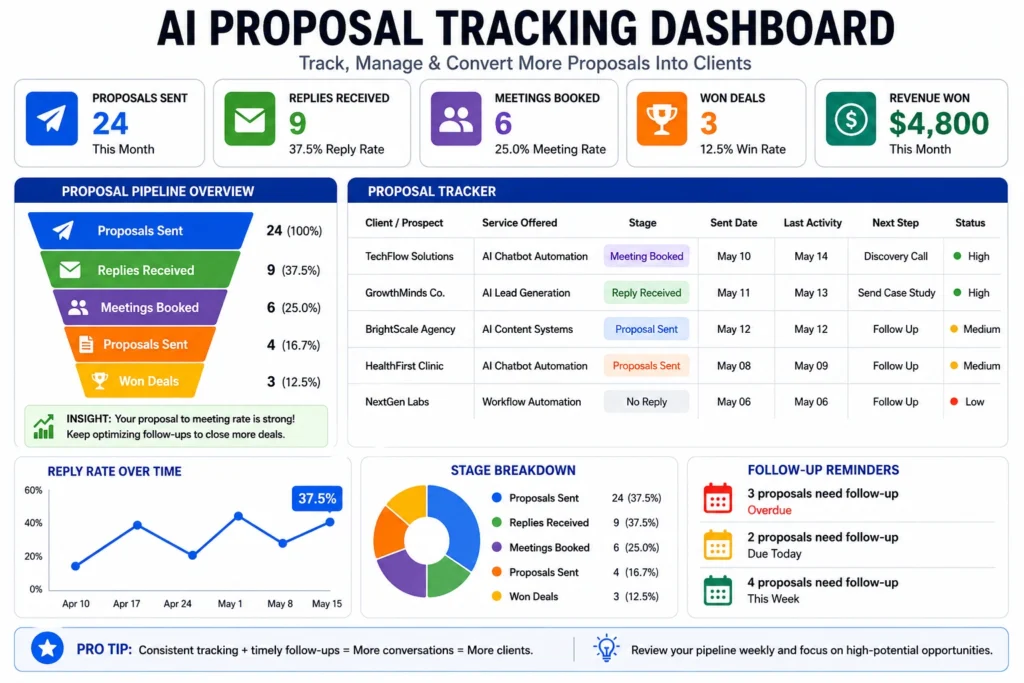
Keep a simple spreadsheet or Notion table with these columns:
- Prospect Name / Company
- Template Used
- Date Sent
- Response Received?
- Follow-up Date
- Outcome (Closed / Lost / Pending)
Review this tracker every Sunday. After sending 25–30 proposals, clear patterns will emerge — which templates work better for certain industries, which subject lines get higher reply rates, and which pricing approaches feel most comfortable to clients.
This small habit turns proposal sending from random guessing into a repeatable, improving system. I don’t quote “average” conversion rates because I haven’t seen a reliable public dataset for AI freelance proposals. Your own tracker is the only benchmark that matters.
Unlike generic outreach messages, effective AI freelance proposal templates are personalized, outcome-focused, and tailored to the client’s specific situation.
Final Thoughts
Strong proposal templates give you a significant advantage as a beginner AI freelancer. However, templates alone are not enough. Success comes from consistent execution, genuine personalization, and a focus on solving real business problems. Many freelancers start by building a small AI side hustle before transitioning into full freelance services. See How to Start an AI Side Hustle (Beginner Guide).
Start with one template today. Customize it for a real prospect and send it this week. The more proposals you send, the faster you will improve and close clients.
As competition increases, freelancers who use well-structured AI freelance proposal templates will have a significant advantage when pitching potential clients.
When you land your first client using these templates, come back and share your experience in the comments. I read every single one.
Frequently Asked Questions
What should an AI freelance proposal include?
A personalised opening, the client’s problem in their words, one concrete deliverable, proof (a sample or case study), a risk reducer such as a pilot or milestone, the price, and one clear question or next step.
How long should an Upwork proposal for AI services be?
Upwork suggests around 200–300 words or fewer for a cover letter. Clients see the opening lines first, so put the client’s problem and your fix in the first two sentences.
Can I send a proposal with no portfolio or clients?
Yes. Link one or two sample projects and label them clearly as samples, then offer a small paid pilot so the client can test you with low risk.
Should I use AI to write my proposals?
Use AI to draft and tidy, but write the opening and the problem line yourself from the client’s post. Clients spot generic AI text quickly.
How do I write a cold pitch email for AI services?
Lead with one detail you observed about their business, state the outcome you deliver, link a sample, and end with a low-effort offer such as a free 3-point teardown. Include your address and an opt-out line.
When should I follow up on a proposal?
A short first nudge after 3–4 days that adds something new, and a polite close-out about a week later. Stop after that unless they reply.
Should I include prices in my proposal?
Yes for small, clearly scoped work. For larger or unclear projects, give a starting price or a paid discovery step and confirm the final number after one or two questions.
How we researched this
Illustrative, not client results. The templates, prices, scopes and do/don’t lines are my working examples, not real client cases or survey data. Replace every placeholder with your own details.
- Upwork’s own guidance on proposals and cover letters: anatomy of a winning proposal, cover letter tips, how to submit a proposal.
- Freelancer advice published by Upwork: how to write proposals.
- Cold email rules: FTC CAN-SPAM compliance guide.
- A review of the pages currently ranking for “AI freelance proposal template”, “Upwork proposal for AI services” and “cold pitch template”, to find what they leave out (platform versions, follow-ups, honest proof).
About the Author
I’m Omar Yousaf, founder of Digital Solo Hub. I have 14+ years of hands-on experience in computer-controlled embroidery technology, digital design workflows and specialised design software. That background in tool-driven production work is what drives my interest in AI tools and online business. Find me on YouTube, LinkedIn and Medium, or email hello@digitalsolohub.com.