
Short answer on how much to charge for video editing: price your editing hours, not the finished minutes. Time three test edits, multiply the average hours by your floor rate (your minimum hourly rate), add 25% for messages, exports and one revision round, then quote it as a flat price per video or a monthly retainer.
On an illustrative $25/hour floor, that puts a simple 60-second Reel at about $35 and a 10-minute talking-head YouTube edit at about $160. Next step: get your own floor in two minutes with the free AI freelance rate calculator, then use the tables below.
Most beginner editors price by looking at the runtime.
Sixty seconds? Must be cheap.
It isn’t. A 60-second Reel with captions, B-roll, sound effects and a rewritten hook can eat two hours. A 10-minute talking head with clean audio can take less time per finished minute than that Reel. Clients see the runtime. You pay in edit time.
What this guide covers (and what it doesn’t): this page answers one question: how much to charge for video editing, and in which unit to quote it? It deliberately does not cover:
- How to start a video editing side hustle and which path to pick. That’s the AI video editing side hustle guide.
- Rates for AI services in general (writing, automation, research). See AI freelancing rates for beginners.
- Packaging any service into tiers. See how to package AI freelance services.
- Writing the revision clause itself. Use the freelance revision policy.
Every price on this page is an illustrative example built from the formula shown, unless it’s linked to a source. None of it is a promise of what you’ll earn.
Key Takeaways
- Price edit time, not output time. In the worked table below, one floor rate produces about $1.60 to $65 per finished minute.
- Quote = edit hours × floor rate × 1.25, rounded up. The 25% covers messages, exports and one revision round.
- Pick the unit by job type: per video for one-offs, a retainer for recurring Shorts, hourly with a cap for messy scope.
- Cap revisions and raw footage in writing. One round per Short, two per long-form edit.
- A view bonus sits on top of a fair base, never instead of one.
Table of Contents
- How Much to Charge for Video Editing: Quick Reference Table
- Hard Truth: Per-Minute Pricing Pays You for the Wrong Thing
- The Edit-Time Floor Method (3 Steps)
- Worked Example: Edit Time × Floor Rate
- Which Pricing Unit Should You Use? (Decision Table)
- How Much to Charge for Video Editing per Hour
- Pricing Reels and Short-Form Videos
- Video Editing Retainer Pricing: Three Tiers
- Revision Caps That Protect Your Floor
- The Optional View Bonus (Without Gambling Your Rent)
- Copy-Paste Video Editing Rate Card
- Scripts for the Five Pricing Questions Clients Ask
- Pricing Mistakes I See (and What Most Guides Get Wrong)
- The 60-Minute Pricing Setup
- Frequently Asked Questions
How Much to Charge for Video Editing: Quick Reference Table
If you only read one section, read this one. These quotes come from the formula in the next sections, using two illustrative beginner floors. Your edit times will differ, so treat the hours as placeholders until you’ve timed your own work.
| Job (illustrative edit time) | Quote at $25/hr floor | Quote at $40/hr floor | Best pricing unit |
|---|---|---|---|
| Simple Short or Reel, 30 to 60 sec (1 hr) | $35 | $50 | Per video |
| Polished Reel with B-roll, SFX, motion text (2 hrs) | $65 | $100 | Per video |
| 3 vertical clips from one podcast episode (2.5 hrs) | $80 | $125 | Per episode |
| 10-min talking-head YouTube video (5 hrs) | $160 | $250 | Per video |
| 12-min YouTube video, heavy B-roll and graphics (9 hrs) | $285 | $450 | Per video, tiered by raw footage |
| 8 simple Shorts a month on a retainer (10% off) | $255/mo | $360/mo | Monthly retainer |
How to read it: the price comes from hours, and the unit is just how you present it to the client.
Hard Truth: Per-Minute Pricing Pays You for the Wrong Thing
Most advice on how much to charge for video editing starts with runtime. It feels fair because clients can see it.
It’s still the wrong base.
An editor with 25 years in the trade put it plainly in an r/editing thread: a 30-second video can take an hour or a few weeks, so pricing by the finished duration doesn’t hold up.
Their advice was to price on complexity, the time you invest and the value to the client instead (r/editing discussion). In another thread, a working editor described billing $200 for a two-minute spot and $5,000 for a 30-second one, because the work behind them was nothing alike (r/VideoEditors discussion).
Per-minute pricing ignores what actually drives your hours:
- Raw footage volume. Cutting 90 minutes down to 10 is a different job from cutting 15 down to 10.
- Density. A Short has a cut every second or two and captions on every line.
- Assets. B-roll, music checks and motion text take time and add no runtime.
- Approvers. Five stakeholders with notes cost more than one creator who trusts you.
Contrarian Insight: per-minute isn’t wrong as a display unit. Agencies and some clients think in it, and that’s fine. It’s wrong as a pricing method. Work out the hours first, then translate into per minute only if someone asks.
The Edit-Time Floor Method (3 Steps)
This is my whole system for deciding how much to charge for video editing. It takes about an hour to set up once, and then every quote takes five minutes.
Floor rate → measured edit hours → buffer → round up → present in the client’s unit
Step 1: Find Your Floor Rate (Your Minimum, Not Your Market Rate)
Your floor is the lowest hourly figure that still pays your bills after everything comes out. It isn’t what you hope to charge. It’s the line you don’t quote below.
To get it, you need four inputs:
- The monthly income you need to keep. What covers your life, not what you’d like.
- Monthly business costs. Software, storage, stock music or footage, AI tools, hardware savings.
- Tax and time off. Self-employed income isn’t take-home pay.
- Billable hours. Renders, uploads, messages and admin aren’t billable. You’ll bill fewer hours than you work, often far fewer.
The free AI freelance rate calculator does this math for you and shows the formula, including a platform-fee field.
Then gross up for platform fees. If you sell on a marketplace, the fee comes out of your price, so your listed rate has to be higher than your floor:
- Fiverr: sellers earn 80% of the purchase amount, including Gig extras and tips (Fiverr Help: Your earnings page). A $25 floor becomes $25 ÷ 0.80 = $31.25 listed.
- Upwork: the Freelancer Service Fee ranges from 0% to 15% per contract, and you see the exact fee when you submit a proposal or receive an offer (Upwork Help: Freelancer Service Fee). At a 10% fee, a $25 floor becomes $25 ÷ 0.90 = $27.78.
A sanity check, not a target: the US Bureau of Labor Statistics reports a median annual wage of $75,420 for film and video editors in May 2025, with the lowest 10% earning under $40,280 (BLS Occupational Outlook Handbook).
The same page notes that BLS wage figures don’t include self-employed workers, even though 35% of film and video editors are self-employed. That’s what employed editors earn, with someone else paying for the gear and the slow weeks. Don’t copy it. Just notice how far below it a $15 Reel sits.
Outside the US? Build your floor from your own costs and currency, then price to the market your clients are in.
Step 2: Time Three Real Edits
You can’t price hours you haven’t measured.
Pick the job type you want to sell. Edit three examples from start to finish with a timer running (Toggl Track, Clockify, or your phone’s stopwatch all work). Log every stage, not just the timeline work:
EDIT TIME LOG: [job type]
Video: [name]    Raw footage: [mm:ss]    Finished length: [mm:ss]

Stage                         Minutes
Download, ingest, organise    [ ]
Rough cut / selects           [ ]
Captions and text             [ ]
B-roll, music, SFX            [ ]
Colour and audio clean-up     [ ]
Exports and versions          [ ]
Upload and client message     [ ]
TOTAL                         [ ]

Footage ratio (raw ÷ finished): [ ]
Tools used (CapCut, Descript, Premiere Pro, DaVinci Resolve, Opus Clip...): [ ]
Use your average, not your best run. If one edit took 70 minutes and the others took 95 and 110, your number is about 92 minutes, not 70.
About AI tools: time your work with the tools you’ll actually use on client jobs. If Descript’s transcript editing or CapCut’s auto captions cut an hour off a podcast edit, that hour is your margin. It isn’t a discount you owe the client.
Step 3: Multiply, Add a Buffer, Round Up
The formula:
Quote = average edit hours × floor rate × 1.25, rounded up to the nearest $5
The 1.25 buffer pays for the work around the edit: back-and-forth messages, re-exports, file transfers, and one included revision round. If a client is known to be chatty, or there are several approvers, use 1.4 instead.
Then present the number in whichever unit fits the job (the decision table below shows which).
Worked Example: Edit Time × Floor Rate
Here’s how much to charge for video editing on six common beginner jobs, using the formula above. The edit times are hypothetical assumptions for a beginner using AI-assisted tools. They’re not measurements from real clients. Swap in your own logged hours.
| Job | Assumed edit hours | Hours × 1.25 | Quote at $25 floor | Quote at $40 floor | Implied per finished minute (at $25) |
|---|---|---|---|---|---|
| Simple Short or Reel, 60 sec, captions and jump cuts | 1.0 | 1.25 | $35 | $50 | $35/min |
| Polished Reel, 60 sec, B-roll, SFX, motion text | 2.0 | 2.5 | $65 | $100 | $65/min |
| 3 clips from one podcast episode (about 1 min each) | 2.5 | 3.13 | $80 | $125 | about $27/min |
| 10-min talking-head YouTube video | 5.0 | 6.25 | $160 | $250 | $16/min |
| 12-min YouTube video, heavy B-roll and graphics | 9.0 | 11.25 | $285 | $450 | about $24/min |
| 60-min podcast video, 2-camera clean-up | 3.0 | 3.75 | $95 | $150 | about $1.60/min |
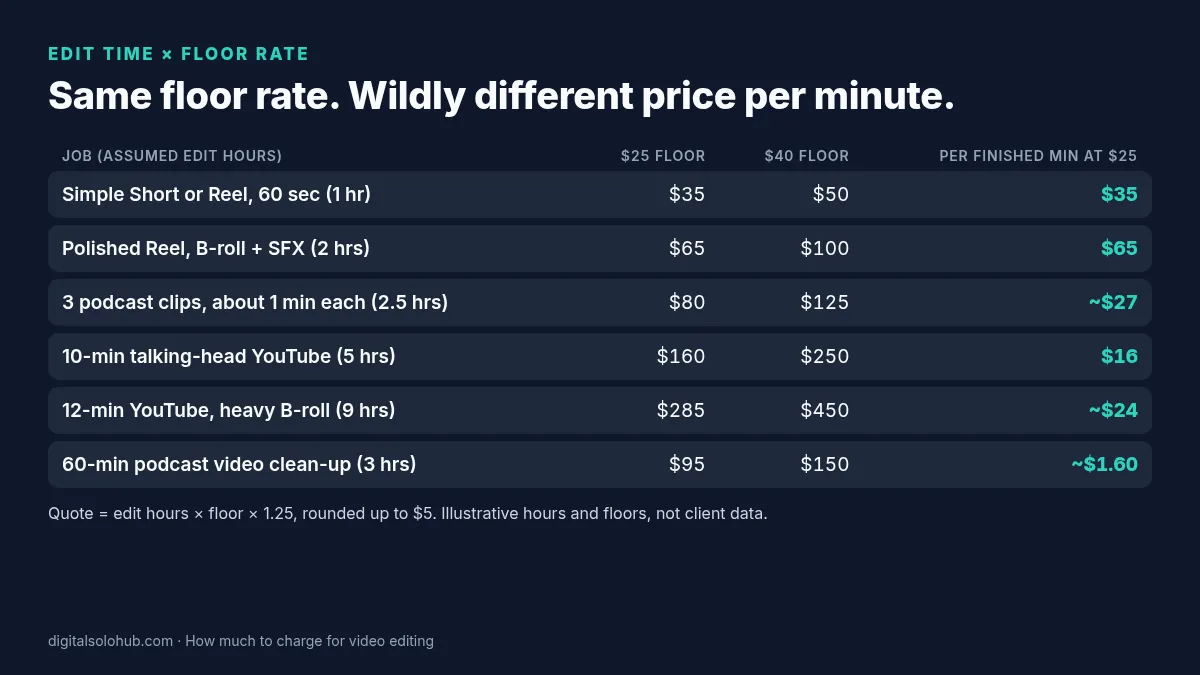
Look at the last column.
One floor rate. Prices from about $1.60 to $65 per finished minute. That’s the whole argument against per-minute pricing in one table. If you’d quoted every job at a flat “$10 a minute,” you’d have lost money on every Reel and overcharged badly on the podcast.
Community threads show the same problem.
A beginner on r/VideoEditors lost two potential real-estate clients: one turned down $40 for a one- to two-minute edit with effects, and the other wanted $15 for a simpler captioned version they’d quoted at $20. The most useful replies told them to work out the hours each video takes and price from an hourly minimum (r/VideoEditors thread).
Which Pricing Unit Should You Use? (Decision Table)
You’ve got the number. Now choose how to present it. The unit should match how the client buys, while the hours underneath stay the same.
| Your situation | Quote as | Why it works | Guardrail to write down |
|---|---|---|---|
| One-off Short or Reel for a new client | Flat price per video | Clients compare per video | Max length, 1 revision round, footage supplied by client |
| 8 or more Shorts a month, same style | Monthly retainer | Predictable for both sides | Monthly video count, turnaround, unused videos expire |
| Long-form YouTube, consistent format | Per video, tiered by raw footage | Fair when raw length varies | Raw footage cap (e.g. up to 60 min) and overage price |
| Messy or unclear scope (archive footage, “fix this edit”) | Hourly with an estimate range | Protects you from unknowns | “Estimate 6 to 8 hrs. I’ll check in before hour 8.” |
| Client or agency insists on per minute | Per finished minute plus a minimum fee | Speaks their language | Minimum fee and a raw-to-finished ratio cap |
| Creator focused on views | Per video base plus an optional view bonus | Rewards results you influence | Base covers your floor; bonus capped and dated |
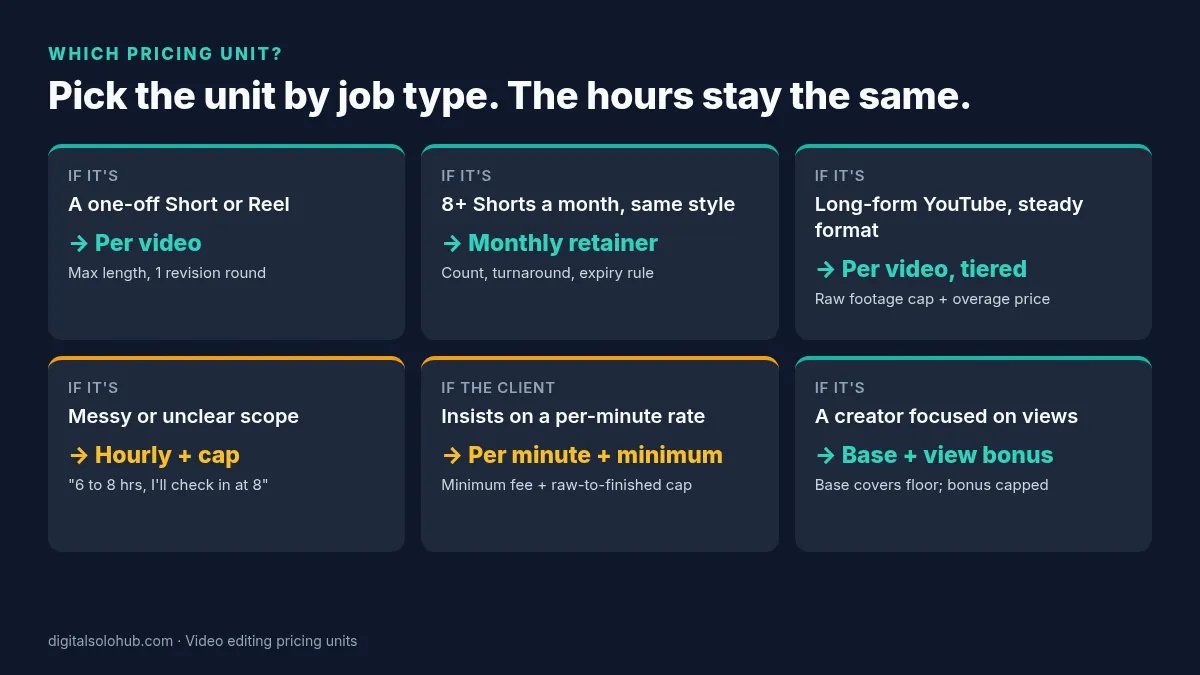
My default for beginners: flat price per video for the first job, then a retainer offer after the second delivery. Hourly only when you genuinely can’t see the scope.
How Much to Charge for Video Editing per Hour
Your hourly rate is your floor, or higher once you have proof.
That’s the honest answer. There’s no universal “beginner editor rate” that fits a student in Manila, a parent in Ohio and an ex-agency editor in Leeds.
When to actually show an hourly rate:
- The scope is unclear and the client won’t send sample footage.
- It’s a repair job on someone else’s timeline.
- It’s consulting work, such as a style guide or setting up templates.
When not to: standard repeatable edits. Hourly billing punishes you for getting faster, and with AI-assisted captioning and transcript editing, you will get faster. If a 5-hour edit drops to 3 hours, an hourly client pays less while a per-video client pays the same, and that difference is your skill paying off.
Pro tip: if you quote hourly, always give a range and a check-in point. “Estimate 6 to 8 hours. I’ll message you before I pass 8.” Clients relax when there’s a ceiling.
Pricing Reels and Short-Form Videos
When beginners ask how much to charge for video editing Reels, they usually underprice, because the videos look small.
They aren’t small to make. A 30-second Reel can involve a hook rewrite, captions on every line, zooms, sound effects, platform-safe text margins and three export sizes.
Rules I’d use for Shorts and Reels:
- Price per video, sold in batches. Quote a single Reel, then offer a batch of 4 or 8 at a small discount, because one brief and one style setup covers the whole batch.
- Define the format. Up to 60 seconds, one aspect ratio, captions in one style, music from the client or a licensed library.
- Extra versions are extras. A second hook, a TikTok-specific cut or a horizontal version is a new version, priced at roughly 30 to 50% of the base (illustrative), not a free revision.
- Know your speed. One short-form specialist on r/VideoEditors described a job editing 90 very simple Shorts a week for $600. That’s about $6.66 per Short, which sounds terrible, yet with a fixed template they reached roughly $25 to $30 an hour, plus performance bonuses (same r/VideoEditors thread). The per-video price only makes sense once you know the hours behind it.
Hard Truth: if a client’s budget is $15 a Reel and your floor math says $35, the fix is never “just this once.” Cut the scope (no B-roll, template captions, one version) until the job fits $15 at your floor, or let it go.
Video Editing Retainer Pricing: Three Tiers
On a retainer, how much to charge for video editing is the same per-video math, sold as a monthly bundle with a small discount in exchange for commitment.
The discount comes out of your buffer, never your floor. Recurring clients mean one brand style, fewer messages and no re-quoting, so you need less buffer.
Here are three illustrative tiers at a $30/hour floor, where a simple Short prices at $40 (1 hr × $30 × 1.25, rounded up) and a 10-minute YouTube video at $190 (5 hrs × $30 × 1.25, rounded up), with 10% off for the monthly commitment:
| Tier | What’s included each month | Math | Illustrative monthly fee | Edit hours covered at floor |
|---|---|---|---|---|
| Starter | 8 Shorts or Reels | 8 × $40 = $320, minus 10% | $290 | 8 hrs ($240 at floor) |
| Growth | 12 Shorts + 2 long-form YouTube videos | $480 + $380 = $860, minus 10% | $775 | 22 hrs ($660 at floor) |
| Channel | 20 Shorts + 4 long-form YouTube videos | $800 + $760 = $1,560, minus 10% | $1,405 | 40 hrs ($1,200 at floor) |
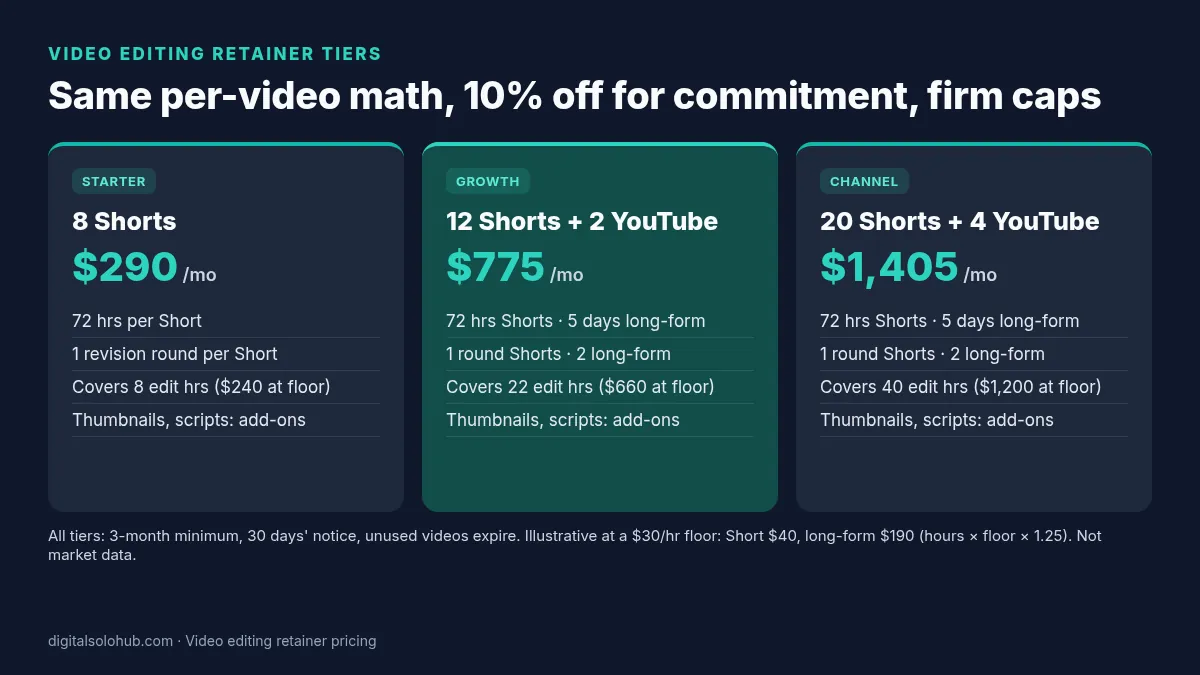
Notice the last column. Every tier still covers the edit hours at your floor, with room left for messages and revisions.
What every video editing retainer should state in writing:
- Monthly count: exact number of Shorts and long-form videos.
- Turnaround: for example, 72 hours for Shorts and 5 business days for long-form, counted from when the footage arrives, not from when it’s requested.
- Revision cap: 1 round per Short, 2 per long-form video.
- Raw footage cap: for example, up to 20 minutes of raw footage per Short batch and up to 60 minutes per long-form video.
- Rollover rule: unused videos expire at month end, or roll over once and then expire.
- Not included: thumbnails, scripting, posting, community management, paid stock. Price each as an add-on.
- Term and notice: a 3-month minimum and 30 days’ notice to cancel are sensible starting points.
For the general retainer structure (minimum terms, offer ladders, when not to offer one), the packaging guide for AI freelance services goes deeper. This page only adds the video numbers.
Revision Caps That Protect Your Floor
Your 25% buffer pays for one round. Every extra round eats your floor.
So write the cap into the quote:
- Shorts and Reels: 1 revision round included.
- Long-form YouTube: 2 rounds included.
- Extra rounds: priced at your floor × the hours the round takes, quoted before you start.
What counts as a revision vs a new version in video work:
| Request | Revision (uses a round) | New version (priced add-on) |
|---|---|---|
| “Swap this B-roll clip” | ✔ | |
| “Try a different hook” | ✔ | |
| “Make a TikTok cut and a horizontal cut” | ✔ | |
| “Re-cut it around a different message” | ✔ |
The freelance revision policy guide has the formal clause, the definition of one round and the scripts for “can you just…”. Paste the clause into every video quote.
The Optional View Bonus (Without Gambling Your Rent)
Some creators like paying for results. That can work for you, if the bonus sits on top of a fair base.
The short-form specialist quoted above described exactly this setup: an extra $10 per 100,000 views, capped at 1 million views, on top of a per-Short base.
On a more complex job, they reported a $30 base per Short with a performance bonus that could take it up to $100 per Short (r/VideoEditors thread). Their principle: every Short covers the hourly minimum first, and then the bonus pays for the value.
Rules for a bonus that doesn’t backfire:
- The base covers your floor alone. Assume the bonus pays nothing.
- Cap it. Without a cap, a viral video turns into an argument.
- Fix the measurement date. For example, views at day 30, from a screenshot of the client’s analytics.
- Only on videos you control. If the client changes the title, the thumbnail or the posting time, the bonus terms should say so.
- Pay it with the next invoice. No chasing.
Illustrative math: $40 base per Short plus $10 per full 100,000 views at day 30, capped at $100. A Short at 250,000 views earns $40 + $20 = $60. A Short at 3,000 views earns $40. Both cover the floor.
Never accept a bonus-only or “exposure plus bonus” deal. That’s not a pricing model. That’s you funding their content.
Copy-Paste Video Editing Rate Card
Fill in the brackets with your own numbers from the steps above. Send it as a PDF or paste it into a proposal.
[YOUR NAME] VIDEO EDITING RATE CARD
Prices in [currency]. Valid until [date].

SHORT-FORM (Reels, Shorts, TikTok)
Simple Short (up to 60 sec, captions, cuts)        [price] per video
Polished Short (B-roll, SFX, motion text)           [price] per video
Batch of 8 Shorts                                   [price] (save [x]%)
Extra version (new hook / new platform cut)         [price] per version

LONG-FORM (YouTube, podcasts)
Talking-head video, up to [x] min finished          [price] per video
  includes up to [60] min raw footage; extra raw   [price] per 30 min
Podcast episode video clean-up                      [price] per episode
3 clips from one episode                            [price] per episode

MONTHLY RETAINERS (3-month minimum)
Starter: [8] Shorts                                 [price] / month
Growth: [12] Shorts + [2] long-form                 [price] / month
Channel: [20] Shorts + [4] long-form                [price] / month

INCLUDED
Revisions: 1 round per Short, 2 per long-form video
Turnaround: [72 hrs] Shorts, [5 business days] long-form, from footage receipt
Music: client-supplied or from a licensed library

NOT INCLUDED (quoted separately)
Thumbnails, scripting, posting, paid stock, extra revision rounds ([price] / round)

PAYMENT
New clients: 50% upfront. Retainers: billed monthly in advance.
Optional: view bonus of [price] per [100k] views at day 30, capped at [price].
Scripts for the Five Pricing Questions Clients Ask
Short, calm, and always ending with a next step.
1. “What’s your rate per minute?”
Good question. I price by the edit, because a 60-second Reel can take
longer than a 10-minute talking head. Send me one sample of your raw
footage and a reference video, and I'll give you a flat price per video
today. For rough planning, simple Shorts start at [price] each.
2. “Our budget is $15 per video.”
Thanks for being upfront. At $15 I can do a captions-only version:
template captions, jump cuts, no B-roll or sound design, one revision.
The version in your reference video is [price], because it takes me
about [x] hours. Happy to do either. Which fits better?
3. “Can you do a free test edit?”
I'm happy to show you how I'd handle your footage. I do paid test edits
at [price] for one Short, and if we continue, I'll credit it against your
first batch or month. That way you see real work on your own content.
4. “Can you give us a discount if we send more videos?”
Yes. If you can commit to [8] Shorts a month for three months, the
monthly price is [price], which works out to [x]% less per video. It
includes [turnaround] turnaround and one revision round per Short.
5. “Can you just make a TikTok version too?”
Sure. A second platform cut is a new version rather than a revision,
because it's re-framed and re-timed. It's [price] per version, or I can
add it to every video for [price] a month. Want me to include it?
Pricing Mistakes I See (and What Most Guides Get Wrong)
What most guides on how much to charge for video editing get wrong: they hand you a market range (“$15 to $35 an hour,” “$50 to $250 per Short”) and stop. A range tells you what the market tolerates. It can’t tell you whether your edit time makes that price profitable. Check every range against your own logged hours first.
The mistakes I see most:
- Copying a per-minute number from a blog. Fix: time three edits and build from hours.
- Pricing off your fastest edit. Your best day isn’t your average. Fix: use the average of three.
- Handing AI time savings back to the client. Fix: price per video, so speed becomes your margin.
- No raw footage cap. Three hours of footage arrive for a 10-minute video. Fix: put the cap and overage price in the quote.
- Accepting bonus-only deals. Fix: a base that covers your floor, always.
- Never repricing. Fix: recalculate after every five videos of the same type, and raise prices for new clients as your proof grows.
The 60-Minute Pricing Setup
Do this once. Then every quote takes minutes.
- Minutes 0 to 15: find your floor. Run your numbers through the AI freelance rate calculator. Add the platform fee if you sell on Fiverr or Upwork.
- Minutes 15 to 35: get your edit times. Use your last three logged edits, or start the timer on a practice edit now and finish the other two this week.
- Minutes 35 to 45: fill the worked table. Hours × floor × 1.25, rounded up, for each job type you sell.
- Minutes 45 to 55: build the rate card. Copy the template above and fill every bracket.
- Minutes 55 to 60: save the five scripts somewhere you can paste them from your phone.
Days 1 to 14: send real quotes, log every edit, and adjust the hours in your table after five videos.
If you don’t have editing reps or a first client yet, pricing isn’t your bottleneck. Follow the day-by-day 30-day AI freelancing plan to build samples and send your first offers, and use how to get your first AI freelance client for the outreach routine.
Frequently Asked Questions
How much should a beginner charge for video editing?
How much to charge for video editing as a beginner comes down to your edit time. Time three test edits, multiply the average hours by your minimum hourly rate (your floor), add about 25% for messages, exports and one revision round, and round up. On an illustrative $25/hour floor, that is about $35 for a simple 60-second Reel and about $160 for a 10-minute talking-head YouTube video.
How much to charge for video editing per minute?
Avoid using finished minutes as your pricing method, because effort per minute varies hugely: a 60-second Reel can take longer than a 10-minute talking head. Work out the price from your edit hours first. If a client insists on a per-minute rate, translate your hourly price into one and add a minimum fee and a raw-footage cap.
How much to charge for video editing per hour?
Your hourly rate should be your floor: the minimum that covers your income needs, software, tax, unbilled hours and platform fees. A rate calculator gives you that number. Show an hourly rate only for unclear or repair work, and quote standard edits per video so that getting faster raises your earnings.
How much should I charge to edit a YouTube video?
Price it from your edit time and the amount of raw footage. In the worked example on this page, a 10-minute talking-head video assumed at 5 hours comes to about $160 at a $25 floor and $250 at a $40 floor. Heavy B-roll and graphics add hours, so tier long-form prices by raw footage length.
How much to charge for video editing reels?
Price Reels per video and sell them in batches. A simple captioned Reel assumed at 1 hour comes to about $35 at a $25/hour floor; a polished Reel with B-roll and sound effects at 2 hours comes to about $65. Extra versions, such as a new hook or a TikTok cut, are priced add-ons, not free revisions.
What is a fair price for a video editing retainer?
A fair retainer is your per-video prices for the monthly volume minus a small commitment discount, often around 10%, taken from your buffer rather than your floor. For example, 8 simple Shorts at $40 each is $320, or about $290 a month on a retainer. Put the video count, turnaround, revision cap and rollover rule in writing.
Should I charge per video or per hour for video editing?
Charge per video for repeatable edits such as Shorts, Reels and consistent YouTube formats, because clients can compare a fixed price and your speed becomes margin. Charge hourly, with an estimate range and a check-in point, only when the scope is genuinely unclear, such as archive footage or fixing someone else’s timeline.
How do Fiverr and Upwork fees change my video editing price?
Divide your floor by what you keep. Fiverr sellers earn 80% of the purchase amount, so a $25 floor needs a $31.25 listed rate. Upwork’s Freelancer Service Fee ranges from 0% to 15% per contract, so at a 10% fee a $25 floor becomes $27.78. Check the exact fee shown on each proposal or offer.
Final Thoughts
Deciding how much to charge for video editing gets easier the moment you stop staring at the runtime.
Measure the hours. Know your floor. Add a buffer. Round up. Then pick the unit that makes the client comfortable.
Every number in your quote should trace back to time you’ve actually logged. That’s what lets you say your price calmly, and it’s what keeps a “cheap” Reel from turning into an unpaid afternoon.
Your next action:
- Get your floor rate from the free rate calculator.
- Time your next three edits with the log above.
- Fill in the rate card and send it with your next quote.
If you’re still choosing which kind of video work to sell, go back to the AI video editing side hustle roadmap and pick one path first. For pricing beyond video, AI freelancing rates covers the wider picture.
Price the hours. The minutes take care of themselves.
Sources
- U.S. Bureau of Labor Statistics: Film and Video Editors and Camera Operators, Occupational Outlook Handbook (May 2025 wages, self-employment share)
- Upwork Help: Learn about the Freelancer Service Fee (0% to 15% per contract)
- Fiverr Help: Your earnings page (sellers earn 80% of the purchase amount)
- r/VideoEditors: How much do you charge for a short form video? (hourly minimum and view bonus replies)
- r/editing: What are the typical rates for video editing services for a newbie editor? (25-year editor on duration pricing)
- r/VideoEditors: Is it fair to charge $20 to $50 per edited minute? (editor on not charging by the finished minute)
Reddit replies are individual experiences from working editors, not market data. Platform fees and BLS figures change; check the linked pages before you rely on them. Sources checked October 19, 2026.
About the Author
Omar Yousaf
Founder of Digital Solo Hub
I help beginners build practical AI freelancing skills through structured learning, portfolio development, and realistic business strategies. My focus is on helping new freelancers create sustainable income by combining AI tools with professional execution rather than shortcuts or unrealistic promises.