
By Omar Yousaf, Founder of Digital Solo Hub · Last updated: November 7, 2026
Quick answer: Build three to five sample projects for one service, each based on a realistic business brief. Write each one up as a one-page case study: the problem, your approach (including where AI helped and how you checked it), the deliverable and the expected benefit. Label them as samples, put them on one free page, and add the same pieces to your Upwork portfolio and LinkedIn Featured section.
Next step: Copy the one-page case study template below.
A client can’t see the hours you’ve spent learning AI tools. They can only judge the work you put in front of them. A portfolio is that proof, and you don’t need paid clients to build one.
Where this guide fits: if you haven’t picked a service or practised a workflow yet, start with start AI freelancing with no experience. This page does one job: turning your practice into a portfolio that wins the first reply.
What a Beginner AI Freelancing Portfolio Needs
- One service. A client should know what you sell within seconds.
- Three to five sample projects for that service, each based on a realistic brief.
- A one-page case study for each sample, explaining the problem, your approach and the expected benefit.
- Honest labels. Samples are marked as samples, and you never invent results.
- The same pieces on the platforms clients already use: a free portfolio page, your Upwork portfolio and your LinkedIn Featured section.
That’s the whole standard. The rest of this guide shows how to meet it.
Step 1: Pick One Service and One Type of Client
A portfolio that mixes writing, design, research and automation makes a client wonder what you’re actually best at. Pick one service for your first portfolio. You can add a second later.
It also helps to aim your samples at one type of business, such as dental clinics, SaaS startups or local gyms. “I write SEO articles for physiotherapy clinics” is easier to trust than “I offer AI writing”. If you’re still choosing, compare the best AI freelance services to offer and read how to choose who to serve.
Step 2: Build 3–5 Sample Projects That Look Like Paid Work
A good sample solves a problem a real business has. Pick a real, public business to practise on (without claiming you worked for it) or a clearly fictional one, and label the piece as a sample. Upwork’s portfolio guide says pieces don’t have to come from paying clients, and that mock-ups and personal projects work well when you’re starting out.
| Service | Sample project | What to show | Time to build (estimate) |
|---|---|---|---|
| AI content writing | Rewrite one weak blog post for a local business, plus one new 1,000-word article | Before and after, outline, sources checked, SEO notes | 1–2 days |
| AI social media content | A 2-week calendar with 10 posts and captions for one brand | Calendar, post visuals, short voice guide | 1–2 days |
| Email copywriting | A 3-email welcome sequence for one online shop | Sequence, subject lines, the goal of each email | 1 day |
| Product descriptions | 20 descriptions for one product category | Style rules, before and after | 1 day |
| AI research and analysis | A 2-page competitor brief on 3–5 competitors | Summary, sources, method | 1 day |
| AI automation | A form → spreadsheet → email workflow with a short screen recording | Workflow diagram, test run, hand-off notes | 1–2 days |
Time estimates assume you already practise the tools. They are working estimates, not measured results.
A missed call text back workflow is a good automation sample to frame this way: the problem is callers who never hear back, and a short recording of a test call shows the fix working. For more automation samples, ordered from easiest to hardest, see AI automation projects for beginners.
Step 3: Write Each Sample Up as a One-Page Case Study
A file shows what you made. A case study shows how you think, and that’s what clients are really judging. Copy this template and fill in the brackets:
- Project: [service] for [type of business] (sample project)
- Problem: what wasn’t working, in one or two sentences
- Goal: what a good result would look like
- Approach: 3–5 steps you took, including where AI helped and where you checked or rewrote
- Tools: the tools you used
- Deliverables: what you handed over, with links or images
- Expected benefit: what should improve for the business (for samples, never invented numbers)
- What I’d do next: one next step you’d recommend
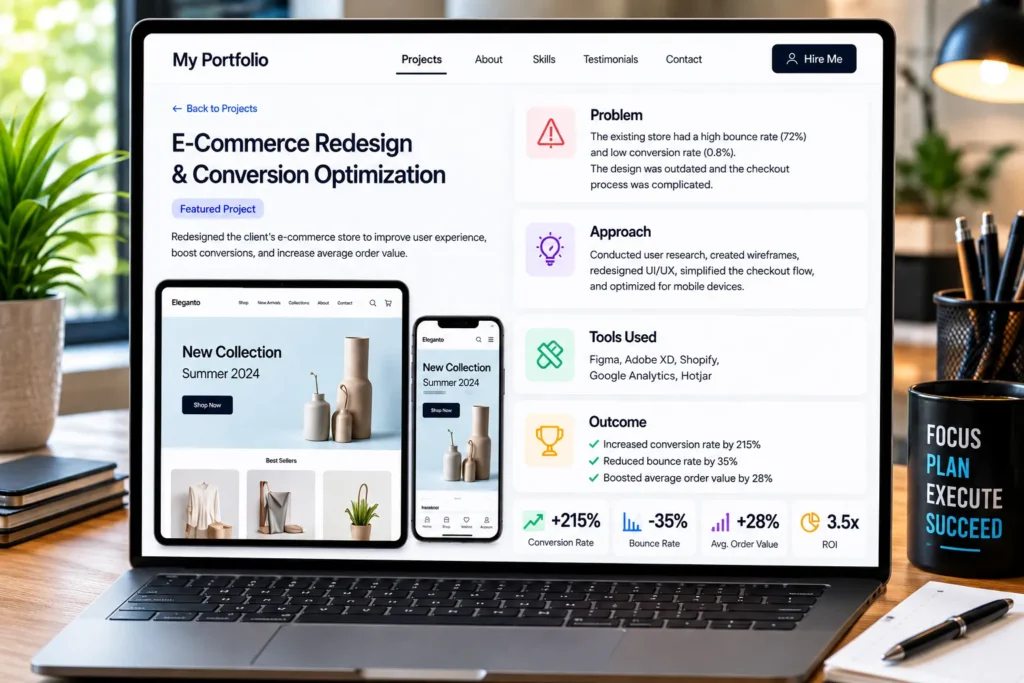
Example: A Filled-In Case Study (Sample)
- Project: SEO article for a physiotherapy clinic (sample project, not client work)
- Problem: the clinic’s blog has short posts that don’t answer the questions new patients search for.
- Goal: one in-depth article that answers a common patient question and points readers to booking.
- Approach: checked what the top results cover, outlined the gaps, drafted with AI from the outline, fact-checked every health claim against an official source, then rewrote the intro and the call to action by hand.
- Tools: ChatGPT for the first draft, Grammarly for the final proofread.
- Deliverables: a 1,200-word article, a meta title and description, and a list of the sources checked.
- Expected benefit: a page that can rank for a real patient question and give readers a clear next step.
- What I’d do next: turn the article’s FAQ into three short social posts.
Notice what this does: it shows your judgment (what you checked and why) without claiming results you don’t have.
Step 4: Show Where AI Helped and How You Checked It
Clients know freelancers use AI. What they want to know is whether you catch its mistakes. One line per case study is enough: what AI drafted or sped up, and what you verified, edited or rewrote yourself. For contracts and client conversations, our guide on how to tell clients you use AI has a disclosure clause and scripts. If you’re choosing tools for your samples, see the best AI tools for freelancers.
What to Show (and What Never to Show)
- Show the brief, your process, the finished piece and why it would help the business.
- Show where AI was used and how you reviewed it.
- Label sample and practice projects as samples. Never present them as paid client work.
- Never show invented metrics, fake testimonials or logos of companies you haven’t worked with.
- Never publish real client work or data without written permission.
- Never upload raw, unedited AI output as a portfolio piece.
Where to Put Your Portfolio
The platform matters far less than the work. Start free, and put the same three to five best pieces everywhere clients look.
| Where | Use it for | Good to know |
|---|---|---|
| Notion or Google Drive | One free portfolio page you can link anywhere | Fastest way to start |
| Upwork portfolio | Samples next to your proposals | Each item gets a title, role, description, skills and media (Upwork Help). Upwork suggests three to five strong pieces per skill. |
| LinkedIn Featured | Samples on your profile | The Featured section shows samples of your work to profile visitors (LinkedIn Help). |
| Your own website | Later, once you have steady work | Not needed to start |
Check It Before You Send It
Run your portfolio through this list. If any answer is “no”, fix that first:
- Can a stranger tell what you sell, and for whom, within 20 seconds?
- Do all your pieces belong to the same service?
- Does every piece have a case study with a problem and an expected benefit?
- Is every sample clearly labelled as a sample?
- Does each case study say where AI helped and what you checked?
- Are there no invented numbers, testimonials or logos?
- Is your contact link easy to find?
Using Your Portfolio in Proposals
- Send one or two matching pieces, not the whole portfolio. Pick the samples closest to the job. Our AI freelance proposal templates show where to place them.
- In outreach, lead with the sample. “I made a sample for businesses like yours” gets more replies than “I offer AI services”. See how to get your first AI freelance client.
- On LinkedIn, post a short case study of each sample. See how to get AI freelance clients on LinkedIn.
Frequently Asked Questions
Can I build an AI freelancing portfolio without paid clients?
Yes. Sample projects, personal projects, volunteer work and mock briefs all count, as long as you label them as samples. Upwork’s own portfolio guide says pieces don’t have to come from paying clients.
How many projects should I include?
Three to five strong pieces for one service. That matches Upwork’s advice of three to five pieces per skill. Extra pieces rarely help, especially if they cover different services.
Should I disclose that projects are samples?
Yes. Label every practice piece as a sample. Never present it as paid client work, and never add invented results.
What should an AI freelancing case study include?
The problem, the goal, your approach (including where AI helped and how you checked it), the tools, the deliverables, the expected benefit and one next step you would recommend. For samples, describe the expected benefit instead of inventing numbers.
Where should I host my AI freelancing portfolio?
Start with a free page in Notion or Google Drive, then add the same best pieces to your Upwork portfolio and your LinkedIn Featured section. Build your own website once you have steady work.
How long does it take to build an AI freelancing portfolio?
For most beginners it takes a few weekends: roughly one to two days per sample if you already practise the tools. These are working estimates, and your time depends on the service and the hours you have.
Should I show which AI tools I used?
Yes, briefly. Clients trust a visible quality step more than a hidden one. Say where AI drafted or sped up the work, and what you checked or rewrote yourself.
How We Researched This
Estimates, not client results. The sample projects, the case-study example and the time estimates are working illustrations, not survey results or real client cases. How long a portfolio takes depends on your service, starting skills and weekly hours.
Sources. Platform features come from the Upwork Help article on freelancer profiles, Upwork’s portfolio guide and LinkedIn Help, checked in November 2026. If you spot something outdated, email hello@digitalsolohub.com. See our editorial standards.
Next Steps
- Still choosing a service? Best AI freelance services to offer
- Portfolio ready? How to get your first AI freelance client
- Got a reply? How to close your first AI freelance client
About the Author
Omar Yousaf
Founder of Digital Solo Hub
I have 14+ years of hands-on experience in computer-controlled embroidery technology, digital design workflows and specialised design software, which drives my interest in AI tools and online business. I help beginners develop practical AI freelancing skills, build proof of work, and create sustainable income opportunities through focused execution rather than endless learning.