
Most AI freelancers handle the AI question the same way.
They say nothing and hope nobody asks.
Then somebody asks. Usually at the worst moment: after delivery, inside a revision thread, with a screenshot of a detector score attached.
Silence isn’t a policy. It’s a delay.
The better move is to tell clients you use AI once, early, in writing, in plain words, before the work starts. Not as a confession. As an operating note, the same way you’d mention your revision rounds or your payment terms.
This page gives you the exact system I’d use: a five-level disclosure ladder, a decision table for picking the right level per project, a green/amber/red rule for client data, three copy-paste contract clauses, a short AI policy for your profile, a delivery note, and word-for-word replies to the questions clients actually ask.
What this guide covers (and what it doesn’t): this page answers one question: how do you tell clients you use AI without losing the deal or breaking a rule? It deliberately does not cover:
- How to write the full pitch. Use the AI freelance proposal templates.
- How to scope an automation build line by line. Use the automation scope of work template.
- What to charge when AI makes you faster. See AI freelancing rates.
- Which tools to use in the first place. See the AI tools freelancers are actually using.
This is practical guidance from a working freelancer’s point of view, not legal advice. If a contract or project is high-stakes, have a lawyer in your country read the clause before you sign.
Key Takeaways
- Disclose once, early, in writing. A proposal line plus a contract clause handles most of it. A short note at delivery closes the loop.
- Your duty usually comes from the contract and the platform, not one big law. Fiverr and Upwork both have AI rules you’ve already agreed to.
- Describe tasks and data, not tool brands. Say what AI does, what you do, and what never goes into a tool.
- Client data is the real risk. Pasting a client’s customer list into a personal chatbot account can break an NDA even if the final work is perfect.
- Watch your ownership promise. The US Copyright Office says prompts alone don’t make you the author of AI output. Don’t promise rights you may not have.
- “No AI” is a scope term, not a mood. Put it in writing and price the project honestly.
Table of Contents
- Should you tell clients you use AI?
- Where the duty actually comes from
- Hard Truth
- The AI Disclosure Ladder
- Decision table
- The client data rule
- Copy-paste templates
- Scripts for awkward questions
- Special cases
- Illustrative example
- Common mistakes
- 60-minute setup
- FAQ
Should You Tell Clients You Use AI? (Short Answer)
Yes. Tell clients you use AI when it shapes the deliverable or touches their data, and do it before work starts: one line in the proposal, one clause in the contract, and a short note at delivery. Routine assistive features like spellcheck or transcription rarely need a mention. If a client asks directly, answer honestly. If they say “no AI,” treat it as a scope term.
That’s the snippet answer. Here’s why it holds up.
Clients aren’t really asking “do you use AI?” They’re asking three other questions:
- Is this going to be generic?
- Is my data safe with you?
- Am I overpaying for something a machine did?
A good disclosure answers all three before anyone asks. A vague “yes, I use some AI tools” answers none of them.
If you’re brand new and still building your first offer, start AI freelancing with no experience covers the setup. This page assumes you’re already doing client work, or you’re about to.
Where the Duty to Tell Clients Actually Comes From
A lot of freelancers freeze because they picture one big “AI disclosure law” they might be breaking. For most solo freelancers, the obligation comes from four smaller places. Know all four and the fear goes away.
1. Your contract.
If the client’s agreement says “no generative AI” or “disclose AI use,” that’s binding. So are the quieter clauses: confidentiality, “the work is original,” and “client owns all rights.” Careless AI use can break any of those even when the contract never mentions AI.
2. The platform you work through.
Fiverr’s AI guidelines allow AI in every service category. They also say three things you should take seriously:
- AI-generated or AI-assisted work must be “meaningfully refined and customized” to the client’s requirements. Generic, unmodified output doesn’t meet the standard.
- If a client asks for non-AI work before or at the start of an order, you must honor it and disclose your intended workflow.
- Deception about how work was delivered, or misrepresenting AI use, can mean a cancelled order, a full refund to the client and a permanently suspended account.
Fiverr even tells clients that freelancers don’t necessarily list every tool in their Gigs. That’s exactly why you should say it first.
Upwork’s AI preferences are about data, not disclosure. They control whether your messages and work product help train Upwork’s own AI models. A few details matter for client work:
- For communications and work product, both sides must be opted in. If either the client or the freelancer opts out, that data is excluded.
- Opting out stops future use. Content shared while you were opted in may still be used.
- Training for fraud detection and trust and safety isn’t covered by the opt-out.
- Freelancers change it under Account settings → Profile settings → AI preferences.
If you’re still deciding which marketplace to sell on in the first place, Fiverr vs Upwork vs LinkedIn for AI freelancers compares them.
3. Rules for specific kinds of AI output.
The EU AI Act’s transparency rules started applying on 2 August 2026, according to the European Commission. Article 50 puts duties on providers (for example, AI systems that interact with people must be designed so people know they’re dealing with AI, and synthetic content must be machine-readably marked) and on deployers (for example, disclosing deepfakes, and disclosing AI-generated text published to inform the public on matters of public interest, unless it went through human review and someone holds editorial responsibility).
In California, the AI Transparency Act (SB 942 as amended by AB 853) became operative on August 2, 2026. It targets “covered providers”: businesses that produce a generative AI system with over 1,000,000 monthly visitors or users that’s publicly accessible in California. A solo freelancer is very unlikely to be one.
My plain reading: these rules mainly land on tool makers and on whoever deploys or publishes the content. On their own they don’t hand you a duty to email your client a disclosure. But they flow downhill into client contracts, and they matter a lot the moment you build the chatbot or make the synthetic video. More on that in the special cases section.
4. Copyright and ownership.
The US Copyright Office’s Part 2 report on copyrightability (published January 29, 2025) concludes that, with current generally available technology, prompts alone don’t give enough control to make the user the author of the output. Human expression that’s perceptible in the output, creative selection and arrangement, and creative modifications can still be protected.
Here’s why a freelancer should care. If your contract says “I assign all copyright in the deliverables” and part of the deliverable is raw AI output, you may be promising rights that don’t exist in that part. Fixing that sentence is disclosure, whether you call it that or not.
Hard Truth: Clients Rarely Punish AI Use. They Punish Hiding It.
Read Fiverr’s rules again. AI is allowed everywhere. What gets an order cancelled is deception, misrepresentation and generic output.
The penalty sits on the hiding and the laziness. Not on the tool.
My read is that most direct clients think the same way, even if nobody wrote it down. They’re fine with you using a calculator. They’re not fine finding out you used one after you billed them for long division.
Contrarian Insight: specific disclosure sells. “I use AI” sounds like a shortcut. Compare it with this:
“AI drafts a first version of each product description from your spec sheet. I rewrite every one in your brand voice, check every claim against your product data, and nothing from your customer list ever goes into an AI tool.”
That isn’t an admission. It’s a process. And a visible process is what lets you charge for judgment instead of keystrokes.
The AI Disclosure Ladder (Pick a Level for Each Project)
Not every project needs the same conversation. Over-disclosing every spellcheck makes you sound nervous. Under-disclosing on a project full of customer data is how freelancers get into real trouble.
So pick a level per project.
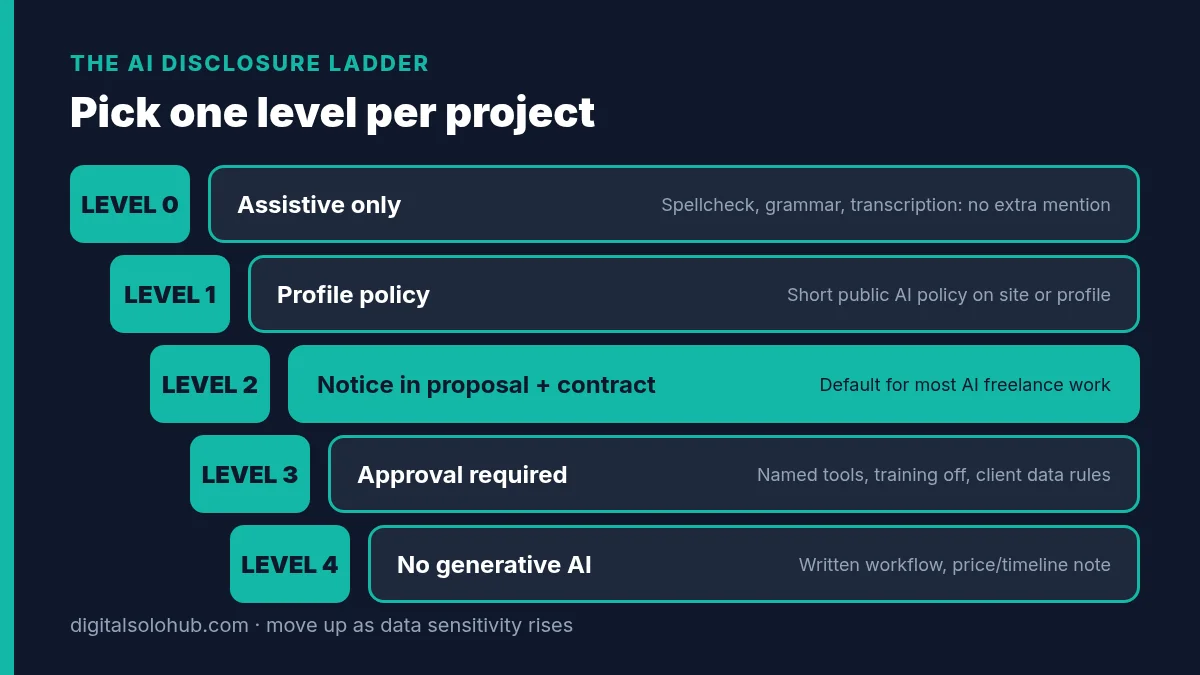
Level 0: Assistive only.
Spellcheck, grammar suggestions, autocomplete, transcription, noise removal. No special mention needed. You still answer honestly if asked.
Level 1: Profile policy.
A short public AI policy on your website, Upwork profile or Fiverr Gig description. It sets expectations for every lead before the first message.
Level 2: Notice in the proposal and contract.
One line in the proposal, a “permitted with notice” clause in the contract, a short note at delivery. This is the default for most AI freelance work: content, research, slide decks, data clean-up, automation builds with an LLM step.
Level 3: Approval required.
You name the tools and use cases, and the client approves them in writing before you use them. Client data only goes into setups they’ve approved, with model training turned off. Use this for confidential data, regulated industries, enterprise clients, and anything that talks to the client’s customers.
Level 4: No generative AI.
The client bans it. You confirm your workflow in writing, and the price or timeline may change.
The rule: start at Level 2. Move up one level when the data gets more sensitive, or when AI output goes into the final deliverable with little change. Move down only for purely assistive use.
Which Level Should You Use? (Decision Table)
| Your situation | Level | What to send |
|---|---|---|
| Grammar, spellcheck or transcription only | 0 | Nothing extra; honest answer if asked |
| You sell on any public profile | 1 | Short AI policy on the profile |
| Copy, research, slides or reports where AI drafts and you rewrite | 2 | Proposal line + Clause A + delivery note |
| Zapier, Make or n8n build with an AI step | 2 | Clause A + name the AI model and provider in the scope |
| Client shares customer data, financials or unpublished product info | 3 | Clause B + the data rule + named tools |
| Health, legal, finance, HR or enterprise procurement | 3 | Clause B; ask for their AI policy before you quote |
| Chatbot or AI agent that talks to the client’s customers | 3 | Clause B + an “AI assistant” line inside the build |
| Synthetic voice, avatar or face-swap video | 3 | Clause B + written consent from the person + a label |
| Client says “no AI” | 4 | Clause C + written workflow + price/timeline note |
| Contract says work “must pass an AI detector” | Don’t sign as written | Offer Clause C + process evidence instead |
That last row deserves a sentence. Detector scores aren’t proof of anything. OpenAI withdrew its own AI text classifier in July 2023, citing its low rate of accuracy. If the contract makes a detector score the test, you can fail without using AI at all. Agree to a workflow, not a score.
The Client Data Rule: Green, Amber, Red
Disclosure gets the attention. Data is where the actual damage happens.
A client can forgive an AI-drafted paragraph. They won’t forgive their customer list sitting in your personal chatbot history.
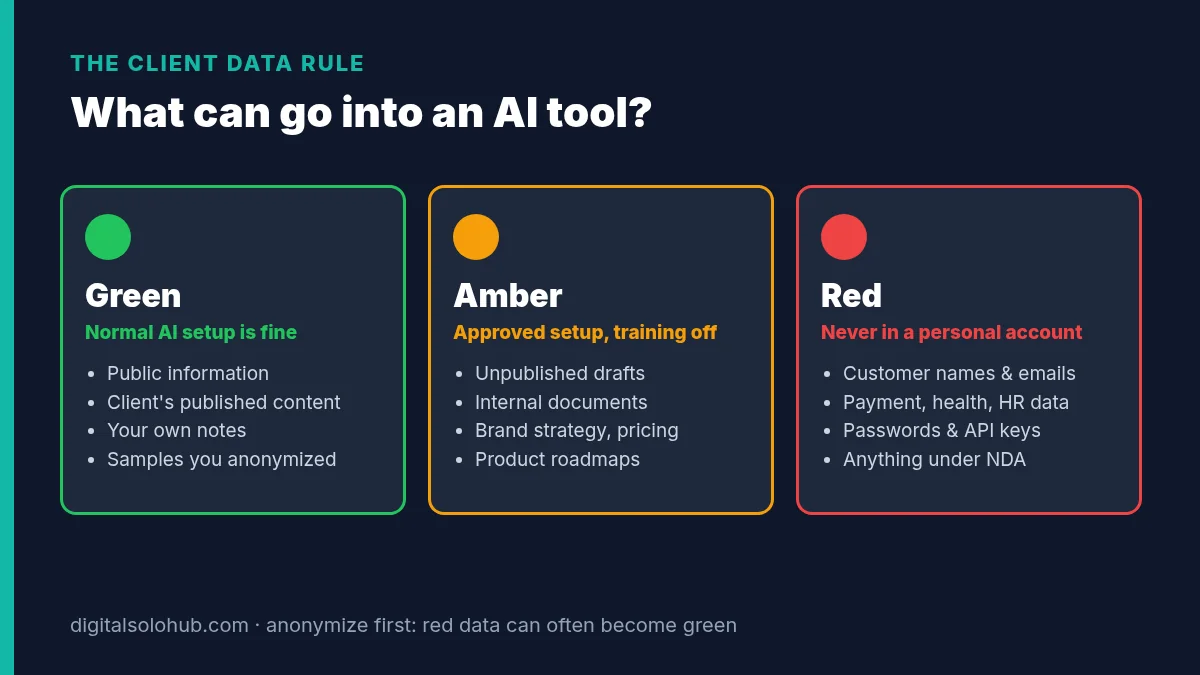
Green: fine in your normal AI setup.
Public information, the client’s already-published content, your own notes, and samples you’ve anonymized yourself.
Amber: only in an approved setup, with training off, and only if the contract allows it.
Unpublished drafts, internal documents, brand strategy, pricing sheets, product roadmaps.
Red: never in a personal chatbot account.
Customer names, emails and phone numbers, payment details, health or HR records, passwords and API keys, anything under NDA. Red data only moves with written approval, a business-grade workspace, and a clear reason it can’t be anonymized first.
Check your settings before amber data touches a tool. For ChatGPT, OpenAI’s data controls help page says:
- With Improve the model for everyone turned off (Settings → Data controls), new conversations aren’t used to train OpenAI models.
- Temporary chats aren’t used to improve models, but may be kept for up to 30 days for safety purposes.
- If you give thumbs-up or thumbs-down feedback, the entire conversation tied to that feedback may be used for training, even after you’ve opted out.
- By default, OpenAI doesn’t use content from ChatGPT Business, Enterprise, Edu or Healthcare workspaces to train its models.
That feedback detail catches people. Don’t rate responses inside client conversations.
Other AI tools have their own settings and their own wording. Check each one you use, and write down what you checked and when.
Pro tip: anonymize before you paste. Swap names for [Customer A], [Customer B], drop emails and order numbers, then work. It takes a few minutes and often turns red data into green.
Copy-Paste Templates (Proposal Line, Policy, Clauses, Delivery Note)
Copy these, fill every bracket, and keep them as snippets next to your proposal and contract templates.
1. The one-line proposal disclosure
This goes in the proposal or first reply, right after you describe the outcome. It works on Upwork, Fiverr, LinkedIn or cold email, and it slots straight into the structure in the AI freelance proposal templates.
How I work: I use AI tools for [research / first drafts / data clean-up], and I personally [rewrite, fact-check and approve] everything before you see it. Your [customer data / internal documents] stay out of AI tools unless you approve a specific setup in writing. If you'd prefer no AI on this project, tell me now and I'll confirm my workflow before we start.
2. Short AI policy for your website or profile
How I use AI (updated [Month YYYY])

- I use AI tools for: [research, outlines, first drafts, data formatting, code suggestions].
- I never use AI for: [final fact-checking, client strategy decisions, anything you've asked me to do by hand].
- Every deliverable is reviewed, edited and approved by me. I'm responsible for the final work, whatever tools I used.
- Client data: I don't put customer personal data, passwords or confidential documents into AI tools without your written approval of the tool and setup.
- Training: where a tool lets me, I turn off model training on my work.
- Your rules win: if your company has an AI policy, or you want no AI on your project, tell me before we start and I'll follow it.
- Questions: ask me anytime. I'll tell you exactly what I used and where.
3. Contract clause (three versions)
Pick one per project based on the ladder level. If you already use a scope of work, drop it into the general terms or assumptions section of the automation scope of work template so it sits next to access and acceptance.
Clause A: AI permitted with notice (Level 2)
Contractor may use AI-assisted tools for research, drafting, editing, data formatting and similar support tasks. Contractor remains fully responsible for the accuracy, quality and suitability of all Deliverables. Contractor will not enter Client's confidential information or personal data into third-party AI tools without Client's prior written approval. Where AI-generated material is included in a Deliverable with little or no modification, Contractor will identify it at delivery.

Clause B: AI with prior approval (Level 3)
Contractor may use only the AI tools and use cases listed in Schedule [X], as approved in writing by Client. Approved tools will be used in a configuration where Client content is not used to train the provider's models, where that option exists. Contractor will not enter Client data classified as confidential or personal data into any AI tool not listed in Schedule [X]. Contractor will tell Client before adding any new AI tool or use case. Contractor will provide a short record of AI use with each Deliverable.

Clause C: No generative AI (Level 4)
Contractor will not use generative AI tools to create any part of the Deliverables. Standard assistive features (spellcheck, grammar suggestions, transcription) are permitted. Compliance will be demonstrated by Contractor's working files and version history, not by the output of any AI-detection tool.
4. Ownership add-on line
Add this to your IP or ownership section, whichever clause you chose above.
Client receives all rights Contractor holds in the Deliverables on full payment. Where a Deliverable includes material generated by AI tools, Contractor makes no representation that such material is protected by copyright, and will identify that material on request.
5. Delivery note
Paste this at the bottom of the delivery message. It takes two minutes and removes most “did you use AI?” arguments before they start.
AI use note: [Project name], delivered [date]
- AI tools used: [tool] for [task]
- My work: [rewrote all copy / verified every figure against your data / built and tested the workflow]
- Client data handled: [none / anonymized only / approved workspace: name]
- Material included with little or no change from AI output: [none / list]
Word-for-Word Scripts for the Questions Clients Actually Ask
Keep the tone of a professional describing their process. Not defensive. Not salesy.
1. “Do you use AI?”
“Yes, for [research and first drafts]. I rewrite and check everything myself before it reaches you, and your [customer data] never goes into an AI tool without your approval. Happy to walk you through exactly how a deliverable gets made.”
2. “If AI does it, shouldn’t it be cheaper?”
“You’re paying for the result and the judgment behind it, not my typing time. AI makes me faster at drafts, which is why I can turn this around in [timeframe]. The editing, checking and accountability are still mine. If you’d rather cut scope to fit a budget, here’s what I’d remove first.”
If this question keeps coming up, your pricing is probably hourly. The AI freelancing rates guide covers moving to project pricing so speed stops counting against you. To set a fixed fee that doesn’t punish you for working faster, start with the project pricing calculator for AI freelancers.
3. “We don’t allow AI on this project.”
“Understood. I’ll do this project without generative AI tools. Standard spellcheck and grammar suggestions only. I’ll add that to the contract so we’re both clear. Working by hand on this means [the timeline moves to X / the fee moves to Y].”
Don’t quietly agree and then hope. On Fiverr, ignoring an explicit no-AI request at the start of an order is a direct policy problem.
4. “Did ChatGPT write this?”
If you didn’t use AI for it:
“No, I wrote it. Happy to share the document’s version history so you can see the drafts and edits. Detector scores are unreliable; OpenAI withdrew its own detector over accuracy. The version history is a better check.”
If AI drafted part of it, say so, plainly:
“AI drafted the first version of [section], as noted in my delivery note. I rewrote it and checked every claim. If that section doesn’t read right for you, I’ll revise it by hand.”
5. “Can you paste our customer list into ChatGPT and segment it?”
“I can segment it, but I won’t paste customer names and emails into a personal AI account. Two options: I anonymize the list first and work on that, or we use a business AI workspace you approve. Which do you prefer?”
That reply often wins trust you didn’t know you’d lost.
Special Cases: Chatbots, Voice, Video and Images
These are where AI disclosure stops being only between you and the client.
Chatbots and AI agents.
When you build a support bot or AI agent that talks to your client’s customers, the question becomes “do their customers know it’s AI?” Under Article 50, AI systems that interact directly with people must be designed so people are informed they’re dealing with an AI system, unless that’s obvious. If your client serves EU users, build that line in by default and let the client’s own counsel decide anything beyond it. A simple first message works:
“Hi, I’m [Brand]’s AI assistant. I can answer questions about [orders, returns, hours]. Type ‘human’ anytime to reach a person.”
Write in the scope who owns that wording after handover. It should be the client.
Synthetic voice, avatars and video.
Fiverr prohibits using someone’s voice or likeness without authorization and creating deceptive deepfakes. The EU rules add a labelling duty for deployers of deepfakes. If you sell AI voiceovers, avatar videos or face-swaps, get written consent from anyone whose voice or face you use, and put a “made with AI” label plan in the scope. If you’re building an AI video editing side hustle, add a consent question to your intake form now.
Images and brand assets.
Raw AI images may carry little or no copyright protection under the Copyright Office’s reasoning. Tell clients before they build an asset they’ll want exclusive rights in, like a logo or mascot. Offer human redrawing or substantial modification as a paid option.
Illustrative Example: One Project, Four Touchpoints
Hypothetical example, not a real client. It shows where each template goes.
A small online home-goods store hires a freelancer to rewrite their product descriptions. They share a product spec sheet and a spreadsheet of customer reviews so the copy can echo how buyers talk.
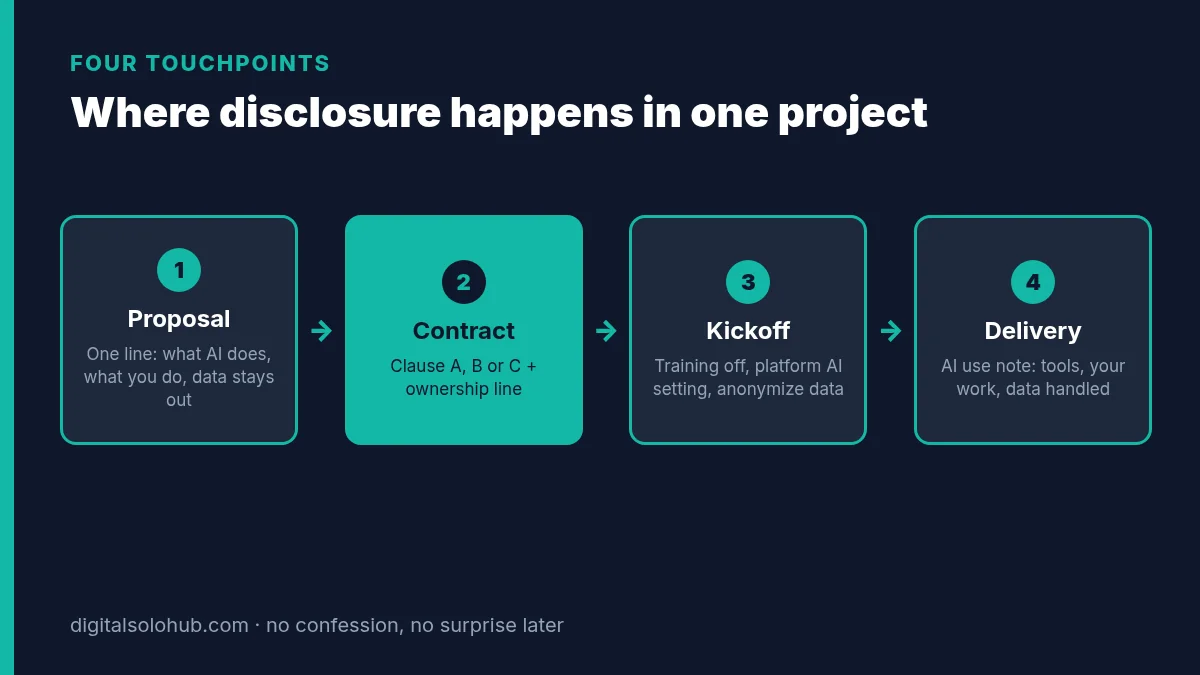
Touchpoint 1: Proposal.
The one-line disclosure: AI for first drafts from the spec sheet, every description rewritten and checked by hand, customer data stays out of AI tools.
Touchpoint 2: Contract.
Ladder check: product specs are amber, reviews with customer names are red. That’s Level 2 work with one red input, so the freelancer uses Clause A plus one extra line: “Customer reviews will be anonymized before any AI-assisted analysis.”
Touchpoint 3: Kickoff.
Before touching the files: confirm the ChatGPT training toggle is off, confirm the Upwork AI preference if the contract runs there, strip names from the review spreadsheet, and note the date in the project file.
Touchpoint 4: Delivery.
The delivery note lists the tool, the task, “anonymized reviews only” and “no AI text included unchanged.”
Four short moments. No confession. No surprise later.
Common AI Disclosure Mistakes (and the Fix for Each)
1. Waiting until delivery.
Disclosure after the fact sounds like getting caught.
Fix: the proposal line, every time.
2. Naming tool brands instead of tasks.
“I use ChatGPT, Claude and Midjourney” tells the client nothing useful and dates fast.
Fix: describe the task AI does, the part you do, and the data rule.
3. Over-disclosing every keystroke.
Listing spellcheck and autocomplete makes you sound anxious and buries what matters.
Fix: Level 0 tasks don’t need a line.
4. Promising full copyright on raw AI output.
“All rights assigned, 100% original” is a risky sentence when part of the work came straight from a model.
Fix: the ownership add-on line, plus real human rewriting.
5. Signing “must pass an AI detector.”
You can fail it without using AI.
Fix: offer Clause C, where version history is the evidence.
6. Client data in a personal chatbot account.
The most expensive mistake on this list, because it can break confidentiality even when the work is great.
Fix: the green/amber/red rule and anonymizing first.
7. Treating “no AI” as a preference.
It’s a scope change, and it often changes the timeline.
Fix: write it into the contract and adjust price or deadline openly.
8. Shading the truth when asked directly.
Every platform penalty above attaches to misrepresentation.
Fix: answer the question you were asked. Then explain the process.
The 60-Minute AI Disclosure Setup
Do this once. Then it runs on every project without thinking.
- Minutes 0–10: write your one-line proposal disclosure and save it as a snippet.
- Minutes 10–25: publish the short AI policy on your website or profile.
- Minutes 25–40: add Clause A and the ownership line to your contract or scope template. Save Clauses B and C as snippets.
- Minutes 40–50: check your settings: ChatGPT data controls, Upwork AI preferences, and the training settings of any other AI tool you use. Write down what you checked and the date.
- Minutes 50–60: save the delivery note and the five scripts where you’ll actually find them, like your text expander, notes app or proposal folder.
From then on, every new project takes about a minute: pick the ladder level, paste the matching clause, send.
Frequently Asked Questions
Do I legally have to tell clients I use AI?
Usually the duty comes from your contract and your platform, not one general law. A client contract that bans or requires disclosure of AI is binding, and Fiverr penalizes misrepresenting AI use. Rules such as EU AI Act Article 50 and California’s AI Transparency Act mainly target AI providers and deployers of specific content. This is not legal advice; check high-stakes contracts with a lawyer.
Should I tell clients I use ChatGPT for first drafts?
Yes, if AI drafts shape the deliverable. Say it in one line in the proposal: what AI does, what you do (rewrite, fact-check, approve), and that client data stays out of AI tools unless they approve a setup. Describe the task rather than listing tool brands.
What should an AI clause in a freelance contract say?
It should state which tasks AI may support, that you stay responsible for the final work, that confidential or personal data will not go into third-party AI tools without written approval, and when you will identify AI-generated material. Pick a permitted-with-notice, approval-required or no-AI version depending on the project.
Does Fiverr require freelancers to disclose AI use?
Fiverr allows AI in every category but requires AI-assisted work to be meaningfully refined and customized. You must honor a client’s explicit no-AI request made before or at the start of an order and disclose your workflow. Misrepresenting AI use can lead to cancellation, a refund and account suspension.
How do I stop Upwork using my work to train its AI?
Freelancers go to Account settings, then Profile settings, then AI preferences, and change their selection. For messages and work product, both freelancer and client must be opted in, so either side opting out excludes that contract’s data. Content shared while opted in may still be used, and fraud and safety training is not covered by the opt-out.
Can I put client data into ChatGPT?
Only public or anonymized data in a normal setup. Unpublished internal documents need client approval and training turned off. Customer personal data, payment details, passwords and anything under NDA should not go into a personal chatbot account at all; anonymize it first or use a business workspace the client approves.
Who owns AI-generated work I deliver to a client?
The US Copyright Office says prompts alone do not make you the author of AI output, while human expression, creative selection and arrangement, and creative modifications can be protected. So assign the rights you actually hold, say you make no copyright claim over raw AI material, and identify that material on request.
Final Thoughts
AI isn’t the problem clients worry about.
Surprise is.
Telling clients you use AI turns a risky moment into a boring one: a line in the proposal, a clause in the contract, a note at delivery. Add a hard rule for client data and an honest ownership sentence, and you’ve covered almost everything that gets freelancers in trouble.
Your next action:
- Write your one-line proposal disclosure today.
- Add Clause A and the ownership line to your contract template.
- On your next project, send the delivery note, even if nobody asked.
If you’re still looking for the first client to send this to, how to get your first AI freelance client covers channels and daily outreach. If you have the lead and need the pitch, the proposal templates have the structure this disclosure line slots into.
Say it once. Say it early. Then get back to the work.
Sources
- Fiverr Help Center: Using AI on Fiverr, guidelines for freelancers and clients
- Upwork Help: How to control your AI preferences on Upwork
- European Commission: Commission starts enforcing AI Act rules and new transparency requirements on 2 August
- AI Act Service Desk (European Commission): Article 50, transparency obligations
- California Legislative Information: AB 853, California AI Transparency Act
- U.S. Copyright Office: Copyright and Artificial Intelligence, Part 2: Copyrightability (PDF)
- OpenAI Help Center: Data controls in ChatGPT
- OpenAI: New AI classifier for indicating AI-written text (withdrawn July 20, 2023)
Platform rules and AI laws change. Check the sources above before you rely on a clause, and have a lawyer review anything high-stakes. Sources checked October 14, 2026.
About the Author
Omar Yousaf
Founder of Digital Solo Hub
I help beginners build practical AI freelancing skills through structured learning, portfolio development, and realistic business strategies. My focus is on helping new freelancers create sustainable income by combining AI tools with professional execution rather than shortcuts or unrealistic promises.