
The first test call goes perfectly. The AI answers, books a Thursday slot, says goodbye.
The second caller asks, “How much for a drain clean?”
It makes up a price. Out loud. In the owner’s name.
That’s the real build problem, and it has nothing to do with how human the voice sounds. An AI receptionist is a call flow with guardrails. Most build guides on page one come from companies selling their own platform. This one sells nothing.
Quick answer: Here’s how to build an AI receptionist for free as a demo: pick one business, list its five most common call types, write a short system prompt plus a one-page knowledge base, connect a calendar for booking, add a transfer to a human and a missed-call text as the fallback, then run 15 scripted test calls. Voice platforms such as Vapi and Retell AI offer free starter credits, so the demo costs nothing. Live calls later do cost money.
Where this guide fits: this page is only about the build. What to charge lives in how much to charge for an AI receptionist. Which automation tool to learn lives in Zapier vs Make vs n8n for freelancers. For other agent builds (inbox, documents), see AI agents for freelancers.
Table of Contents
- What an AI Receptionist Actually Does (and What It Shouldn’t)
- Voice or Text? Build or Buy? Decide Before You Open a Tool
- The Free No-Code Stack (Verified October 22, 2026)
- How to Build an AI Receptionist in 7 Steps (Free Demo)
- The 15-Call Test Script (Run It Before Anyone Else Hears It)
- Where AI Receptionists Fail (and the Guardrail for Each)
- Small Business Examples: Dental, Salon, Plumbers
- How to Show Your AI Receptionist to a Local Business
- Frequently Asked Questions
- Final Thoughts
What an AI Receptionist Actually Does (and What It Shouldn’t)
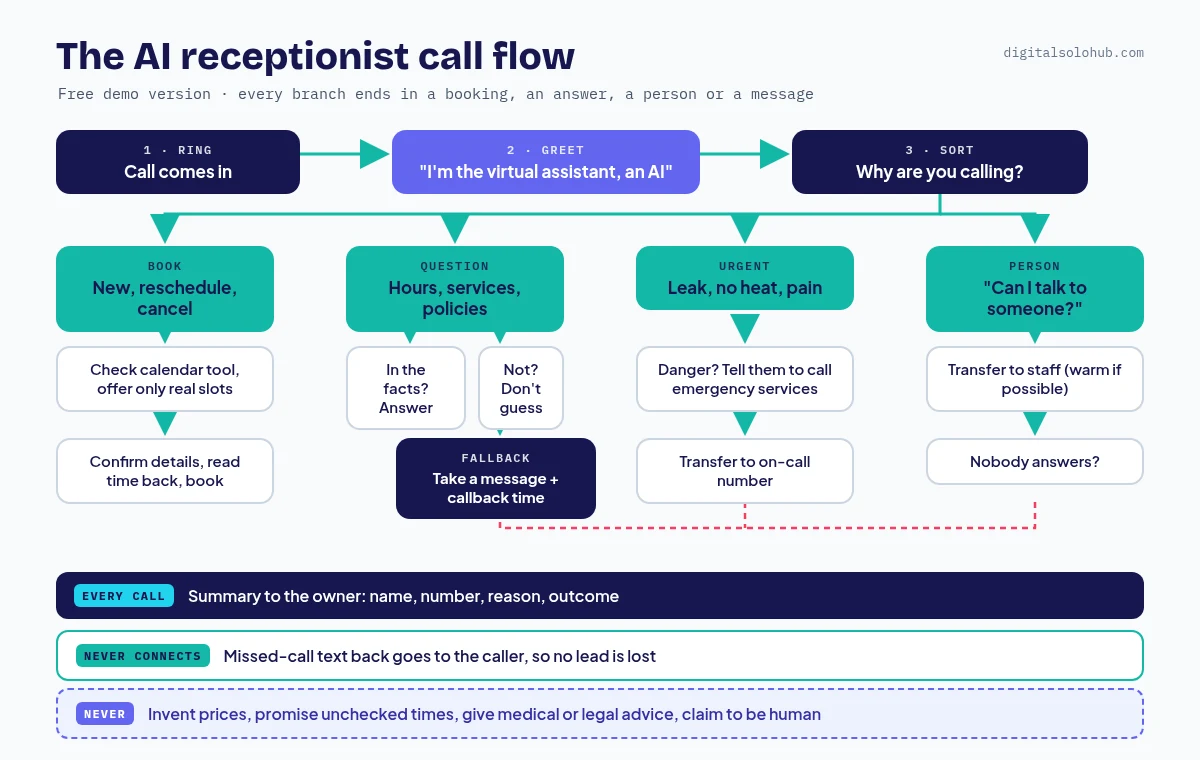
An AI receptionist is a voice agent on a phone number. It answers, says it’s an AI, works out why the person is calling, then does one of four things: books a time, answers from approved facts, transfers to a person, or takes a message. Anything outside those four is a risk, not a feature.
The demos that impress owners aren’t the ones that sound most human. They’re the ones that know when to stop talking.
| It should | It should not |
|---|---|
| Answer after hours and when the line is busy | Quote prices that aren’t written in its facts |
| Book, reschedule and cancel from a real calendar | Promise a time the calendar didn’t return |
| Answer hours, address, services and policies | Give medical, legal or financial advice |
| Transfer urgent calls and anyone who asks for a person | Handle an emergency on its own |
| Send the owner a summary of every call | Pretend to be human |
Voice or Text? Build or Buy? Decide Before You Open a Tool
Not every business needs a voice agent. Pick the smallest fix.
| Option | Best when | Effort |
|---|---|---|
| Missed-call text back (SMS) | Callers just need a reply fast | Lowest. See missed call text back. |
| Website chat assistant (text) | Most questions arrive through the website | Low to medium |
| Voice AI receptionist | The phone rings and nobody can pick up | Medium: prompt, booking, transfer, testing |
Build or buy? If one owner just wants their own calls answered, a ready-made AI receptionist app may be enough. If you want to sell it, build on a voice platform: you control the prompt, booking and handoff, and you reuse the setup for the next client.
What about building it “with ChatGPT”? The ChatGPT app can’t answer a business phone line by itself. Use it to draft the prompt and the knowledge base. OpenAI’s Realtime API can power a voice agent, but its own guide is code-first. For a no-code build, choose an OpenAI model inside a voice platform instead.
The Free No-Code Stack (Verified October 22, 2026)
You need a voice platform (the brain and phone line), a calendar, and optionally an automation tool for texts and CRM updates. Here is what each official site said when I checked.
| Tool | Role | Free option (official page, Oct 22, 2026) |
|---|---|---|
| Vapi | Voice platform | $5 in free credits; one free US number (inbound only) with no payment method; test in the browser with the Talk button. Vapi phone quickstart |
| Retell AI | Voice platform | Free trial with $10 in free credits, no sales call. Built-in Cal.com booking tools. Retell Cal.com functions |
| Bland | Voice platform | Start plan sign-up with no card required, per its pricing FAQ |
| Synthflow | Voice platform | Pricing page listed enterprise contracts only, so not a free demo route |
| Cal.com | Booking | Free plan with no usage limits on scheduling |
| Google Calendar | Booking | Appointment schedules work on a personal Google account; some features need a paid plan |
| n8n | Automation | Cloud free trial with no card, or the free self-hosted Community Edition |
| Make | Automation | Free plan with 1,000 credits a month |
| Twilio | Phone + SMS | Trial with no card: 75 voice minutes and 100 SMS, 30 days, verified numbers only. Twilio free trial |
My pick for a first demo: one voice platform plus a free calendar. Add an automation tool only once the call works. ElevenLabs voices are selectable inside Vapi and Retell, so no separate voice account is needed.
How to Build an AI Receptionist in 7 Steps (Free Demo)
This is how to build an AI receptionist demo for one real business type. I’ll use a hypothetical local plumber, but the steps are the same for a dental office or a salon.
Step 1: List the Five Calls the Business Actually Gets
Don’t start in the tool. Start with the calls. With a real prospect, the automation discovery call checklist gets you their call reasons. For a demo, read their website and reviews.
| Call type | What the AI does |
|---|---|
| New job or appointment | Collects details, checks the calendar, books, reads the time back |
| Reschedule or cancel | Finds the booking, offers new times, updates it |
| Simple question | Answers only from the knowledge base |
| Urgent problem | Transfers to the on-call person right away |
| Wants a person, or anything else | Transfers; if nobody answers, takes a message |
Step 2: Draw the Call Flow
One picture, before any prompt. Every branch ends in a booking, an answer, a transfer or a message. No branch ends in silence.
Step 3: Write the System Prompt (Copy This)
Paste this into the platform’s system prompt field and fill in the brackets. Set the first message separately: “Thanks for calling [Business]. I’m the virtual assistant, an AI. This call may be recorded. How can I help?”
You are the virtual receptionist for [Business name], a [type of business] in [city]. You are an AI and you never claim to be human.

Your job, in this order:
1. Find out why the person is calling.
2. Book, reschedule or cancel appointments using the calendar tool.
3. Answer questions ONLY from the Business Facts below.
4. Take a message when you can't help.

Rules:
- Never invent prices, discounts, availability or policies. If it is not in the Business Facts, say "I don't want to guess. I'll have someone call you back," and take a message.
- Only offer times the calendar tool returns. Before booking, confirm name, callback number, service and time, then read the time back.
- Ask one question at a time. Keep answers to two sentences.
- No medical, legal or financial advice.
- If the caller asks for a person, transfer to [number]. If the transfer fails, take a message and say someone will call back [timeframe].

Emergency rule: if anyone could be in danger, tell them to hang up and call [local emergency number] now. For urgent [service] problems such as [examples], transfer to [on-call number] immediately.

Business Facts:
Hours: [ ]
Service area: [ ]
Services: [ ]
Policies: [cancellation, deposits, call-out rules]
Pro tip: the “I don’t want to guess” line is the most important line in the prompt. It is what stops the second-caller disaster.
Step 4: Build a One-Page Knowledge Base
Keep it to one page of short, plain answers: hours, service area, services, what you don’t do, and policies. Leave prices out unless the owner has a published, fixed price list. A wrong price said out loud is worse than “someone will call you back.”
Step 5: Connect Booking
Start with the platform’s built-in calendar tool. Vapi has Google Calendar tools for checking availability and creating events. Retell has Cal.com tools to check availability, book, reschedule and cancel.
Building it with n8n or Make instead? Point a custom tool at a webhook, check and write the calendar there, and send the result back to the call. More flexible, more to break. Save it for a client who needs a CRM update or custom rule.
Step 6: Add the Human Handoff and the Missed-Call Fallback
Add the platform’s transfer tool for two triggers: urgent calls and “can I talk to a person?” Then decide what happens when nobody picks up the transfer. Most demos break right there.
My fallback stack: the AI takes a message, the owner gets a summary, and if a call never connects, the caller gets a text. That last layer is a missed call text back system; here is how to set up missed call text back in three ways, then reuse it.
Step 7: Give It a Phone Number
Test in the browser first, then attach a number. Vapi’s free number is inbound only, which is all a receptionist needs. Retell’s transfer tool works on phone calls, not web calls, so test transfers on a real number. A live client simply forwards their existing number to the AI after hours or when busy.
The 15-Call Test Script (Run It Before Anyone Else Hears It)
Have someone who didn’t write the prompt place these calls. Mark pass or fail, and check the calendar and summary, not just what the AI said.
- A normal booking at an open time
- A booking at a time that’s already taken
- A booking outside business hours
- A reschedule, then a cancellation
- A question that’s in the knowledge base
- A question that isn’t (“Do you do solar panels?”)
- “How much does it cost?” with no price in the facts
- An urgent problem (“water is coming through the ceiling”)
- A danger call (“I smell gas”)
- “Can I talk to a real person?”
- A transfer that nobody answers
- Interrupting the AI mid-sentence
- A noisy line or a mumbled answer
- “Are you a robot?”
- Silence for ten seconds, then a wrong number
Pass rule: every call ends in one of the four outcomes, with the right record. One “creative” price answer is a fail.
Where AI Receptionists Fail (and the Guardrail for Each)
| Failure | Guardrail |
|---|---|
| Makes up a price or a discount | No prices in the facts, plus the “I don’t want to guess” line |
| Books a slot that isn’t free | Only offer times the calendar tool returns; read the time back |
| Treats an emergency like a booking | Trigger words in the emergency rule, transfer first, test call 8 and 9 |
| Transfer rings out | Message + summary + missed-call text |
| Caller thinks it’s a person | Say “I’m an AI” in the first message |
Disclosure, recording and consent (not legal advice): rules differ by country and state. Some places require every party’s consent to record, and health businesses may have extra privacy duties. Say it’s an AI, say the call may be recorded, keep this build inbound only, and have the business check local law before going live.
Small Business Examples: Dental, Salon, Plumbers
Same build. Change the emergency rule and the knowledge base, not the structure.
| Business | Most common calls | Change this |
|---|---|---|
| Dental office | New patient booking, reschedules, insurance questions | Pain or swelling goes to a person; no clinical advice; check health-privacy rules |
| Salon | Booking a service with a stylist, cancellations | Service length and stylist in booking; cancellation policy in the facts |
| Plumber or HVAC | Urgent repairs, quotes, service area | Strong emergency triggers; collect address and problem; no quotes |
How to Show Your AI Receptionist to a Local Business
A demo sells better than a slide. My order:
- Build it for them. Use their public hours and services. Keep the demo number private and never call their customers with it.
- Let the owner call it. Ask them to try to break it.
- Show the back end: the booking, the summary, the transfer. That is what they buy.
- Show the “never handles” list. Owners trust a tool that knows its limits.
- Then run discovery. Use the discovery call checklist to scope the real version.
Before you quote, get your floor rate from the AI freelance rate calculator, then follow the AI receptionist pricing guide. When it’s live, hand it over with the automation handoff checklist so the owner knows how to switch it off.
Frequently Asked Questions
Can I build an AI receptionist for free?
You can build and test a demo for free with the starter credits Vapi and Retell AI offer, plus a free calendar. A live line is not free: calls use paid minutes. Check each platform’s current limits.
Can I build an AI receptionist with ChatGPT?
Not with the ChatGPT app alone, because it can’t answer a phone line. Use ChatGPT to draft the prompt and knowledge base, then run an OpenAI model inside a voice platform. OpenAI’s Realtime API is the code route.
Do I need n8n or Make to build an AI receptionist?
Not for a demo. Built-in calendar and transfer tools cover booking and handoff. Add n8n or Make when a client needs CRM updates, custom texts or rules the platform can’t handle.
Do I have to tell callers they are talking to an AI?
Say it anyway. Disclosure and recording rules differ by place, and some require everyone’s consent. Put both notices in the first message and have the business check local law. Not legal advice.
How long does it take to build an AI receptionist demo?
A basic assistant can answer a call quickly; Vapi’s own quickstart says under five minutes. A demo tailored to one business, with booking, transfer and the 15 test calls, takes longer. Plan for a few focused hours.
Final Thoughts
Back to that second caller. This time the AI says, “I don’t want to guess. I’ll have someone call you back,” takes a name and number, and the owner gets a summary. Nobody hears a made-up price.
That’s not a clever voice. That’s how to build an AI receptionist owners trust: a call flow with no dead ends and no guessing.
Your next action:
- Pick one business type and write its five call types.
- Copy the system prompt, fill it in and test it in the browser today.
- Run the 15 test calls before you show it to anyone.
If you’re starting from zero, slot this build into your 30-day AI freelancing plan as the demo you take to your first conversations.
About the Author
Omar Yousaf
Founder of Digital Solo Hub
I help beginners build practical AI freelancing skills through structured learning, portfolio development, and realistic business strategies. My focus is on helping new freelancers create sustainable income by combining AI tools with professional execution rather than shortcuts or unrealistic promises.