Short answer: if you’re a freelancer selling automation to small business clients, learn Make first, keep Zapier in your back pocket for clients who already pay for it, and pick up n8n once you’re comfortable with JSON and want to run AI-heavy workflows without per-step billing. That’s the order I’d follow if I were starting over in 2026. The rest of this guide explains why, and how to choose per client instead of per hype cycle.
Most comparisons of these three tools are written for in-house ops teams. Freelancers have a different problem. You’re not picking one tool for one company. You’re picking a skill to sell, a platform you’ll build on inside other people’s accounts, and a pricing model you’ll have to explain to a client who just wants leads to stop falling through the cracks.
What this guide covers: which automation platform to learn first, how each one bills, how to choose per client, and what n8n’s license allows when you charge for the work. It doesn’t cover which AI service to sell (see the best AI freelance services to offer in 2026) or how to price your time (that lives in the AI freelancing rates guide).
Key Takeaways
- Zapier counts tasks, Make counts operations, n8n counts executions. The billing unit matters more than the feature list.
- Learn Make first for most small-business client work; learn Zapier when a client hands you their account; grow into n8n once you’re comfortable with JSON.
- Choose per client, not per hype cycle: build where the client already pays unless it clearly can’t do the job.
- You can charge for n8n work within the Sustainable Use License, as long as clients don’t get editor access on your instance.
- Always build in the client’s account and add an error alert before handover.
The Real Difference: How Each Tool Counts a “Run”
Feature lists blur together. All three connect apps, all three have AI steps now, all three can branch and loop. The difference that actually shows up on your client’s invoice is the billing unit. Get this wrong and you’ll quote a retainer that the client’s software bill quietly eats.
Zapier counts tasks
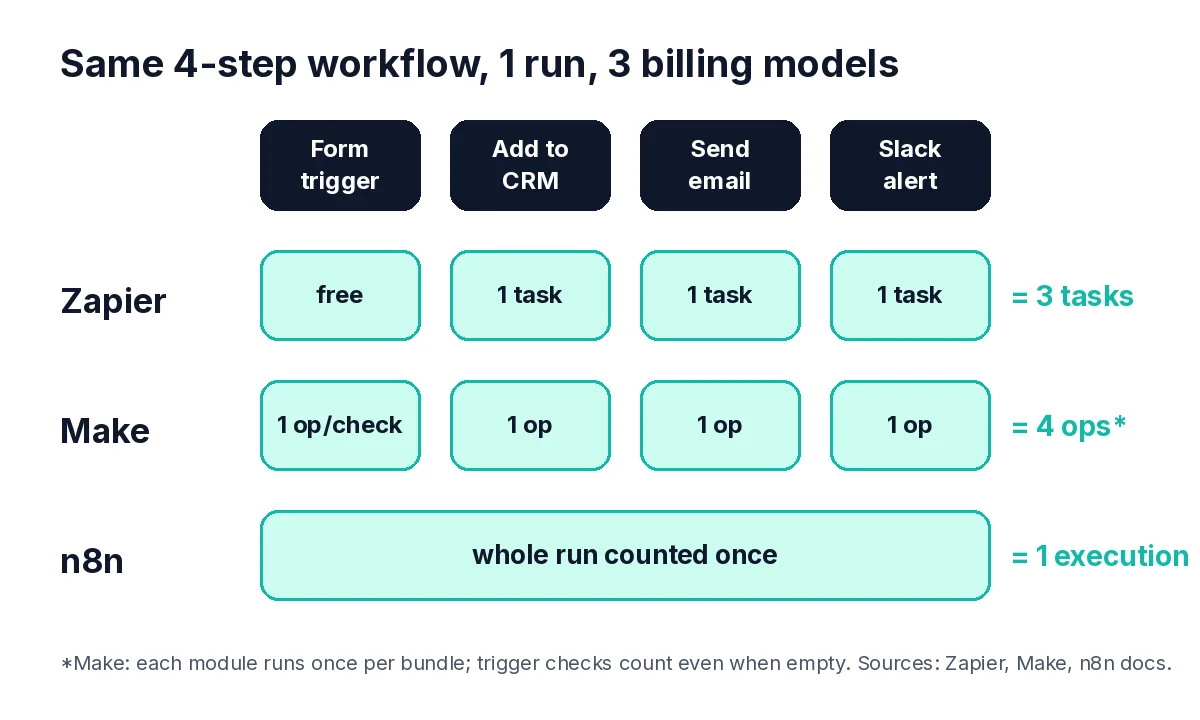
Per Zapier’s own help center, a task is any successful action step. Triggers don’t count. Neither do Filter, Paths, Formatter, or Delay steps. So a Zap that catches a form submission, adds the lead to a CRM, and posts in Slack uses 2 tasks per run, not 3. Zapier also notes that some products bill differently: each Zapier MCP tool call counts as 2 tasks, and each lead routed through Lead Router counts as 5.
Make counts operations (and bills in credits)
Make’s documentation defines an operation as a single module run. Here’s the catch beginners miss: modules run once per bundle. If a trigger returns 10 new form responses, every module after it runs 10 times. Make’s own example shows a 4-module scenario using 31 operations in one run. Triggers cost 1 operation per check, even when nothing new comes back, so polling interval matters.
n8n counts executions
n8n’s pricing page states it charges for full workflow executions, not for each step. A 3-step workflow and a 30-step workflow cost the same per run on n8n Cloud. You can also self-host n8n, which runs as the free Community edition without a license key.
Worked Example: The Same Client Workflow on All Three
Hypothetical client: a small dental clinic gets website enquiries. You build this: new form entry → add contact to CRM → send a welcome email → notify the front desk in Slack. Assume 100 enquiries a month arriving one at a time.
| Platform | How it’s counted | Usage for 100 enquiries | What to watch |
|---|---|---|---|
| Zapier | 3 action steps; trigger is free | 300 tasks | Every extra action you add later adds 100 tasks/month |
| Make | 1 op per trigger check + 1 op per module per bundle | 300 ops for the actions, plus 1 op for every trigger check (including empty ones) | A 1-minute schedule on a polling trigger burns ops all month; use an instant/webhook trigger where you can |
| n8n | 1 execution per workflow run | 100 executions | Cloud plans limit concurrent executions; self-hosting moves the cost to server upkeep and your time |
I’ve deliberately left prices out of that table. They change often enough that any number I print will be stale by the time you read it. Open the pricing pages on the day you quote, and put the plan tier in your proposal so the client sees it too.
What the table does show: step-heavy workflows (think AI enrichment, five lookups, three conditional branches) get expensive fastest on per-step billing, and stay flat on n8n. Simple two-app handoffs are cheap anywhere.
Which One Should You Learn First?
Make: My Pick for Most Freelancers
Make’s visual canvas forces you to see data moving through bundles, iterators, and aggregators. That’s the mental model every automation tool runs on, and Make makes it visible.
It’s also forgiving enough that a non-developer can ship real client work in a week or two of practice.
Pro tip: Once you understand why a Text aggregator can turn 11 operations into 3 (Make’s own docs walk through exactly that), you’ll build cheaper, cleaner workflows on every platform.
Zapier: Learn It, but Don’t Specialize in It First
Zapier is the tool your client is most likely to already have. That’s its real value to you.
You’ll walk into accounts with 40 half-broken Zaps built by a former assistant, and cleaning those up is honest, billable work.
But Zapier hides a lot of the data plumbing, which is great for clients and less great for building your skills. I’d learn it second, and I’d skip trying to brand yourself as “the Zapier person” when it’s the easiest tool for a client to DIY.
n8n: The One to Grow Into
n8n rewards people who don’t flinch at JSON, expressions, and the occasional Code node. Its AI and agent nodes plus per-execution billing make it a strong fit for AI workflows with many steps. If you’re already reading about building AI agents for clients, n8n is where a lot of that work ends up.
I’d skip it as a total beginner, though. Self-hosting means you own updates, backups, and downtime, and that’s a lot of responsibility to take on before your first paid project.
How to Choose Per Client (5-Question Checklist)
Your skill choice and your client’s platform are two different decisions. Run every new project through these questions before you open a builder:
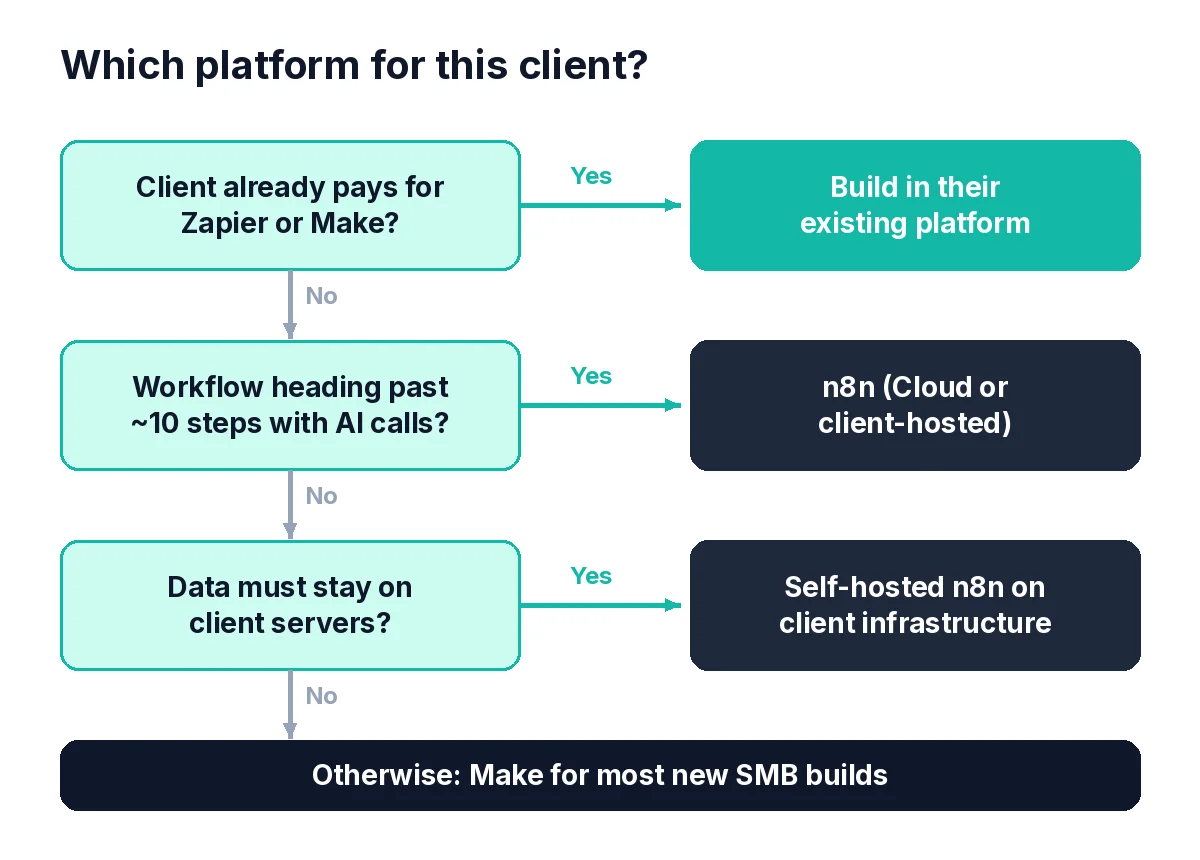
- What do they already pay for? If there’s an active Zapier or Make account, build there unless it clearly can’t do the job. Migration is a separate project with a separate quote.
- How many steps will the workflow have in six months? Not today. Workflows grow. If it’s heading past 8 to 10 steps with AI calls, per-step billing deserves a hard look.
- How many runs per month? Ask for a real number: last month’s form fills, orders, or tickets. Multiply by steps.
- Who maintains it after handover? A client who wants to tweak things themselves is usually happiest in Zapier. A client who’ll keep you on retainer can live with Make or n8n.
- Is there data that can’t leave their servers? If yes, self-hosted n8n on the client’s own infrastructure is often the cleanest answer.
Hard Truth: The n8n Licensing Question Most Guides Skip
This is where I see freelancers get nervous, or worse, careless.
Most comparisons stop at features. But if you’re charging clients for n8n work, the license matters more than any node.
Self-hosted n8n runs under the Sustainable Use License, which limits use to internal business purposes. So can you sell n8n work at all?
Yes, within limits. n8n’s help center spells it out:
- Allowed: building and running workflows for clients on your own instance and charging for that work, as long as clients only get the outputs and can’t open the editor or change workflow logic.
- Allowed: installing and managing n8n on the client’s own server, as long as you don’t also host it for them.
- Needs a commercial license: letting people outside your organization build or configure workflows, hosting n8n as a service, white-labeling it, or using features that require a license key.
My advice: if a client wants their own editor access, put n8n on their infrastructure or their own n8n Cloud account, not yours. And if your situation is unusual, email n8n’s licensing team instead of guessing. That’s what they ask you to do.
Common Automation Tool Mistakes (and the Fix for Each)
1. Building in Your Own Account
It’s faster, and it’s a trap. When the client leaves, you’re stuck either paying for their automations or ripping them out. Build in an account the client owns and invite yourself as a team member. Where a platform doesn’t support that on the client’s plan, document it in the proposal.
2. Quoting Without Estimating Usage
Runs × billable steps, every time. Put the number in the proposal. When usage doubles in month four, you’ll have a written baseline instead of an awkward conversation. (If you’re unsure how to price the work itself, the rates guide covers that side.)
3. Polling Every Minute ‘Just in Case’
On Make, every trigger check is an operation, empty or not. Use webhooks or instant triggers when the app supports them. On Zapier, polling itself is free, so this one matters less there.
4. No Error Handling
A workflow that fails silently is worse than no workflow, because the client stops checking manually. All three platforms give you a way to catch failures, they just do it differently:
- Zapier: add an error handler path to the step that’s most likely to break. Successful steps inside that path count as tasks, per Zapier’s task rules, so budget for them.
- Make: attach an error handler route to the module. Make’s error handler reference lists Skip, Retry (stores incomplete executions for automatic or manual retries), Resume (substitutes a value and keeps going), and Rollback (stops the run and reverts changes). For most client builds I’d reach for Retry on flaky API calls and put an alert module on the handler route.
- n8n: build one workflow that starts with the Error Trigger node and sends an email or Slack message, then select it under Workflow Settings > Error workflow. n8n’s error-handling docs confirm one error workflow can serve many workflows, so you set it up once per client instance.
Whichever tool you’re in, wire the alert to an inbox or channel you actually read. An alert nobody sees is just a slower silent failure.
5. Selling the Tool Instead of the Result
No clinic owner wakes up wanting “a Make scenario.” They want every enquiry answered within five minutes. Lead with the outcome; mention the platform in the scope section. That positioning shift is covered in the AI automation agency breakdown.
Your First Client-Ready Build, Step by Step
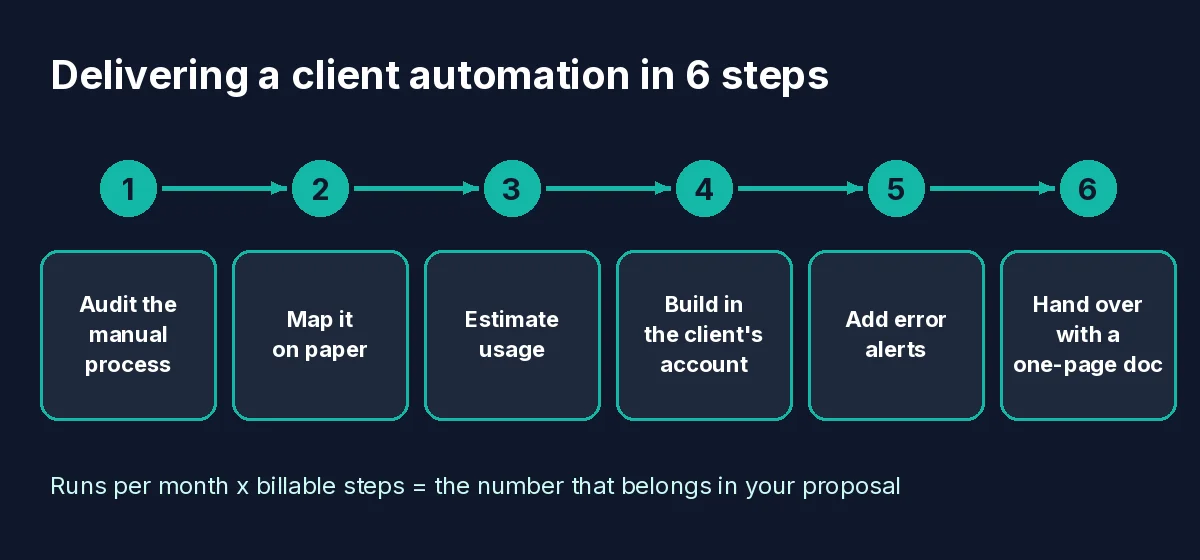
Here’s the process I’d follow on a first paid automation, whichever platform you land on:
- Audit (30–60 minutes). Screen-share while the client walks through the manual process. Write down every app, every copy-paste, every “then I check…”.
- Map it on paper. Trigger, steps, branches, failure points. If you can’t draw it, you can’t build it.
- Estimate usage. Runs per month × billable steps on their platform. Add headroom.
- Build in their account with test data first. Name every step clearly (“Find contact in HubSpot by email,” not “Step 4”).
- Add an error alert and trigger a failure on purpose to prove it works. In n8n, the Stop and Error node exists for exactly this: it forces a failure so your error workflow fires.
- Hand over with a one-page doc: what it does, where it lives, what to do if it breaks, and how to reach you.
A handover message you can adapt:
“Hi Sara, your enquiry workflow is live in your Make account. Every new website form now creates a CRM contact, sends the welcome email, and pings #front-desk in Slack. If anything fails, I get an alert within minutes. Current usage estimate is in the attached doc, alongside a quick guide to pausing it. I’ll check the run history on Friday and send you a short summary.”
If you haven’t landed that first project yet, start with how to get your first AI freelance client, and turn this exact build into a fixed-scope offer using How to Package AI Freelance Services in 2026.
Zapier vs Make vs n8n Compared: Side-by-Side Summary
| Zapier | Make | n8n | |
|---|---|---|---|
| Billing unit | Task (successful action) | Operation (module run per bundle) | Execution (full workflow run) |
| Learning curve | Easiest | Moderate | Steepest |
| Self-hosting | No | No | Yes (Community edition) |
| Best freelance use | Fixing and extending existing client setups | Most new SMB builds | Many-step AI workflows, data-sensitive clients |
| What I’d skip | Branding yourself as a Zapier-only freelancer | Fast polling schedules on low-volume triggers | Self-hosting for clients before you can maintain a server |
For the wider AI toolkit that sits around these platforms (writing, design, client management), see AI Tools Freelancers Are Actually Using in 2026. And if you’re still deciding whether automation is the right skill for you at all, starting AI freelancing with no experience is the better first read.
14-Day Automation Skill Sprint
Days 1–3: Open a free Make account and rebuild the clinic workflow above with test data.
Days 4–6: Add an error handler route and an alert, then trigger a failure on purpose to prove it fires.
Days 7–9: Work out exactly how many operations one run uses and why. Write it down as if it were a proposal line.
Days 10–12: Rebuild the same workflow in Zapier and compare task usage against your Make number.
Days 13–14: Write the one-page handover doc and adapt the handover message for a real prospect.
Frequently Asked Questions
Is Make or Zapier better for freelancers in 2026?
For building skills and handling most new small-business builds, I’d pick Make. For clients who already run Zapier or want to edit workflows themselves, Zapier is usually the right call. Plenty of freelancers end up using both.
Can I legally charge clients for n8n workflows?
According to n8n’s help center, yes: you can build and run workflows for clients and charge for that work, provided clients don’t get access to the editor or workflow logic on your instance. Hosting n8n as a service or letting outside users build workflows requires a commercial license.
Do Zapier triggers use tasks?
No. Zapier’s help center says trigger steps never use tasks, and polling checks are free. Only successful action steps count, with a few exceptions such as Filter, Paths, and Formatter steps, which don’t count.
Why is my Make scenario using so many operations?
Usually because of bundles. Each module runs once per bundle it receives, so a trigger returning 10 items multiplies every later step by 10. Aggregators, filters placed early, and instant triggers are the usual fixes.
Do I need to know how to code to use n8n?
Not strictly, but you’ll get much more out of it if you’re comfortable reading JSON and writing simple expressions. That’s the main reason I’d learn it third.
Final Thoughts
Don’t try to master all three this month.
The tool matters less than understanding what you’re billing for, and building it in a way the client can keep.
Your next action: open a free Make account, rebuild the clinic workflow above with test data, and add an error alert. When you can explain exactly how many operations it uses and why, you’re ready to quote it to a real client.
Learn Zapier the first time a client hands you their account. Save n8n for when your workflows outgrow per-step billing.
Once the build works, turn it into a fixed-scope offer with How to Package AI Freelance Services in 2026, then take it to prospects with How to Get Your First AI Freelance Client in 2026.
Make first. Zapier when a client needs it. n8n when you’ve outgrown per-step billing.
Sources
- Zapier Help Center: How is task usage measured in Zapier?
- Make Help Center: Operations
- n8n: Pricing
- n8n Docs: Host n8n
- n8n Docs: Sustainable Use License
- n8n Help Center: Which license do I need for my use case?
- Make Help Center: Error handlers
- n8n Docs: Handle errors gracefully
- n8n Docs: Error Trigger node
Platform rules and plans change. Everything above was checked against the official pages on October 10, 2026.
About the Author
Omar Yousaf
Founder of Digital Solo Hub
I help beginners build practical AI freelancing skills through structured learning, portfolio development, and realistic business strategies. My focus is on helping new freelancers create sustainable income by combining AI tools with professional execution rather than shortcuts or unrealistic promises.