
The number you quote on the first call decides whether this is a business or a hobby.
Quote an AI receptionist too low, and three months in you’re paying for your client’s phone calls out of your own pocket.
Nobody warns you about that part. Everyone worries about the setup. The minutes are what get you.
Quick answer: Here’s how much to charge for an AI receptionist: a one-time setup fee of build hours × your floor rate × 1.25, plus a monthly fee made of the call costs passed through at cost and your support hours × your floor rate, sold as a set number of included minutes with an overage rate. Get your floor from the AI freelance rate calculator first. The setup half is the same formula as pricing an n8n automation, and your hours should come from the discovery call checklist, not a guess.
Next step:
Get your floor rate in two minutes or jump to the free rate card
Setup fee = build hours × floor rate × 1.25
Monthly fee = call costs at cost + care hours × floor rate
Two lines. That’s the whole method. The rest of this page is about filling them in honestly, because every mistake I see with AI receptionist pricing comes from guessing one of those inputs.
Picture it. It’s hypothetical, but you’ll recognize it. It’s 6:40 PM at a small dental office, closed since six. The phone rings with a cracked tooth on the line, and nobody picks up. The owner asks you to fix that, then asks: “So what does it cost?”
Not covered here: finding clients (First Clients for an AI Automation Agency), choosing a tool (Zapier vs Make vs n8n for freelancers), or the simpler first offer, missed call text back. If you haven’t sold that yet, start there.
Every dollar figure here is an illustrative example from the formula at an illustrative $25 an hour floor, not a market rate, vendor price or earnings promise. Not legal advice.
Table of Contents
- How Much to Charge for an AI Receptionist: The Two-Part Formula
- Part 1: The AI Receptionist Setup Fee (Build Hours × Floor × 1.25)
- Part 2: The Monthly Fee (Call Costs at Cost + Care Hours)
- Per-Minute vs Flat Monthly: Which AI Receptionist Pricing Model to Use
- Worked Example: Pricing the 6:40 PM Dental Office (Hypothetical)
- The Price Ceiling Check: DIY AI Receptionist Tools and Live Answering Services
- The Pricing Ladder: From Missed-Call Text Back to a 24/7 AI Receptionist
- AI Receptionist Pricing by Industry: Dental, HVAC, Law Firms, Salons
- White-Label vs Build-Your-Own: How the Pricing Changes
- AI Receptionist Pricing for Agencies (and Freelancers With Help)
- How Much to Charge for an AI Voice Agent (Is It Different?)
- How Much Do People Charge for an AI Receptionist?
- Is Selling an AI Receptionist Profitable?
- US Compliance Before You Quote (Not Legal Advice)
- Free AI Receptionist Rate Card (Copy, Paste, Fill In)
- The One Script for “Can’t You Just Do Unlimited?”
- The 3 AI Receptionist Pricing Mistakes That Cost the Most
- Your 5-Step AI Receptionist Pricing Setup
- Frequently Asked Questions
- Final Thoughts
How Much to Charge for an AI Receptionist: The Two-Part Formula
To decide how much to charge for an AI receptionist, split the price in two. Charge a one-time setup fee of build hours × floor rate × 1.25. Then charge a monthly fee: call costs passed through at cost, plus support hours × floor rate, sold as included minutes with an overage rate.
| Price component | How to work it out | Example at an illustrative $25 floor |
|---|---|---|
| Setup fee (one time) | Build hours × floor rate × 1.25, rounded up | 17 hours × $25 × 1.25 = about $540 (example) |
| Usage (monthly) | Included minutes × your measured all-in cost per minute, plus fixed monthly costs such as the phone number, all at cost | Depends on your measured cost; see the worked example |
| Care (monthly) | Support and maintenance hours per month × floor rate | 3 hours × $25 = $75 (example) |
| Monthly fee | Usage + care, rounded up, sold as a set number of included minutes | Usage + $75, rounded up (example) |
| Overage | Your measured all-in cost per extra minute, rounded up to the next cent | Your own cost, never a guess |
Three inputs drive everything: your floor rate, your honest hours and your measured cost per minute. Guess any of them and the price is a guess. The setup half matches how much to charge for an n8n automation on purpose; the monthly half is what’s new.
Part 1: The AI Receptionist Setup Fee (Build Hours × Floor × 1.25)
Your floor rate is the lowest hourly figure that covers your bills, tools, tax and unbilled time. The free rate calculator works it out. Then count every build hour: discovery, call flow, knowledge base, escalation, phone forwarding, booking or messages, compliance, staff handoff and your own test calls. Client testing and one round of fixes live inside the × 1.25. If you haven’t built one yet, follow how to build an AI receptionist first, so your hour estimate comes from a real demo.
Why test calls are the line item beginners skip
On at least one major voice platform, Retell, testing an agent bills at the same rates as production, with no free sandbox. So your dozens of test calls cost you twice, in hours and in usage. Count both.
Part 2: The Monthly Fee (Call Costs at Cost + Care Hours)
An AI receptionist is never done. Every call costs money, and under an “unlimited calls” contract those costs are yours. Calls double, your bill doubles, your fee doesn’t. You’re now paying for their busy season. So separate the calls, passed through at cost with a limit, from your time, priced from your floor.
Measure your real cost per minute before you quote
Divide what your test calls cost on the usage screen by the minutes they lasted. That’s your all-in cost: platform, AI model, phone line and add-ons. Read the small print too: Retell’s docs say calls under 10 seconds can bill as 10 seconds, and prompts over 4,000 tokens scale billed duration up. And check peak simultaneous calls, because Retell, for instance, limits concurrent calls per workspace and lets you raise the limit.
Care hours, included minutes and overage
Care hours cover transcripts, updates, fixes, a monthly report and the owner’s questions. Then sell included minutes (expected minutes from the logs, plus a cushion) and an overage rate at your measured cost, rounded up to the next cent.
Monthly fee = (included minutes × cost per minute) + fixed monthly costs + (care hours × floor rate), rounded up.
Per-Minute vs Flat Monthly: Which AI Receptionist Pricing Model to Use
| Model | How it works | The risk |
|---|---|---|
| Included minutes + overage (my default) | One monthly fee for set minutes plus care; extras at cost | You track usage monthly |
| Pass-through + care fee | Exact call costs each month, plus a fixed care fee | Invoices vary, which some owners hate |
| Client pays the platform | Account on the client’s card; you bill setup and care | You depend on their card staying valid |
| Flat “unlimited” | One price, any number of calls | Your margin falls as calls rise |
Contrarian Insight: owners don’t think in minutes. They think “Did someone answer?” Included minutes gives them one monthly price while the math stays yours.
Worked Example: Pricing the 6:40 PM Dental Office (Hypothetical)
Back to the office with the ringing phone. Remember: the office, the call numbers and every dollar below are made up to show the method. They’re not measurements from a real client.
Step by step: how much to charge for an AI receptionist at this office
Step 1: The floor. I’ll use the illustrative $25 an hour. Yours comes from the rate calculator.
Step 2: The scope. On the discovery call, the owner says they want the phone answered after 6 PM and on weekends. The AI should take a message, mark anything urgent, and send a summary to the office by email first thing in the morning. No booking into the practice software yet. That’s rung 2 on the ladder further down.
Step 3: The call logs. A week of the phone system’s call history (hypothetical) shows most after-hours calls are short: opening times, “can I come in tomorrow,” and the occasional pain call. Extend that week to a month and you get an assumed figure of about 250 after-hours minutes.
Step 4: The setup hours.
| Line item (assumed hours) | Hours |
|---|---|
| Discovery and call review | 2 |
| Call flow and script | 3 |
| Knowledge base (hours, services, location, parking, payment questions) | 2 |
| Escalation rules (pain and emergency calls) | 1.5 |
| Phone setup and after-hours forwarding | 1.5 |
| Message summary to the office | 2 |
| Your test calls | 3 |
| Compliance pieces (disclosure, recording notice, HIPAA questions) | 1 |
| Handoff and training | 1 |
| Total build hours | 17 |
Setup fee: 17 × $25 × 1.25 = $531.25. Round up: about $540 (example).
Step 5: The usage. Say your test calls showed an all-in cost of $0.20 per minute. That number is a placeholder I picked so the arithmetic is easy to follow. It isn’t any provider’s rate. Use the cost you measure on your own platform.
- Included minutes: 250 expected + a cushion = 300 minutes (example).
- Usage: 300 × $0.20 = $60 (example).
- Fixed monthly costs, such as the phone number: say $10 (placeholder; use your real cost).
- Usage at cost: $70 (example).
Step 6: The care hours. Reading transcripts, updating the knowledge base, one small fix and a monthly report: assume 3 hours. 3 × $25 = $75 (example).
Step 7: The monthly fee. $70 + $75 = $145. Round up: about $150 a month (example), including 300 minutes, with extra minutes at $0.20 each.
Notice what you just did. Every dollar of that quote traces back to a line you can explain. If the owner asks “why $150?”, you don’t defend a number. You walk them through it.
Quote (example only): about $540 setup, then about $150 a month with 300 included minutes, overage at your measured cost. Before you send it, there’s one more check, and it’s the one that keeps you from quoting a price nobody will pay.
The Price Ceiling Check: DIY AI Receptionist Tools and Live Answering Services
The formula gives you your floor price, not the ceiling, and you can’t settle how much to charge for an AI receptionist without one. Two alternatives set it: DIY AI receptionist tools the owner can set up alone, and live answering services staffed by people. Check both on the vendors’ own pricing pages the day you quote, but don’t copy their prices into your proposal.
Land below the DIY tools and you probably under-counted care or usage. Above them is fine, as long as you can name what you add, such as setup on their phones and same-day fixes. Near a live answering service, shrink the scope to after-hours only. Hard Truth: if you can’t name what you add, the DIY tool is the right answer for that client. Tell them so.
The Pricing Ladder: From Missed-Call Text Back to a 24/7 AI Receptionist
Most clients don’t need a voice AI on day one. That’s why the missed call text back guide tells beginners not to start with an AI receptionist. Start with the small thing, then climb.
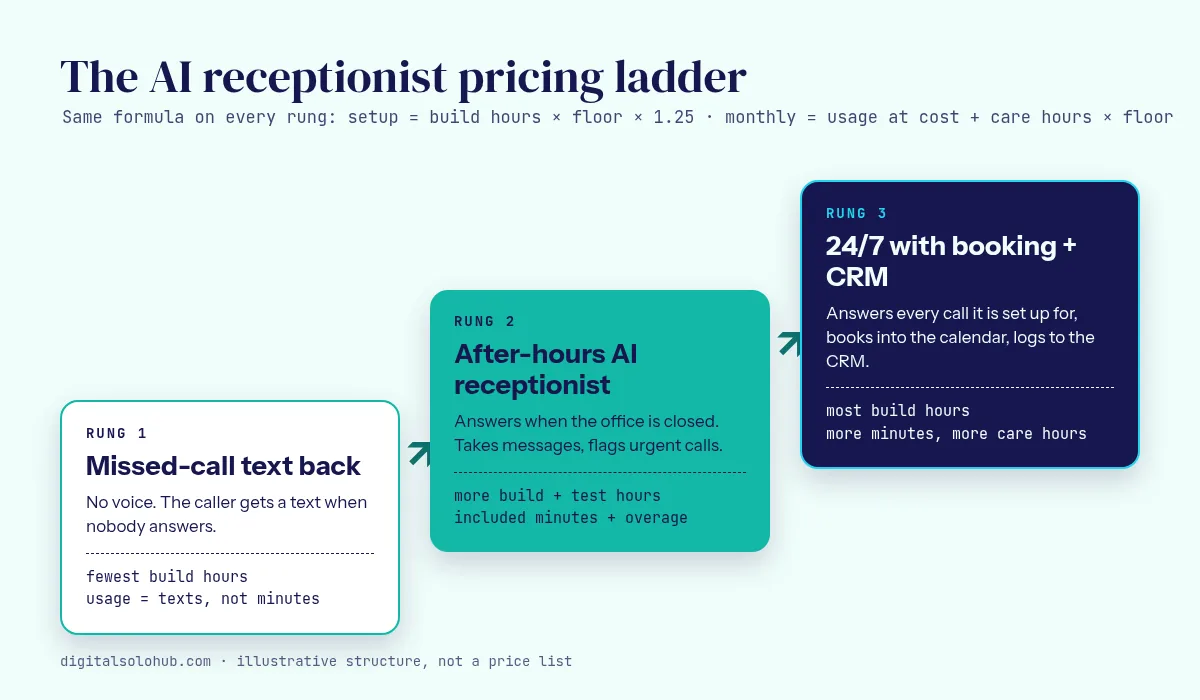
| Rung | What the caller gets | Setup fee (example at $25) | Monthly fee (formula) |
|---|---|---|---|
| 1. Missed-call text back | A text when nobody answers | 6 hours × $25 × 1.25 = about $190 (example) | Texting at cost + about 1 care hour |
| 2. After-hours AI receptionist | A voice AI takes messages and flags urgent calls | 17 hours, about $540 (example) | Included minutes at cost + about 3 care hours |
| 3. 24/7 with booking + CRM | Answers at any hour, books, logs to the CRM | 32 hours × $25 × 1.25 = about $1,000 (example) | More minutes at cost + about 5 care hours |
Each rung is the next sale to a happy client; for proposal tiers, see how to package AI freelance services.
AI Receptionist Pricing by Industry: Dental, HVAC, Law Firms, Salons
| Niche | Where the extra hours hide | Ask on discovery |
|---|---|---|
| Dental and medical | HIPAA, pain and emergency escalation, no clinical advice | “What happens when someone calls in pain at 9 PM?” |
| HVAC and home services | Emergency triage, on-call transfer, address capture | “Which calls are worth waking someone up for?” |
| Law firms | Intake, no legal advice, confidential recordings | “What must only a person ask?” |
| Salons and spas | Booking, stylists, cancellations and rescheduling | “How many calls are just booking?” |
- Dental: care hours grow when insurance or opening hours change.
- HVAC: volume swings with the weather, so included minutes beat a flat price.
- Law: transcript reviews take longer because the stakes are higher.
- Salons: short calls, but booking rules add build hours.
White-Label vs Build-Your-Own: How the Pricing Changes
White-label usually means fewer setup hours but a subscription you pay with or without clients, so spread it across clients at cost. Building your own means more hours and control, with usage you measure and pass through. My strategy: start white-label while you learn, but never let a platform’s suggested resale price replace your math. It doesn’t know your floor.
AI Receptionist Pricing for Agencies (and Freelancers With Help)
If a contractor or VA helps, your floor for those hours must cover their rate plus your time managing them. Give each client a separate sub-account so one busy month never lands on another invoice, and keep the phone number in the client’s name. Clean exits are a selling point.
How Much to Charge for an AI Voice Agent (Is It Different?)
If you’re asking how much to charge for AI voice agent work, the answer is the same way. A receptionist is one kind of voice agent, and an inbound support line gets the same two lines. The exception is outbound calling: different service, different legal rules. Scope it separately and get proper advice first.
Pricing a text bot for a website or WhatsApp instead? See how much to charge for an AI chatbot.
How Much Do People Charge for an AI Receptionist?
Search “how much do people charge for AI receptionist” and you’ll find numbers in threads and reseller pitches. I’m not repeating them. Most come from companies selling the platform, none knows your floor, and a copied number is one you can’t defend. What matters is whether your quote covers your hours and costs.
Is Selling an AI Receptionist Profitable?
It can be, since the formula makes every job cover your floor. But profit is something you check monthly, not assume: usage covered by included minutes, care hours that match your price (priced at 3 but spending 8 means re-quote), and clients who stay because it works. I won’t promise an income, but you’ll know within a month whether a client is profitable.
US Compliance Before You Quote (Not Legal Advice)
General information, not legal advice. Laws vary by state, so clients in regulated fields should ask their own lawyer. Each item costs hours; estimate them.
- Inbound only. In February 2024 the FCC confirmed that the TCPA’s limits on “artificial or prerecorded voice” cover current AI technologies that generate human voices, and the ruling itself requires prior express consent for calls using an AI-generated voice. Outbound is a different service.
- Disclose the AI in the greeting. For talking about AI with clients, see how to tell clients you use AI.
- Recording consent. California’s Penal Code section 632 requires the consent of all parties to record a confidential communication. Add a recording notice.
- HIPAA. Per HHS, a business associate handles protected health information for a covered entity. For dental or medical clients, confirm the platform will sign a business associate agreement before you quote.
Free AI Receptionist Rate Card (Copy, Paste, Fill In)
Here’s the asset, free to copy with no sign-up and no email. It answers how much to charge for an AI receptionist on one page. Fill in the [brackets] with your own numbers.
AI RECEPTIONIST RATE CARD  |  [your name / business]
Formula: digitalsolohub.com/how-much-to-charge-for-ai-receptionist/

MY INPUTS
Floor rate (from my own costs):          [$__ per hour]
Measured all-in cost per minute:          [$__ per minute] (re-test after changes)
Fixed monthly costs per client:           [$__] (phone number, platform share)

SETUP FEE  (build hours x floor x 1.25, rounded up)
Rung 1  Missed-call text back             [__ hours]  -> [$____]
Rung 2  After-hours AI receptionist       [__ hours]  -> [$____]
Rung 3  24/7 with booking + CRM           [__ hours]  -> [$____]

MONTHLY FEE  (usage at cost + care hours x floor, rounded up)
Rung 2  [___] included minutes + [__] care hours  -> [$____ / month]
Rung 3  [___] included minutes + [__] care hours  -> [$____ / month]
Overage (all rungs):                       [$__ per extra minute, at cost]

ALWAYS INCLUDED
- AI disclosure in the greeting, recording notice where needed
- Escalation for urgent calls to a named person
- One round of fixes after launch
- Monthly report

ALWAYS RE-QUOTED
- New integrations, new answer hours, outbound calling
- A second round of changes
- Care hours over [__] in a month

REVIEW
Check usage and care hours every month. Re-quote at [3 / 6] months.
And when you send the price to a client, use this quote template:
QUOTE: AI receptionist for [business]

What it does
From [hours], calls to [number] are answered by an AI assistant
that tells callers it is an AI, answers [common questions], takes
messages and sends urgent calls to [person] by [transfer / text].
You get a summary of every call by [email / text].

Setup (one time)
[price], flat, for the setup described above.
Includes call flow, knowledge base, phone forwarding, testing
with your real questions, one round of fixes, and staff handoff.

Monthly
[price] per month, including [minutes] call minutes and [care]
(transcript review, updates, small fixes, monthly report).
Extra minutes: [rate] per minute.

Not included (quoted separately)
- New integrations or booking systems not listed above
- Changes to the hours it answers
- Outbound or callback calls
- A second round of changes

Accounts
Platform account and phone number in your name: [yes / no].

Payment
Setup: [50%] to start, the rest at launch. Monthly: in advance.
The One Script for “Can’t You Just Do Unlimited?”
“I’d have to guess your busiest month and charge you for it every month. This way you get a set number of minutes, and if you go over, you pay what those minutes cost me, nothing more.”
The 3 AI Receptionist Pricing Mistakes That Cost the Most
- Selling “unlimited” calls. Their busy season becomes your bill. Fix: included minutes plus overage at cost.
- Guessing the cost per minute. The headline rate isn’t your all-in cost. Fix: measure it on your own test calls.
- Pricing care at zero. “It runs itself” until the calendar breaks. Fix: care hours × floor, every month.
Your 5-Step AI Receptionist Pricing Setup
- Get your floor from the rate calculator.
- Run five test calls and work out your all-in cost per minute.
- Before each quote, run the discovery call checklist and ask for a week of call logs.
- Fill in the rate card above with honest hours, then run the ceiling check.
- Each month, compare real minutes and care hours with your price, and fix the rate card.
Frequently Asked Questions
How much should I charge for an AI receptionist?
If you are working out how much to charge for an AI receptionist, charge a setup fee of build hours times floor rate times 1.25, then a monthly fee of call costs at cost plus care hours times floor rate. Example only: at an illustrative $25 floor, 17 hours comes to about $540.
What is a fair setup fee for an AI receptionist?
One that covers every build hour, test calls and compliance included, times your floor rate times 1.25. More integrations or 24/7 coverage means a higher fee.
Who pays for the phone number and call minutes?
The client does, on an account in their name or through your monthly fee at cost. Show usage apart from care hours so a busy month raises their bill instead of cutting your margin.
Can I sell an AI receptionist without a monthly fee?
Yes: put the platform account on the client’s card and charge setup only. Any ongoing transcript reviews or fixes are still care hours at your floor rate.
How often should I review my AI receptionist pricing?
Compare real minutes and care hours with your price every month. If overage appears two months running, raise the included minutes at the review point in your quote.
Is an AI receptionist worth it for a small business?
Check a week of call logs. If many calls go unanswered after hours, it can help. If a person answers almost every call, it may not be worth it.
Final Thoughts
Back at the dental office at 6:40 PM, something answers this time, says it’s an AI, and flags the cracked tooth as urgent. You know what that call cost and who paid. That’s the difference between a business and a hobby.
Not selling yet? Start one rung lower with missed call text back. Price the setup. Then the minutes. Then go answer the phone.
Sources
- FCC: TCPA applies to AI-generated voices (FCC-24-17, Feb 2024)
- FCC: Declaratory Ruling FCC-24-17, full text
- California Penal Code section 632
- HHS: Business Associates (HIPAA)
- Retell docs: billing exceptions
- Retell docs: testing pricing
- Retell docs: concurrency
Facts only, never prices. Retell is an example, not a recommendation. Checked October 20, 2026.
About the Author
Omar Yousaf
Founder of Digital Solo Hub
I help beginners build practical AI freelancing skills through structured learning, portfolio development, and realistic business strategies. My focus is on helping new freelancers create sustainable income by combining AI tools with professional execution rather than shortcuts or unrealistic promises.