
Most automation freelancers finish the build and still don’t finish the project.
They send a Loom. They say “you’re all set.” Two weeks later the client Slack-pings at 11 p.m.: the Zap errored, the Make connection died, nobody knows whose card pays n8n, and the only person who can fix it is you.
You built the workflow. You never handed ownership.
The fix is an automation handoff checklist you run before you call the project done.
This page gives you the exact one I’d use for Zapier, Make and n8n projects: a copy-paste runbook, a credential ownership matrix (secrets stay out of the doc), a live acceptance test the client must pass, a support window that bridges back to your SOW change-control language, plus a sample handoff email and walkthrough outline.
What this guide covers (and what it doesn’t): this page answers one question: what do you deliver at the end of an automation project so the client can operate, pause, recover and own the system without you? It deliberately does not cover:
- How to diagnose the workflow before you quote. Use the automation discovery call checklist.
- How to define scope, inclusions and change control at kickoff. Use the automation scope of work template.
- How to pitch the outcome. Use the AI freelance proposal templates.
- Which platform to build on. Start with Zapier vs Make vs n8n for freelancers.
- How to price the build or a retainer. See AI freelancing rates and how to package AI freelance services.
Key Takeaways
- Handoff is ownership transfer, not a demo. A Loom proves it worked on filming day. A runbook proves they can run it next month.
- Never put secrets in the runbook. Put account owners, billing owners and password-manager locations, not API keys or passwords.
- Acceptance is a live test the client runs. If only you can pass it, you still own the system.
- Write the support window into the same language as your SOW. After the window, changes are change requests or retainer work, not free fixes.
- Default to the client’s platform account. Building in yours turns you into unpaid hosting. Put that choice in the handoff email.
- Handoff creates retainers. Clients who can fire you and lose nothing renew because the monthly work is visibly worth it.
Table of Contents
- What is an automation handoff checklist?
- Why automation handoff is different
- Hard Truth
- The free Automation Runbook
- Credential ownership matrix
- Acceptance test script
- Decision table
- Support window
- Sample handoff email + Loom
- Common mistakes
- 7-day plan
- FAQ
What Is an Automation Handoff Checklist?
An automation handoff checklist is the end-of-project delivery package that transfers knowledge, access and responsibility so the client can operate, pause, recover and own a Zapier, Make or n8n workflow without the original builder. It includes a runbook, credential ownership map, live acceptance tests, a support window and a clear path for later changes. It happens after the build passes, before you call the invoice final.
Use the one-page change request and overflow pricing in the freelance revision policy so post-window asks stay paid and documented.
That’s the snippet answer. Here’s the practical one.
A bad handoff sounds like: “Here’s a Loom. Ping me if anything breaks.”
A good one sounds like: “Here’s the runbook, the ownership matrix, the export in your Drive, and a 30-minute live acceptance where you pause, fail and recover one run. Support window ends [date]. After that, changes go through the SOW change-request process or a retainer.”
If you’re still deciding what agent-style services to sell, see AI agents for freelancers. If you’re brand new, start AI freelancing with no experience covers setup. This page assumes the build is done and you need to leave cleanly.
Why Automation Handoff Is Different
Handing off a logo PDF is easy. Handing off a living workflow is not. Four things break generic “project close” checklists.
1. The deliverable keeps running after you leave.
A PDF doesn’t fail at 2 a.m. A workflow can. So the handoff must name who gets the alert, how to pause safely, and how to recover without creating duplicates.
2. It lives inside accounts and billing.
Your build touches their CRM, inbox, forms and payment tools. Ask, and write down, whose Zapier, Make or n8n account it runs in, who pays the plan, and where credentials live. Default to least privilege: the minimum access required to operate.
3. Platform usage has a cost the client must see.
Zapier counts tasks (successful action steps; triggers don’t count). Make counts operations (each module run; bundles multiply downstream). n8n counts executions. The handoff should point the client at where to monitor usage so your absence doesn’t surprise their bill.
4. Exports are not secrets, but they can leak names.
Make blueprints export scenario structure as JSON (connections still need re-creating on import). n8n workflow exports include credential names and IDs, strip sensitive labels before sharing outside the client’s org. Put exports in a Drive/folder they control.
Hard Truth: a working build without ownership is a rental.
Hard Truth: A Working Build Without Ownership Is a Rental
If the Zapier workspace, the Make org, the n8n instance, the OpenAI key and the billing card sit in your name, the client rented an outcome. They did not buy a system.
When you go quiet, they inherit a hostage.
That is bad for them. It is also bad for you. Hostage retainers produce resentful clients and ugly endings. Clean handoffs produce renewals because the monthly work is visibly worth it (monitoring, a fix window, a small change queue), not because leaving would be painful.
Contrarian Insight: the freelancers who look “extra” at handoff are the ones clients keep on retainer. A long runbook doesn’t scare good clients. It shows you’ve done this before. The clients who refuse a live acceptance test are telling you where the project would have leaked after you left.
Agency and buyer pages already argue this from the client’s side. See Kastling’s AI automation handover checklist and Octavius on handover documents as further reading. This page flips the same discipline for solo freelancers who want to leave clean and sell support honestly.
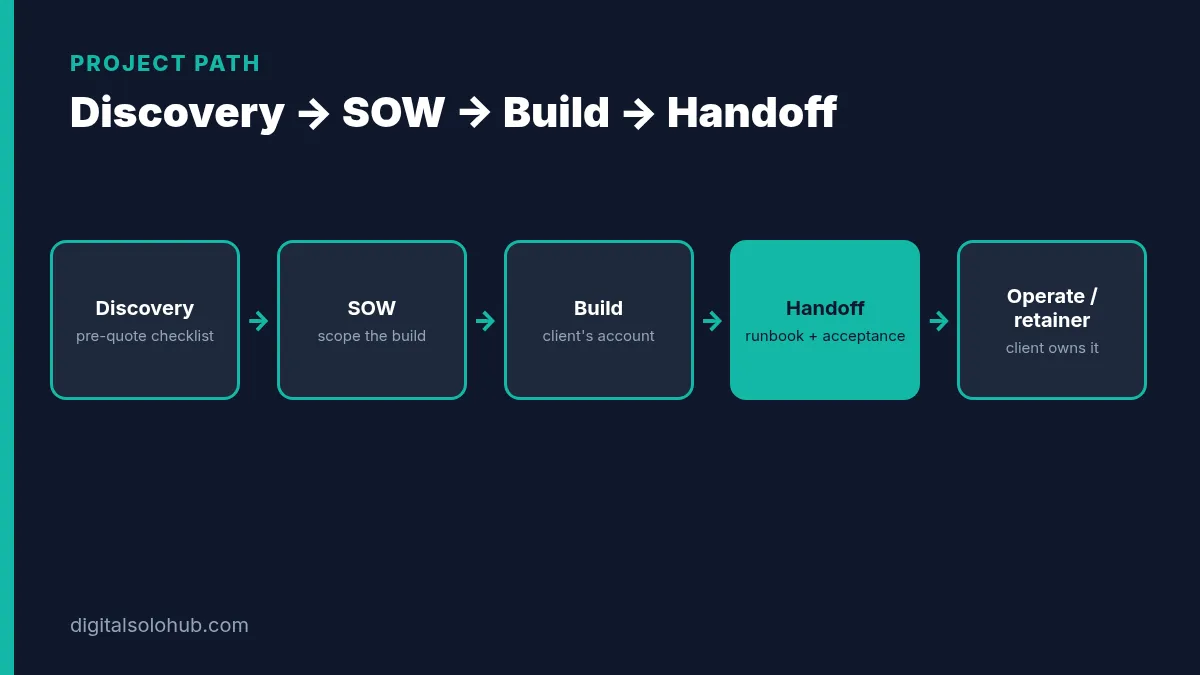
The Free Automation Runbook (Copy-Paste Template)
Copy this into Notion, Google Docs or a Markdown file in the client’s Drive. One runbook per workflow. Fill every bracket. Leave no “TBD” on launch day.
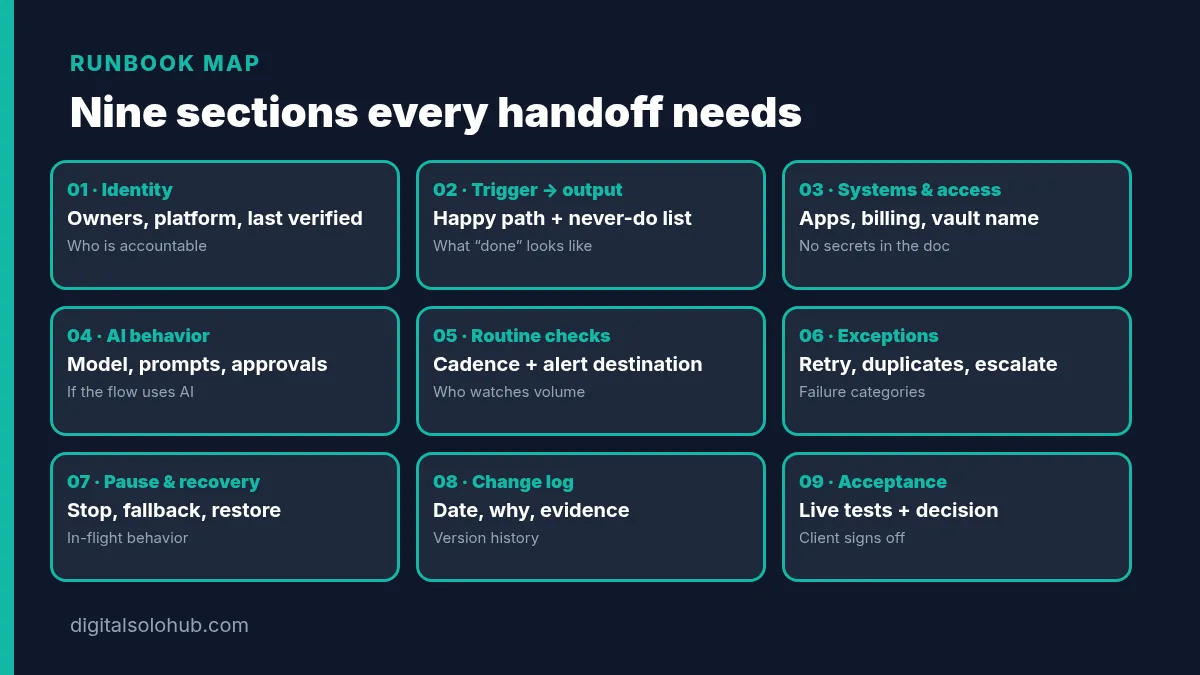
# Automation Runbook · [Workflow name]

## 1. Workflow identity
- Purpose (one sentence the client would say to their boss): […]
- Business owner: [name] · Backup: [name]
- Technical operator: [name] · Backup: [name]
- Platform: [Zapier / Make / n8n] in **[client's]** account
- Last verified: [YYYY-MM-DD] by [name]

## 2. Trigger → output
- Trigger (one sentence): […]
- Approved inputs: […]
- Steps in plain English: 1. … 2. … 3. …
- Expected output / system of record: […]
- Completion check (how you know it worked): […]
- Actions this workflow must NEVER take: […]

## 3. Systems & access
- Connected apps: […]
- Account / org names (no passwords): […]
- Required permission level for operator: […]
- Credential store location (password manager vault name / folder): […]
- Billing owner for platform plan: […]
- Where to view usage (tasks / operations / executions): […]

## 4. AI behavior (if any)
- Model / deployment identifier: […]
- Prompt / agent version: […]
- Retrieval / knowledge sources: […]
- Allowed tools / actions: […]
- Human approval points: […]
- Quality check: […]

## 5. Routine checks
- Daily / weekly checks (exact clicks): […]
- Expected volume (rough runs per day/week): […]
- Alert destination (Slack channel / email): […]
- Who acknowledges alerts within [X hours]: […]

## 6. Exceptions
- Failure categories: connection expired / empty run / partial write / timeout / bad input
- Where failed items land: […]
- Retry rules + duplicate-prevention note: […]
- Escalation route after [N] failed attempts: […]
- Reconciliation before replay (check destination system first): […]

## 7. Pause & recovery
- How to pause safely (control location + expected result): […]
- What happens to in-flight items: […]
- Manual fallback (step-by-step): […]
- How to restore last known-good version / export: […]
- Who may authorize resume: […]

## 8. Change log
| Date | Change | Why | Test evidence | Approver |
|---|---|---|---|---|
| … | … | … | … | … |

## 9. Acceptance record
- Demonstrations completed: [list]
- Remaining gaps / accepted limitations: […]
- Receiving owner's decision: Accept / Accept with restrictions / Return for correction
- Signed off by: [name] on [YYYY-MM-DD]
Pro tip: write every action as location + permission + expected result. “Check monitoring” is useless at 8 a.m. “Open Zap History → filter Errors → compare unmatched CRM IDs in the ops sheet → assign each to #ops-queue” is a runbook line.
Cite platform facts without inventing numbers:
- Zapier measures tasks as successful action steps; triggers don’t use tasks.
- Make counts operations per module run; bundles multiply downstream ops.
- Make error handlers and n8n error workflows exist so failures don’t stay silent. Name who receives them in section 5.
The Credential Ownership Matrix
Secrets never go in the runbook, Slack or a PDF. This matrix names who owns what and where the secret lives.
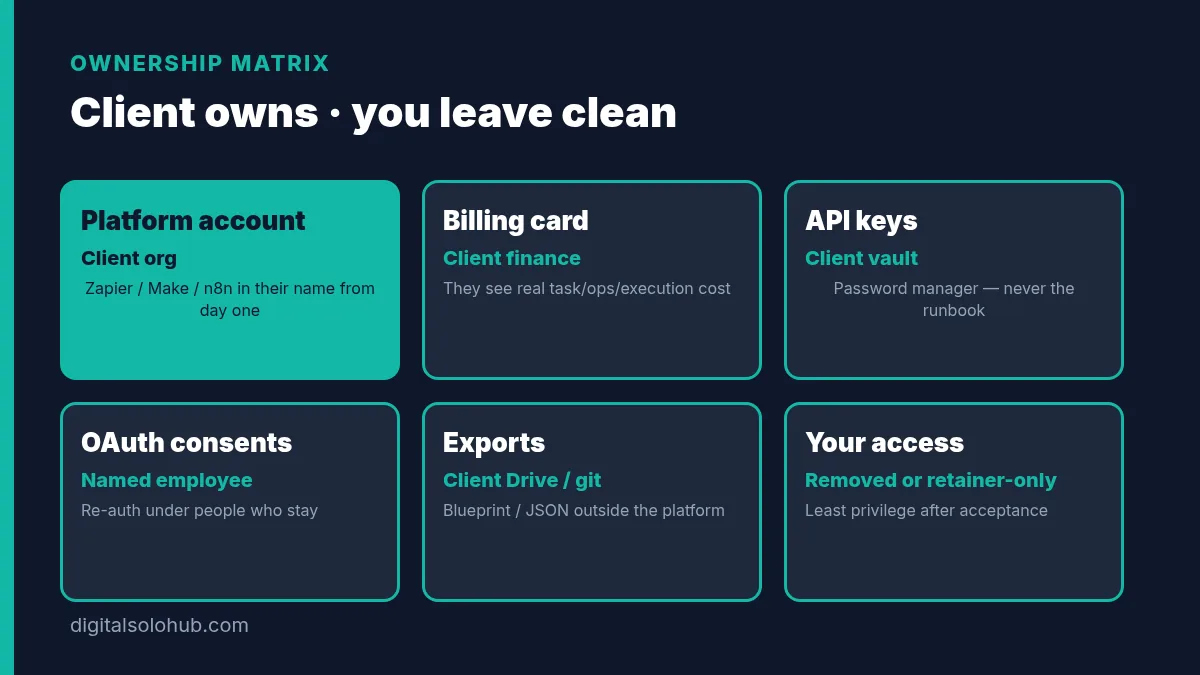
| Asset | Who should own it | Where it lives | Freelancer access after handoff | Notes |
|---|---|---|---|---|
| Zapier / Make / n8n account or org | Client (company email) | Client org | Removed or least-privilege collaborator only if on retainer | Prefer client-owned from day one |
| Billing card for platform plan | Client finance / founder | Client billing portal | None | Client sees real usage cost |
| Connected app OAuth (Gmail, Sheets, CRM…) | Named employee who stays | Their login + platform connection | Re-auth under client user before you leave | OAuth dies when that person leaves IT |
| API keys (OpenAI, Twilio, Stripe test…) | Client | Client password manager vault | Temporary; rotate after handoff | Never email keys in plain text |
| Password manager vault for this project | Client admin | 1Password / Bitwarden / etc. | Share revoked on acceptance | Runbook stores vault name, not secrets |
| Workflow exports (blueprint / JSON) | Client | Client Drive / git repo | Copy only if needed for retainer | Strip sensitive credential names before external share (n8n export note) |
| Error alert channel | Client ops | Slack / email they control | Optional invite if on retainer | Archived channels = silent failures |
My strategy: build in the client’s account from the first connection. Transferring later is slower and often incomplete. Put the ownership row in your discovery recap and your SOW so handoff is confirmation, not a surprise fight.
Illustrative example (hypothetical, not a client story): a freelancer builds lead routing in their own Zapier under a personal card, then “hands off” a Loom. Six months later the card declines, Zaps pause, and the client has no org to recover into. The fix would have been client-owned Zapier from week one, not a nicer PDF.
The Live Acceptance Test Script
Do not accept “looks good” as acceptance. Book 30–45 minutes. The client operator drives. You coach. Record it if they agree.
Agree expected results before each exercise. Use approved test records. Avoid production actions that send real customer messages or move money unless scoped with the business owner.
| # | Exercise | Pass looks like |
|---|---|---|
| 1 | Trace one routine item from trigger → final record | Operator names the completion check without asking you |
| 2 | Submit incomplete / ambiguous input | Item lands in the documented reviewer queue with enough context |
| 3 | Simulate a failed dependency (disconnect a test connection or force an error path) | Alert reaches the named channel/person |
| 4 | Replay an already-completed test item | No duplicate consequential action (second email, second invoice, second CRM create) |
| 5 | Pause while items are queued | Operator states what stops vs what can finish; pause control found without your help |
| 6 | Run one item through manual fallback, then reconcile | Destination system matches runbook; resume only after reconcile |
| 7 | Point to last export / known-good version and say how they’d restore | Operator finds the file in their Drive/repo |
Mark the runbook acceptance record: Accept / Accept with restrictions / Return for correction. If an exercise only passes because you quietly fixed a permission, update the handoff and repeat that exercise.
Quick-Win Method: if time is short, never skip 1, 3, 4 and 5. Happy-path demo + silent failure + duplicate risk + pause are where freelancers get pulled back unpaid.
Delivering a text-back build? The eight-path test list in the missed call text back guide works as a ready-made acceptance script.
Handoff vs SOW vs Paid Retainer
| Item | Belongs in SOW (start) | Belongs in handoff (end) | Belongs in paid retainer |
|---|---|---|---|
| Workflow outcome, inclusions, exclusions | Yes | Confirm delivered | — |
| Acceptance criteria (definition of done) | Yes | Executed live + signed | — |
| Change-control / change-request rules | Yes | Restated in support-window email | Used for out-of-window changes |
| Runbook + ownership matrix + exports | Promised as deliverable | Delivered + verified | Kept updated monthly |
| Live acceptance rehearsal | Named as exit gate | Performed | Optional quarterly drill |
| Bug fixes inside support window | Scoped hours/days | Tracked against window | — |
| Monitoring, alert response, small edits | Optional line item | Handed to client or retained by you | Yes, if they want you on the hook |
| New workflows / phase two | Out of scope / phase two | Listed as next proposal | Or separate SOW |
| Platform fees, AI usage fees | Client-paid (stated) | Confirmed on client billing | Client still pays platforms |
If you’re packaging retainers, the packaging guide covers tiers. Handoff is what makes the retainer optional instead of mandatory captivity.
Support Window and Change-Request Bridge
Write this into the handoff email and the SOW exit section using the same words.
Support window: [N] calendar days after acceptance sign-off (target end date: [YYYY-MM-DD]).
Included: defects against the accepted SOW (workflow does not meet a written acceptance criterion).
Not included: new triggers, new apps, copy changes, historical imports, training for extra teammates, platform plan upgrades, AI model swaps, or anything listed as excluded in the SOW.
After the window: submit a change request. Pricing follows the SOW change-control clause or a separate retainer agreement. Silence is not a blank cheque for free edits.
Hard rule: “It broke” is only a defect if the acceptance record said it should behave otherwise. “We also want Slack alerts for VIP deals” is a change request. Say that out loud on the handoff call.
Point clients who want ongoing coverage at a small retainer (monitoring + fix window + monthly change budget) rather than an endless free Slack channel. Price that using your rates guide, not invented promises. The free rate calculator helps you check that a monthly fix window actually covers the hours you’re committing to.
Sample Handoff Email and Loom Outline
Handoff email (send the same day as acceptance)
Subject: Handoff package + support window: [Workflow name]
Hi [Name],
Thanks for running acceptance today. Here’s everything that transfers ownership to your team.
Runbook: [link, client Drive]
Ownership matrix: [link or embedded table]
Exports: [Make blueprint / n8n JSON / Zap description] in [folder]
Walkthrough recording: [Loom link]
Platform: [Zapier/Make/n8n] in your account · Billing owner: [name]
Alert destination: […]
Business owner / technical operator / backups: […]Acceptance decision: [Accept / Accept with restrictions: …]
Support window ends: [YYYY-MM-DD]
Included in window: defects against accepted SOW criteria only
After window: change requests per SOW §[change control] or retainerPlease confirm:
1. You can open the runbook and the export folder
2. My collaborator access should be [removed / reduced to …] by [date]
3. Reply “ownership confirmed” so we can close the project file[Your name]
Loom / live walkthrough outline (8–12 minutes)
- Identity (60 sec): workflow name, outcome, owners.
- Happy path (2 min): trigger one test item; show completion check.
- Where it lives (90 sec): platform login path, folder for exports, password-manager vault name (no secrets on camera).
- Failure path (2 min): show error alert destination; open one failed/test error; first three checks from the runbook.
- Pause (60 sec): click pause/off; say what happens to in-flight items.
- Support window (60 sec): end date, defect vs change request, how to reach you inside the window.
- Stop: remind them the live acceptance (not this video) is the real sign-off.
Keep the video. It is training. It is not the handover.
Common Handoff Mistakes (and the Fix for Each)
1. Demo instead of acceptance.
You drive; they watch.
Fix: they drive the seven-row script. You coach.
2. Secrets in the runbook.
API keys in a Google Doc that gets copied forever.
Fix: matrix + password manager. Rotate keys you touched.
3. Building in your account.
Faster today. Hostage tomorrow.
Fix: client account from day one; confirm in discovery and SOW.
4. No error owner.
Silent failures become your reputation problem weeks later.
Fix: name the alert destination; wire Make / n8n error paths before acceptance.
5. Vague support window.
“Ping me anytime” becomes unpaid ops.
Fix: dated window + defect vs change-request language tied to the SOW.
6. Exports only inside the platform.
If the account is the backup, the account is also the single point of failure.
Fix: Make blueprint / n8n JSON in client-controlled storage.
7. Skipping duplicate / pause drills.
Happy path passes; replay creates a second invoice.
Fix: exercises 4 and 5 are mandatory.
The 7-Day Handoff Sprint
If you don’t have a handoff system yet, build one in a week.
- Day 1: Copy the runbook template into your notes. Add your business name and standard support-window paragraph.
- Day 2: Fill the credential matrix for a fictional lead-intake workflow so the rows feel natural.
- Day 3: Write your standard exclusions + defect-vs-change-request blurb (align wording with your SOW template).
- Day 4: Save the handoff email and Loom outline as text snippets.
- Day 5: Practice the acceptance script once out loud. Time it. Cut anything that sounds like a sales pitch.
- Day 6: Create a client Drive folder structure:
/Runbook,/Exports,/Acceptance-record. - Day 7: Use the full checklist on your next real delivery, even a small Zap. Client drives acceptance. Send the email same day.
Keep the fictional filled sample. It becomes a portfolio piece that shows prospects how you leave projects, which often beats another flashy demo. If you still need first clients to practice on, how to get your first AI freelance client covers outreach.
Frequently Asked Questions
What should be in an automation handoff checklist?
A runbook (identity, trigger→output, systems, routine checks, exceptions, pause/recovery, change log), a credential ownership matrix without secrets, workflow exports in client-controlled storage, a live acceptance test the client operator runs, a dated support window, and a bridge to SOW change-request language for anything after that window.
Should passwords and API keys go in the runbook?
No. Record the password-manager vault name, account owners, billing owners and the procedure to request or rotate access. Keep secret values out of shared docs, screenshots, exports and support tickets. Rotate keys you touched after acceptance.
Whose Zapier, Make or n8n account should the automation run in?
Default to the client’s account. It keeps billing, plan limits and data ownership with them and makes handover simple. Write that choice into discovery, the SOW and the handoff email. Building in your account often turns you into unpaid hosting.
What is the difference between a SOW and a handoff?
The scope of work defines the build at the start: inclusions, exclusions, acceptance criteria and change control. The handoff is the end-of-project package that proves those criteria were met live and transfers ownership so the client can operate without you.
How long should the post-handoff support window be?
Pick a dated window you can actually staff (often a small number of calendar days after acceptance) and write it into the SOW and handoff email. Inside the window: defects against accepted criteria. Outside: change requests or retainer work. Do not invent a universal industry number.
Is a Loom walkthrough enough documentation?
No. A walkthrough is useful training. It does not replace account ownership, a credential matrix, exports the client controls, failure/pause procedures or a live acceptance the operator passes themselves.
When should I sell a retainer instead of ending after handoff?
When the client wants you on the hook for monitoring, alert response or a monthly change budget. A clean handoff makes that optional. Price retainers from your rates and packaging guides — not because leaving you would break their accounts.
Final Thoughts
Automation projects rarely fail because the freelancer couldn’t connect the apps.
They fail months later because nobody transferred ownership.
An automation handoff checklist fixes that before you send the final invoice. You deliver a runbook, a credential matrix without secrets, exports the client controls, a live acceptance they pass themselves, and a dated support window that bridges back to your SOW. Clients feel safer. You stop being the unpaid on-call pager for every Zap you ever touched.
Your next action:
- Copy the runbook and ownership matrix into a doc today.
- Save the handoff email + support-window paragraph as snippets next to your SOW.
- On your next delivery, make the client drive acceptance before you call it done.
When the project is still at “should I take this?”, use the automation discovery call checklist. When you’re scoping the build, use the automation scope of work template. When you’re ready to leave clean, use this page.
Build it. Hand it off. Then get paid for support on purpose.
Sources
- Zapier Help Center: How is task usage measured in Zapier?
- Make Help Center: Operations
- Make Help Center: Error handlers
- Make Help Center: Scenario blueprints (export/import)
- n8n Docs: Export and import
- n8n Docs: Handle errors gracefully
- NIST Computer Security Resource Center: Least privilege (glossary)
- Kastling: AI automation handover checklist (further reading, buyer/ops angle)
- Octavius: AI automation handover document (further reading, buyer angle)
- Lurto: Automation handover checklist (further reading, account-ownership emphasis)
Platform rules change. Check the sources above before you send a client handoff. This checklist is a practical starting point, not legal advice.
About the Author
Omar Yousaf
Founder of Digital Solo Hub
I help beginners build practical AI freelancing skills through structured learning, portfolio development, and realistic business strategies. My focus is on helping new freelancers create sustainable income by combining AI tools with professional execution rather than shortcuts or unrealistic promises.