
Most automation projects don’t go wrong in the build.
They go wrong in the first call, when “can you automate our leads?” gets a price before anyone writes down what “automate” means.
Then week two arrives. The client wants Slack alerts too. And a weekly report. And “a quick tweak” to the CRM fields. You said yes to an outcome you never defined, so every new ask feels reasonable to them and unpaid to you.
The fix is boring: an automation scope of work template you fill in before you quote.
This page gives you the exact one I’d use: a free, copy-paste SOW built for Zapier, Make and n8n projects, plus how to fill each section, how to handle change requests, and the mistakes that quietly turn a fixed-price build into a free retainer.
What this guide covers (and what it doesn’t): this page answers one question: how do you write down an automation project so you can build it, get it accepted and get paid? It deliberately does not cover:
- Which platform to build on. That lives in Zapier vs Make vs n8n for freelancers.
- How to pitch the project. Use the AI freelance proposal templates for that.
- What number to put on the quote. Start with the AI freelancing rates guide.
Key Takeaways
- An SOW is not a proposal. The proposal sells the outcome. The SOW defines the workflow, the boundaries and what “done” looks like.
- Scope the workflow, not the tool. Trigger, inputs, steps, outputs, error path and owner. In that order.
- Write the exclusions first. The “not included” list is the section that saves the project.
- Put usage and accounts in writing: whose Zapier, Make or n8n account it runs in, who pays the plan, and what volume you designed for.
- Acceptance criteria must be testable. “Works well” is not a criterion. “A test lead appears in the CRM within 5 minutes” is.
- Every new ask goes through one change-request path. Not a debate. A path.
Table of Contents
- What is an automation scope of work?
- Why automation projects need a different SOW
- The free automation scope of work template
- How to fill in each section
- Proposal vs SOW vs contract
- The change request process
- Common mistakes
- 7-day plan
- FAQ
What Is an Automation Scope of Work?
An automation scope of work (SOW) is a short document that defines exactly which workflow you will automate, which systems and accounts it touches, what is explicitly excluded, how both sides will test that it works, and how changes get approved and priced. It sits between your proposal and your build, and both you and the client sign it before work starts.
That’s the snippet answer. Here’s the practical one.
A proposal says: “I’ll make sure every new lead gets a reply within five minutes.”
An SOW says: “When a Typeform submission arrives, create or update a contact in HubSpot, send the welcome email from the client’s Gmail, and post a summary to #sales in Slack. Failed runs alert the client’s ops email. Not included: lead scoring, SMS, historical data import.”
One is a promise. The other is a build spec the client can say yes to.
Why Automation Projects Need a Different SOW
A generic freelance SOW (deliverables, timeline, revisions) works for a logo or a blog post. Automation has four problems a design SOW never has to deal with.
1. The deliverable keeps running after you leave.
A logo doesn’t break at 2 a.m. A workflow can. So the SOW has to say who gets the alert, who fixes it, and for how long you’re responsible.
2. It lives inside someone else’s accounts.
Your build touches the client’s CRM, inbox, forms and payment tools. The SOW needs an access section: what you need, at what permission level, and when it’s revoked.
3. Usage costs money, and it’s not your money.
Zapier counts tasks. Make counts operations. n8n counts executions. Zapier’s help center explains that successful action steps use tasks while triggers don’t, and Make’s documentation explains that each module run counts as an operation. A workflow that’s cheap at 50 leads a month can look very different at 5,000. If the SOW doesn’t state the volume you designed for, the client’s next invoice from the platform becomes your problem.
4. “Done” is invisible.
A client can look at a logo and approve it. They can’t look at a webhook. Acceptance has to be a list of tests, not a feeling.
Hard Truth: most scope creep in automation work isn’t the client being difficult. It’s the freelancer never writing down where the workflow ends.
The Free Automation Scope of Work Template
Copy this into a doc, replace everything in [brackets], and delete any line that doesn’t apply. Keep it to two pages. Longer SOWs don’t get read, and unread SOWs don’t protect anyone.
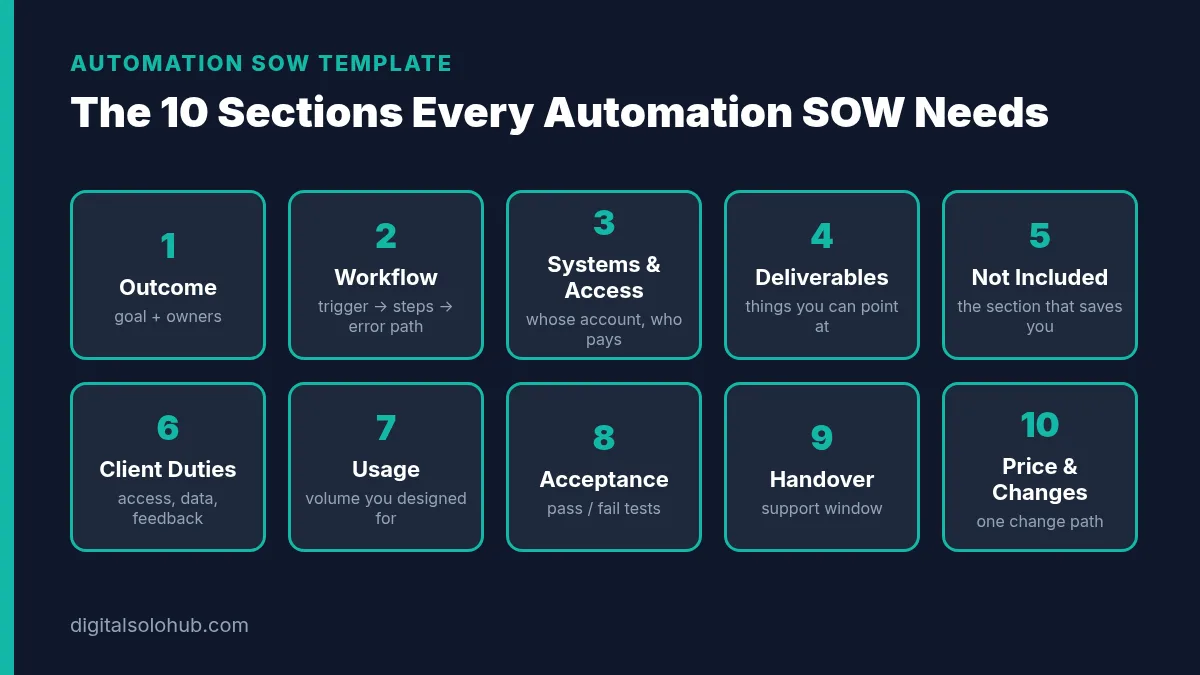
AUTOMATION SCOPE OF WORK
Project: [Workflow name, e.g. “New lead intake automation”]
Client: [Business name] · Provider: [Your name / business]
Version: [1.0] · Date: [YYYY-MM-DD] · Valid until: [date, usually 14 days]1. Outcome
Business goal: [the observable result, e.g. “every new web lead is in the CRM and has received a reply within 5 minutes”].
Workflow owner after handover: [name]. Decision owner who approves scope and changes: [name].2. Workflow in scope
Trigger: [the event that starts it, e.g. “new Typeform submission on the Contact form”].
Steps: [1. … 2. … 3. …, in plain English].
Outputs: [what exists when it finishes: a record, an email, a message, a row].
Error path: [what happens when a step fails, and who is alerted].
Human review: [any step a person approves before it goes out, or “none”].3. Systems, accounts & access
Platform: [Zapier / Make / n8n Cloud / n8n self-hosted], running in the [client’s] account on the [plan name] plan, paid by [client].
Connected apps: [list each app and the account it uses].
Access needed: [specific permission per app]. Access is removed or credentials rotated within [X] days of handover.4. Deliverables
– [Number] live workflow(s) as described in section 2
– Error alert routed to [email / Slack channel]
– Written handover doc: what it does, where it lives, how to pause it, who to call
– [Optional] Short screen-recorded walkthrough5. Not included
– [Additional workflows, triggers or apps not listed above]
– [Historical data import or clean-up]
– [Changes to the client’s forms, website, CRM structure or email copy]
– [Platform subscription and usage fees]
– [Ongoing monitoring after the support window]
Anything not listed in sections 2–4 is out of scope and handled through section 10.6. Client responsibilities
– Provide access listed in section 3 by [date]
– Provide test data that contains no real customer personal data unless agreed
– Review and give consolidated feedback within [X] business days
– Name one decision owner for approvals7. Usage assumptions
Designed for about [X] runs per [month] at about [Y] steps per run. If real volume is materially higher, platform costs will rise and the design may need review (see section 10).8. Acceptance criteria
The project is accepted when these tests pass in the live account:
– [Test 1, e.g. “A test submission creates a HubSpot contact with name, email and source filled within 5 minutes”]
– [Test 2, e.g. “A duplicate email updates the existing contact instead of creating a new one”]
– [Test 3, e.g. “A forced failure sends an alert to ops@client.com”]
Acceptance is confirmed in writing, or automatically [X] business days after delivery if no scope-based defect is reported.9. Handover & support
Support window: [X] days after acceptance, covering defects where the workflow doesn’t do what section 2 says. Not covered: changes caused by third-party app updates, new requirements, or edits made by others. Ongoing care is available as a separate [monthly plan].10. Price, payment & change control
Fixed fee: [amount]. Payment: [e.g. 50% to start, 50% on acceptance].
Changes: any request outside this SOW is quoted in writing (time, cost, timeline impact) and starts only after written approval.Approved by: [Client name, date] · [Provider name, date]
Pro tip: send the SOW as a shared doc with comments on, not a PDF. Clients who leave comments are clients who actually read section 5.
How to Fill In Each Section
The template is the easy part. Filling it in well is where the money is. Here’s how I’d approach each block.
Step 1: Write the Outcome in One Sentence the Client Would Say
Not “build a Make scenario.” The client doesn’t care about scenarios. Write it the way they’d describe success to their boss: “no lead waits more than five minutes for a reply.”
Then name two people: the workflow owner (who lives with it after you leave) and the decision owner (who can say yes to changes). If those are different people, you want to know now, not in week three.
Step 2: Map the Workflow as Trigger → Steps → Output → Error Path
This is the core of the whole document. Write it in plain English, numbered, one action per line.
Trigger → Steps → Output → Error path → Owner
If you can’t write the error path, you don’t understand the workflow yet. Go back to discovery.
Quick-Win Method: on the discovery call, share your screen and type the steps live while the client talks. When they say “and then someone usually…”, stop. That “someone” is either a step you’re automating or a human-review line. Write down which.
Step 3: Put Accounts and Access in Writing
Three questions, answered in the SOW:
- Whose account does it run in? My default is always the client’s account. If you build in yours, you own their outage, their plan limits and the awkward migration later.
- Who pays the platform? Write the plan name and who pays. Don’t bundle a platform subscription into your fee unless you mean to manage it forever.
- What access do you need, at what level? Ask for the minimum. The security principle here is least privilege: each user gets only the access needed to do the job. It also makes clients trust you faster.
If you build on n8n, check the license before you write “hosted by me” into a SOW. n8n’s license FAQ separates building workflows for a client (generally fine) from hosting n8n as a service for others (which needs a different license). The platform guide covers this in more detail.
Step 4: List Deliverables You Can Point At
Each deliverable should be something you can link to, show or hand over:
- The live workflow(s)
- The error alert
- The handover doc
- A walkthrough video (optional, but clients love it)
“Automation consulting” is not a deliverable. “A one-page workflow map of the current lead process” is.
Step 5: Write the Exclusions Before You Write the Price
This is the section most freelancers skip, and the one I’d never skip.
Go through every “nearby” request the client might reasonably assume is included and list it:
- Other forms, other pipelines, other teams
- Importing or cleaning old data
- Editing their email copy, CRM fields or website
- Platform fees
- Monitoring after the support window
Contrarian Insight: a long exclusions list doesn’t scare good clients away. It shows you’ve done this before. The clients who push back on exclusions are telling you exactly where the project would have leaked.
Step 6: State the Usage Assumptions
You don’t need exact numbers. You need the assumption written down.
“Designed for about 300 leads a month, about 6 steps per run.”
Now if the client launches a big campaign and volume jumps tenfold, nobody is surprised that the platform bill went up, and redesigning for scale is a change request, not a favour. If you want help estimating how each platform counts usage, the billing-units section of the Zapier vs Make vs n8n comparison walks through the same workflow on all three.
Step 7: Write Acceptance Criteria as Tests
Every criterion should pass or fail. No opinions.
| Weak criterion | Testable criterion |
|---|---|
| “Leads are synced to the CRM” | “A test form submission creates a contact with name, email and source within 5 minutes” |
| “Duplicates are handled” | “Submitting an existing email updates that contact; no second contact is created” |
| “Errors are managed” | “Forcing a failed step sends an alert to the named ops inbox” |
| “The team is notified” | “A summary message appears in #sales with name, company and form answer” |
| “It’s reliable” | “Ten consecutive test submissions complete with no manual intervention” |
Include at least one failure test. Both Make and n8n have built-in error handling, and Zapier lets you get notified of errors, so there’s no excuse for an automation that fails silently. Then add an auto-acceptance line (“accepted after X business days without a scope-based defect”) so projects don’t sit “almost done” for a month.
Step 8: Define Handover and the Support Window
Say how long you’ll fix defects for free, and what counts as a defect: the workflow not doing what section 2 says.
Then say what doesn’t count: a connected app changing its API, someone on their team editing a step, new requirements.
This is also where you offer ongoing care as a separate monthly plan. Not in a salesy way. Just one line. If you want to structure that properly, the packaging guide covers tiers and retainers, and why most AI freelancers never get repeat clients explains why that line matters more than it looks.
Step 9: Price, Payment and the Change Clause
Keep it simple: fixed fee, payment split, and one sentence about changes. I prefer a deposit to start and the balance on acceptance, because it ties your final payment to the tests in section 8 rather than to someone’s mood.
The SOW doesn’t decide your price. It makes your price defensible, because the client can see exactly what it buys. For the numbers themselves, use the rates guide and the pricing section of the AI automation agency guide.
A Note on Client Data
Many automations move personal data: names, emails, phone numbers. If your client or their customers are in the EU or UK, look at what Article 28 of the GDPR says about processors working on behalf of a business. It expects a written contract covering things like the subject matter, duration, purpose and types of personal data. Your SOW isn’t that contract, and this isn’t legal advice, but the SOW should at least say what data the workflow touches and that test data shouldn’t be real customer data unless agreed.
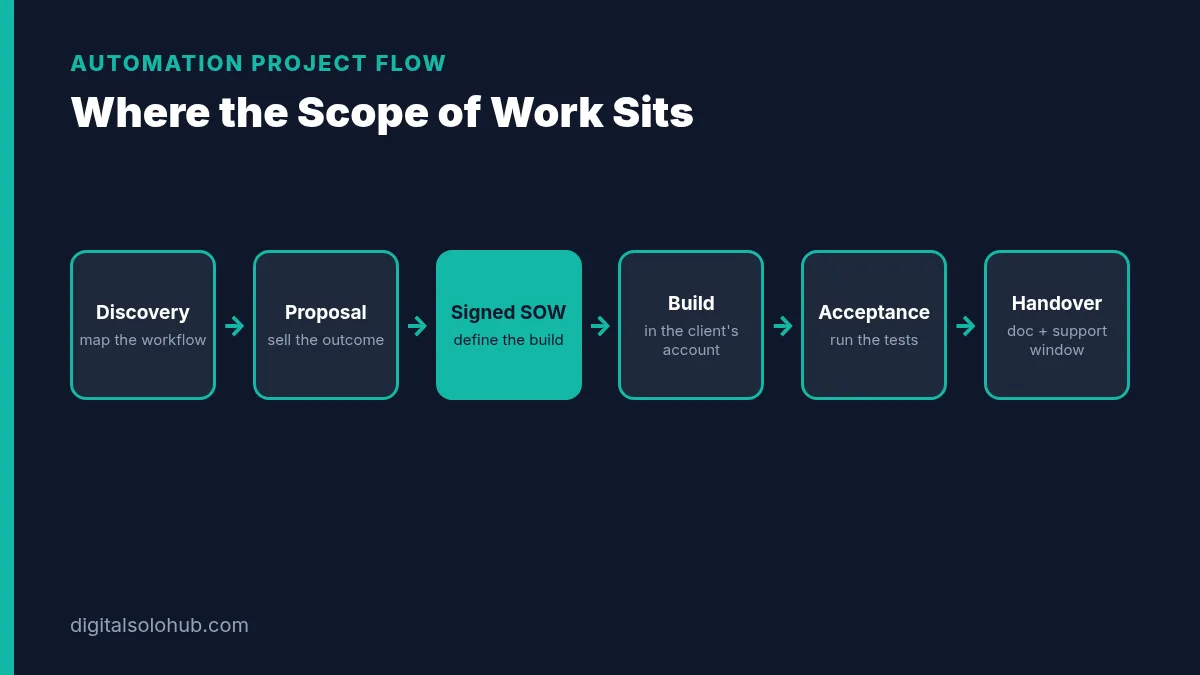
Proposal vs SOW vs Contract: Which Document Does What?
Beginners often blur these three. Each one has its own job.
| Document | Its job | When you send it | Key question it answers |
|---|---|---|---|
| Proposal | Sell the outcome | After discovery | “Why should we hire you for this?” |
| Scope of work | Define the build | Once they say yes in principle | “What exactly are we getting, and what aren’t we?” |
| Contract / terms | Set the legal relationship | With or before the SOW | “What happens with payment, liability, IP, cancellation?” |
On small projects the SOW often sits inside the proposal as a “Scope” section, with your standard terms attached. That’s fine. What matters is that every section of the template exists somewhere the client signed.
My strategy: proposal first, SOW second, and only after the client has agreed to the outcome. Scoping in detail for someone who hasn’t committed is free consulting. If you’re still getting to that yes, How to Close Your First AI Freelance Client covers the call and follow-up.
The Change Request Process That Stops Scope Creep
You will get new asks. That’s normal. It’s often a sign the client likes the work.
The problem is never the ask. It’s handling every ask differently.
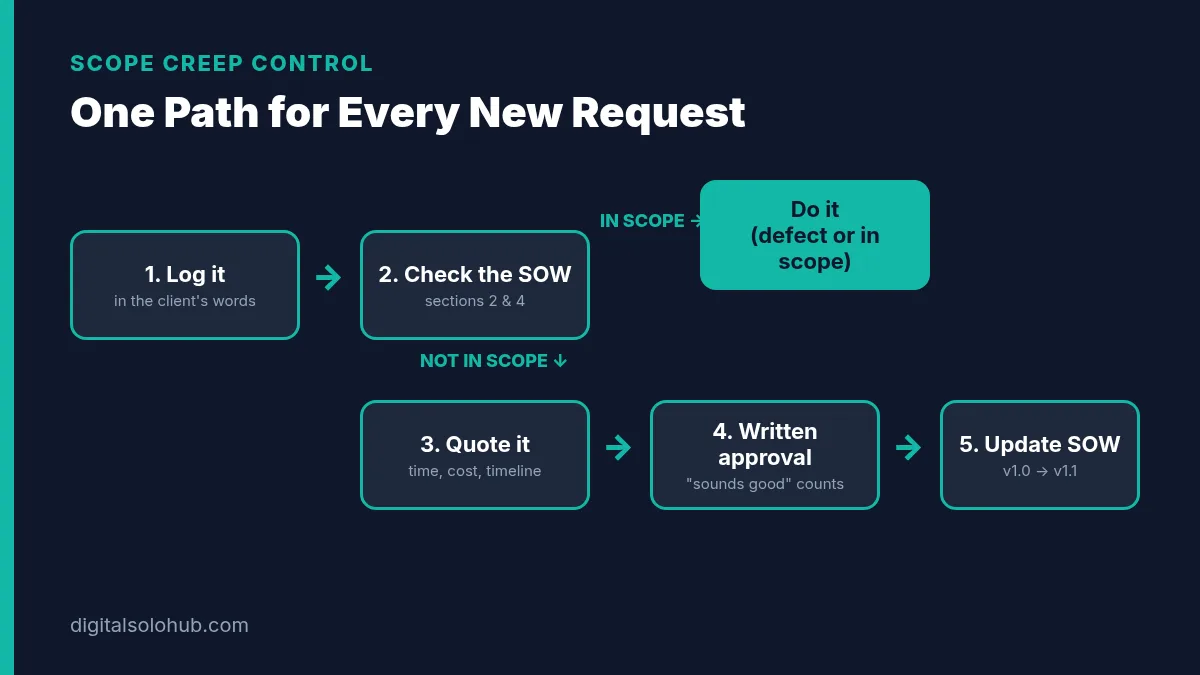
Use one path, every time:
- Log it. Write the request down in the same thread or doc, in the client’s words.
- Check it against the SOW. Is it in section 2 or 4? Then it’s a defect or in scope, so do it.
- If it’s not in scope, quote it. Time, cost and impact on the timeline, in writing.
- Wait for written approval. “Sounds good” in an email counts. A nod on a call doesn’t.
- Update the SOW version. 1.0 becomes 1.1. The change is now part of the record.
Here’s a reply template for step 3:
“Good idea. Adding Slack alerts for lost deals isn’t in the current scope (section 5), so here’s what it would take: [X hours / fixed fee], and it would move handover by [Y days]. Want me to add it as version 1.1, or keep it for phase two?”
Notice what that message doesn’t do. It doesn’t apologise, it doesn’t refuse, and it doesn’t start building. It gives the client a choice.
Pro tip: “phase two” is the most useful phrase in automation freelancing. It turns scope creep into your next project.
Which Scope Format Should You Use?
Not every job needs the full template. Match the format to the risk.
| Your situation | Use this | Why |
|---|---|---|
| One small workflow, client you already know | Short scope section inside the proposal | The template’s sections 2, 5 and 8 cover most of the risk |
| New client, one workflow, fixed price | Full 10-section SOW | You don’t know their habits yet |
| Several workflows or several teams | Full SOW per workflow, plus a one-page master summary | Each workflow gets its own acceptance tests |
| Unclear requirements | Paid discovery first, SOW after | You can’t scope what nobody can describe yet |
| Ongoing monthly work | Retainer terms with a monthly scope list | Scope resets each month instead of growing forever |
Common Automation SOW Mistakes (and the Fix for Each)
1. Scoping the tool instead of the workflow.
“Set up Make for the client” has no edges.
Fix: write trigger → steps → output → error path, then pick the tool.
2. No exclusions list.
Whatever isn’t excluded will be assumed.
Fix: list every nearby request in section 5, even the obvious ones.
3. Building in your own account.
It’s faster, and it’s a trap. You end up hosting their business.
Fix: default to the client’s account and write that in section 3.
4. Silent usage assumptions.
The platform bill jumps, and you get blamed.
Fix: one line in section 7 with the volume you designed for.
5. Acceptance criteria nobody can test.
“Works properly” turns into endless polishing.
Fix: pass/fail tests, including one failure test, plus auto-acceptance.
6. An open-ended support promise.
“I’ll keep an eye on it” quietly becomes unpaid maintenance.
Fix: a fixed support window with a clear defect definition, and a separate paid care plan.
7. Saying yes on calls.
Verbal yeses are where scope leaks.
Fix: “Great, I’ll send that over as a change request.” Every time.
The 7-Day SOW Build Sprint
If you don’t have a scope template yet, here’s how I’d build yours in a week.
- Day 1: Copy the template above into your own doc. Add your business details and payment terms.
- Day 2: Pick one workflow you can already build (lead intake is a good one) and fill in a sample SOW for a fictional client.
- Day 3: Write your standard exclusions list. Aim for at least six lines.
- Day 4: Write five acceptance tests for your sample workflow, including one failure test. Run them on your own test build.
- Day 5: Write your handover doc template: what it does, where it lives, how to pause it, who to call.
- Day 6: Write your change-request reply template and save it as a text snippet.
- Day 7: Read the whole SOW as if you were the client. Delete anything you wouldn’t read. Then use it on your next real discovery call.
Keep the sample SOW. It becomes a portfolio piece that shows prospects how you work, which is often more convincing than a demo video.
Frequently Asked Questions
What should an automation scope of work include?
At minimum: the business outcome, the workflow written as trigger, steps, output and error path, the accounts and access involved, deliverables, an explicit not-included list, client responsibilities, usage assumptions, testable acceptance criteria, the support window, and the price with a change-request clause.
Is a scope of work the same as a proposal?
No. A proposal sells the outcome and explains why you’re the right person. A scope of work defines the build: what’s included, what isn’t, and how both sides know it’s done. On small projects the scope can sit inside the proposal as its own section.
How do I handle scope creep on a fixed-price automation project?
Use one change-request path for every new ask: log it, check it against the SOW, and if it’s out of scope, quote the time, cost and timeline impact in writing. Start only after written approval, then update the SOW version.
Should I build client automations in my account or the client’s?
In most cases, the client’s. It keeps billing, plan limits and data ownership with them, makes handover simple, and avoids you quietly becoming their hosting provider. Write the account and who pays for the plan into the SOW.
Do I need a lawyer to write an automation SOW?
For most small projects, a clear SOW plus your standard terms is a practical starting point. If the workflow handles sensitive personal data, regulated information or large contract values, it’s worth having a lawyer review your terms. This guide isn’t legal advice.
Should I charge for discovery before writing the SOW?
If the client can’t clearly describe the workflow yet, yes. A short paid discovery produces the workflow map you need to scope it. Scoping a complex workflow in detail for free is consulting you’re giving away.
Final Thoughts
Automation work rarely fails because the freelancer couldn’t build it.
It fails because nobody wrote down where it ends.
An automation scope of work template fixes that before the build starts. It turns “automate our leads” into a workflow, a list of exclusions, a set of tests and one clear path for changes. Clients feel safer. You get paid on acceptance instead of on patience.
Your next action:
- Copy the template into a doc today and fill in sections 2, 5 and 8 for one workflow you already know.
- Save the change-request reply as a snippet.
- Use the SOW on your next discovery call, before you quote.
If you haven’t picked a platform yet, start with Zapier vs Make vs n8n for freelancers. If the scope is ready and you need to win the project, the AI freelance proposal templates will help you pitch it.
Scope first. Then build.
Sources
- Zapier Help Center: How is task usage measured in Zapier?
- Make Help Center: Operations
- Make Help Center: Error handlers
- n8n Help Center: Which license do I need for my use case?
- NIST Computer Security Resource Center: Least privilege (glossary)
- GDPR Article 28: Processor
Platform rules change. Check the sources above for the latest rules before you send a client SOW. This template is a practical starting point, not legal advice.
About the Author
Omar Yousaf
Founder of Digital Solo Hub
I help beginners build practical AI freelancing skills through structured learning, portfolio development, and realistic business strategies. My focus is on helping new freelancers create sustainable income by combining AI tools with professional execution rather than shortcuts or unrealistic promises.