
You make money with OpenClaw by selling a small business a finished, locked-down assistant: you install it on the client’s own hardware and accounts, connect one chat channel and one or two scheduled jobs, harden it, then charge a fixed setup fee plus a small monthly care plan. The software is free and open source. What clients pay for is the setup, the safety and someone to keep it running.
That’s the whole model. Everything below is how to do it without hurting a client.
Most guides on how to make money with OpenClaw open with income screenshots and a list of twelve side hustles.
That’s backwards.
An always-on agent that reads a business owner’s messages and inbox is not a toy. The real product is trust.
Quick answer: Pick one owner-facing job (a morning briefing, inbox triage, a team helper). Run one gateway per client on hardware and model accounts the client owns. Keep pairing on, vet every skill, run the security audit, hand over a runbook. Price setup and care from your hours, not from income screenshots.
Where this guide fits: one tool, one question: what can you sell with OpenClaw and how do you deliver it safely? If you build with a coding agent instead, read how to make money with Claude Code. For AI agent services in general, start with AI agents for freelancers.
Every dollar figure below is an example built from a formula at an illustrative $25 an hour floor. None is a market rate, an earnings claim or a promise.
Table of Contents
- What OpenClaw Is (and What Clients Pay For)
- Can You Really Make Money with OpenClaw?
- 5 OpenClaw Offers Small Businesses Pay For
- Which Offer Fits You
- The One-Gateway-Per-Client Rule (and 5 More)
- How to Build a Client-Ready Setup in 6 Steps
- How to Price an OpenClaw Setup
- How to Find Your First OpenClaw Client
- Mistakes (and the Fix for Each)
- Frequently Asked Questions
- Final Thoughts
What Is OpenClaw (and What Do Clients Actually Pay For)?
OpenClaw is an open-source AI assistant that runs on your own computer and answers you inside the chat apps you already use. Its GitHub page lists Discord, iMessage, Slack, Teams, Telegram, WhatsApp and 20+ more. It’s MIT-licensed, stewarded by the OpenClaw Foundation, and says it has no paid tier, hosted service or token.
Three pieces matter for client work:
- The Gateway: one process on one machine that connects the channels to the AI model.
- The model: the getting started guide asks for an existing Claude Code or Codex CLI login, or a provider API key. Someone pays for that.
- Automations: a built-in scheduler for scheduled jobs, webhooks and Gmail triggers, delivered to a chat channel.
The docs say the install takes about five minutes.
The safe version doesn’t. Picking the right job, keeping strangers out, vetting add-ons and leaving the owner in control is real work. That’s the part a busy owner will pay for.
So is there genuinely money in it, or just hype?
Can You Really Make Money with OpenClaw?
Yes, as a service. Not as a magic income stream.
Search suggestions show both sides of the market: people asking how to make money with OpenClaw, and business owners searching for an OpenClaw setup service, installation help, managed hosting and security hardening. Small independent sellers already advertise fixed-price setups.
Hard truth: the tool is free, so “I install OpenClaw” is not a moat. Anyone can run the installer. Your edge is a narrow job, a safe setup and a care plan the owner can rely on.
Contrarian insight: skip the “24/7 AI employee” pitch. Sell one boring job that saves the owner time every single day.
How to Make Money with OpenClaw: 5 Offers Small Businesses Pay For
Each offer below is owner-facing or team-facing. That’s on purpose: the people messaging the agent are people the owner already trusts. Each one also has a check you can show the client.
| Offer | What it does | Best first buyer | How you prove it works |
|---|---|---|---|
| 1. Owner morning briefing | A scheduled job sends today’s calendar, overdue tasks and flagged emails to the owner’s chat | Busy solo owners, consultants | Seven mornings of briefings that match the real calendar |
| 2. Inbox triage assistant | A Gmail trigger labels new mail and drafts replies; the owner approves before anything sends | Owners drowning in email | A week of labels checked against what the owner would have done |
| 3. Team helper in Slack or Teams | Answers staff questions from the business’s own SOP documents, only when mentioned | Small teams with written processes | Ten real staff questions answered with the right SOP section |
| 4. Weekly research digest | Collects public information on a list of prospects or competitors into a short summary | Agencies, B2B services | Every claim in the digest links to its source |
| 5. Hardening and care plan | Reviews a setup someone installed themselves: access, skills, audit, runbook | Owners who already tried OpenClaw | A clean audit report and a written runbook |
Notice what’s missing: a public customer-service bot on WhatsApp. More on why in the safety rules.
Five options is still a lot. Here’s how to choose one.
Which OpenClaw Offer Fits You (Coder or Not)?
- No coding background: start with offer 1 or 3. Both are configuration and writing, not code.
- Comfortable with email tools and APIs: offer 2. Gmail wiring takes patience, and approval steps matter.
- Strong researcher: offer 4, if you’ll check sources yourself.
- Security-minded or technical: offer 5. It sells well to people who installed it in a weekend and now feel uneasy.
My strategy: run offer 1 on your own setup for two weeks before you sell it. You’ll learn the failure points on your own time, not a client’s.
Whichever you pick, the next section decides whether it’s safe to sell at all.
The One-Gateway-Per-Client Rule (and 5 More Safety Rules)
OpenClaw’s security guide is unusually direct. It assumes one trust boundary per gateway: one operator, or a team whose members trust each other. It says OpenClaw is not a hostile multi-tenant security boundary, and that mixed-trust setups need a separate gateway and credentials, ideally separate OS users or hosts.
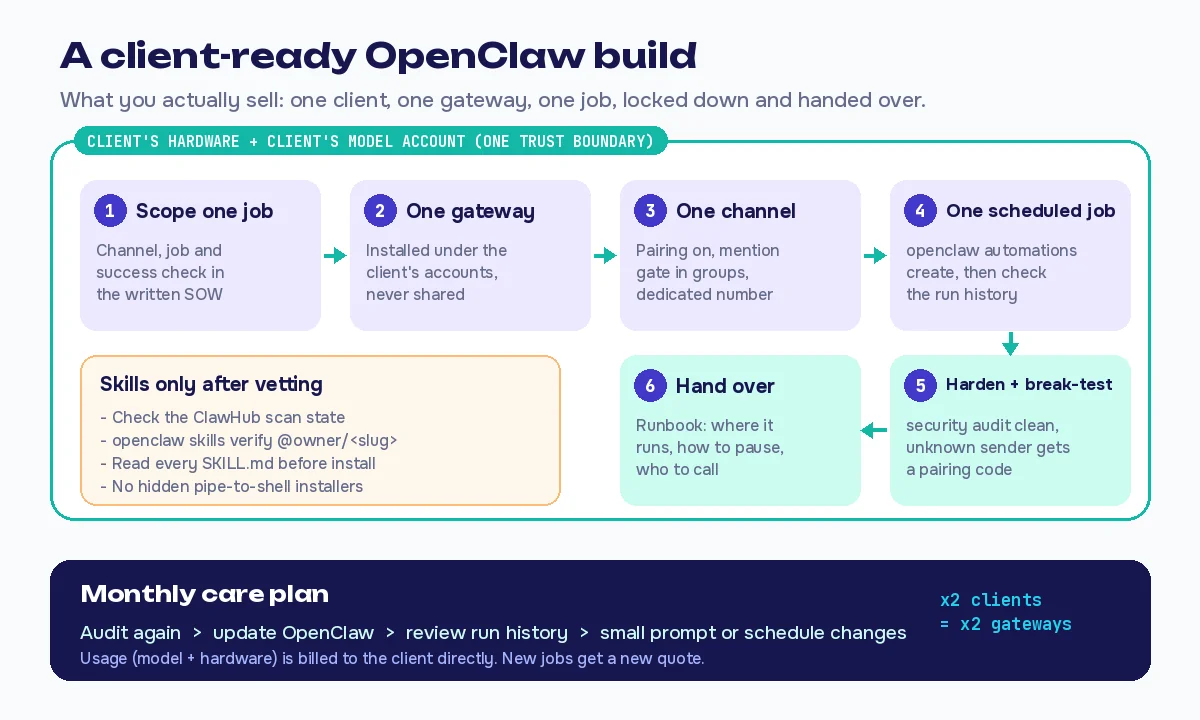
For a freelancer, that turns into six rules:
- One gateway per client. Never put two clients, or a client and yourself, on one gateway.
- Client-owned hardware and accounts. The machine, the model account and the billing belong to the client. You don’t sit in the payment path for their usage.
- Dedicated number for phone channels. The hardened baseline suggests running the assistant on a separate number from a personal one. OpenClaw’s WhatsApp channel links through WhatsApp Web with a QR code; it isn’t Meta’s Business Platform. Keep it owner-facing.
- Keep the safe defaults. Unknown senders get a pairing code, groups need a mention. Add a sandbox and deny dangerous tools for any non-owner agent, as the baseline recommends.
- Vet every skill. ClawHub pages show a security scan state, and the skills docs describe
openclaw skills verify. ClawHub’s acceptable usage policy rejects hidden pipe-to-shell installers; read every SKILL.md anyway. - Tell the client what runs on AI. Put it in the scope, in plain words, before anything goes live.
Inbox jobs need one extra rule. Every incoming email is untrusted text that reaches the model, and the security guide gives prompt injection its own page. That’s why offer 2 drafts and never sends on its own: a stranger’s email should never be able to make the agent act for the owner.
Run openclaw security audit before handover and at every care-plan check. The security guide calls it the one command that tells you if a setup has drifted.
With the rules set, the build itself is short.
How to Build a Client-Ready OpenClaw Setup in 6 Steps
Step 1: Scope one job in writing
One channel, one job, one success check. Run the first call with the automation discovery call checklist and write the scope with the automation scope of work template.
Step 2: Install on the client’s machine, under their accounts
Follow the official getting started steps. Use the client’s model login or API key, then run openclaw gateway install so it keeps running in the background.
Step 3: Connect one channel with pairing on
Telegram or Slack is the calmest first channel. If the client wants WhatsApp, use a dedicated number. Approve only the owner’s pairing request.
Step 4: Add one scheduled job
Create it with openclaw automations create, then check it with openclaw automations runs. Let it run for a few days before you call it done.
Step 5: Harden and break-test
Run the security audit and fix every finding. Then message the bot from an unknown number: it should answer with a pairing code, not a reply.
Step 6: Hand over with a runbook
Write down where it runs, which accounts it uses, how to pause it and who to call. The automation handoff checklist has the full runbook.
Once you know your build hours, pricing is arithmetic.
How to Price an OpenClaw Setup (Formula, Not Copied Rates)
Many guides print price ranges and monthly income figures. You can’t check where those came from, so don’t copy them. Price from your own hours:
- Setup = (scoping + install + hardening + testing + handover hours) × your floor rate × 1.25 for surprises.
- Monthly care = (audit, updates, run-history review and small changes, hours a month) × your floor rate.
- Usage costs (model and hardware) are billed to the client directly, never quietly marked up.
- Example: 12 setup hours × $25 × 1.25 = $375. Care: 2 hours × $25 = $50 a month. Both are examples from the formula, not market rates.
Get your floor from the AI freelance rate calculator. The reasoning behind the 1.25 buffer is in how much to charge for an n8n automation.
What the care plan covers: one audit a month, OpenClaw updates, a look at the run history, and small changes to the prompts or schedule. Anything new is a new quote.
Pro tip: quote the hardening pass (offer 5) as its own fixed fee. It’s the easiest yes for owners who already installed it.
How to Find Your First OpenClaw Client
Pick one type of business you understand. Then show, don’t explain.
- Record a 2-minute demo of your own morning briefing arriving in your chat app.
- Pitch the job, not the tool: “Every morning at 7, your day in one message.”
- Offer a fixed-scope pilot for one job, with the success check from the table.
- Help self-installers: people who post setup problems in OpenClaw communities often need a hardening pass. Answer the question first; offer help only if it’s welcome.
Your next action: pick the offer, then write the one-sentence promise before you build anything.
Mistakes When Making Money with OpenClaw (and the Fix for Each)
- Copying income screenshots into your pitch. Fix: promise the system and its check, not a revenue number.
- Running several clients on one gateway. Fix: one gateway per client, on their hardware.
- Installing popular skills without reading them. Fix: check the scan state, verify, read the SKILL.md.
- Your personal model login doing client work. Fix: the client’s own account and billing.
- A public WhatsApp bot on the owner’s personal number. Fix: owner-facing first, dedicated number.
Frequently Asked Questions
Is OpenClaw free?
Yes. It’s MIT-licensed open source with no paid tier, hosted service or token. You still pay for the AI model you connect and the machine it runs on.
Can you make money with OpenClaw without coding?
Yes. Briefings and team helpers are mostly configuration and writing. You still need to be careful with access settings and skills.
Can I sell OpenClaw skills?
You can publish skills on ClawHub, the public registry. Its docs don’t describe paid listings, so treat skills as part of your service, not a store.
Is OpenClaw safe for business use?
It ships with conservative defaults and a security audit command. Keep one gateway per client, pairing on and skills vetted.
OpenClaw vs n8n: which should I sell?
n8n runs fixed workflow steps; OpenClaw is an assistant you message. Use n8n for repeatable pipelines and OpenClaw for owner-facing help.
How much should I charge for an OpenClaw setup?
Use setup = hours x floor rate x 1.25, plus monthly care = care hours x floor rate. Bill model and hardware costs to the client directly.
Final Thoughts
Learning how to make money with OpenClaw is less about the agent and more about the job around it: scope it, lock it down, prove it works and keep it running.
Sell the setup. Sell the safety. Sell the care.
Your next action:
- Get your floor from the rate calculator.
- Run a morning briefing on your own setup for two weeks.
- Show the demo to five owners you already know.
Still choosing a platform for workflow-style jobs? The Zapier vs Make vs n8n comparison covers those.
About the Author
Omar Yousaf
Founder of Digital Solo Hub
I help beginners build practical AI freelancing skills through structured learning, portfolio development, and realistic business strategies. My focus is on helping new freelancers create sustainable income by combining AI tools with professional execution rather than shortcuts or unrealistic promises.