
Google review automation is a small system that asks every customer for an honest Google review right after a finished job, sends one reminder, alerts the owner to new reviews and drafts replies for a human to approve. You can build it in a day with n8n, Zapier or Make, and sell it to local businesses as a setup plus a monthly care plan.
Most review automations sold to local businesses break Google’s rules on day one.
They ask “How did we do?” first. Happy customers get the Google link. Unhappy ones get a private form.
That’s called review gating. Google bans it.
Ask everyone. Filter nothing. Answer everything.
Quick answer: Trigger on a real “job done” event, skip people only for facts (opted out, no consent, asked recently), send one short request with the direct review link and one reminder, then stop. New reviews get an AI draft the owner approves. Never send the link only to happy customers.
Where this guide fits: one offer, start to finish: build it, keep it within the rules, sell it. For the other beginner-friendly local offer, read how to set up missed call text back. Still choosing what to sell? Start with the AI automation agency guide.
Every dollar figure below is an example built from a formula at an illustrative $25 an hour floor. None is a market rate, an earnings claim or a promise.
Table of Contents
- What Google Review Automation Is
- Is It Allowed? (The Review Gating Rule)
- How to Set Up Google Review Automation in 5 Steps
- 3 Review Request Templates
- Automating Replies (With Human Approval)
- Which Tool to Build It In
- How to Sell It to Local Businesses
- Mistakes (and the Fix for Each)
- Frequently Asked Questions
- Final Thoughts
What Is Google Review Automation?
Google review automation is software that handles the repeat work around reviews: asking each finished customer at the right moment, one reminder, flagging new reviews and drafting replies. It doesn’t write reviews, buy them or decide who deserves to be asked.
A complete system has four parts:
- Ask: a request with the direct review link, sent after the job is done.
- Remind: one follow-up if nothing happened. Then silence.
- Watch: an alert when a new review lands, especially a low one.
- Reply: an AI draft the owner approves before it goes public.
But before you build anything, you need to know the one rule that sinks most DIY versions.
Is Google Review Automation Allowed? (Yes, but Not Review Gating)
Automating the ask is allowed. Google’s tips to get more reviews tell businesses to remind customers with a link or QR code. What’s banned is controlling who gets asked or what they say.
Google’s Maps content policy says merchants may not “discourage or prohibit negative reviews, or selectively solicit positive reviews from customers.” It also bans incentives and asking for specific content, like a staff name.
In the US, the FTC’s Endorsement Guides (16 CFR Part 255, Example 11) describe this exact pattern: inviting only very positive buyers to post reviews may be deceptive; inviting all recent buyers is fine. The FTC’s review rule (16 CFR Part 465) also bans incentives tied to a positive or negative review.
| Allowed | Not allowed |
|---|---|
| Same request and link to every finished customer | Sending the link only to people who rated you 4 or 5 stars |
| “Reply here if anything went wrong” in every message | A 1-to-5 screen that hides the Google link from low scores |
| One reminder, then stop | Discounts, entries or gifts for a review |
| Skipping people for facts: opted out, no consent, asked recently | Asking customers to mention a staff member or a keyword |
| AI drafts replies, a human approves | Staff quotas for a number of reviews |
Hard truth: gating templates are everywhere. Install one for a client and you put their profile at risk. (Not legal advice.)
So what does a clean setup look like in practice?
How to Set Up Google Review Automation in 5 Steps
They work in any tool. Test each on your own phone first.
Step 1: Get the direct review link
In the Business Profile, use the option to ask for reviews and copy the short link or QR code. Test it on a signed-in phone; reviewers need a Google account.
Step 2: Pick a trigger that means “job done”
Job marked complete, invoice paid or appointment attended. Not “booked” or “quote sent”: they haven’t experienced anything yet.
Step 3: Add fact-based checks
- Has an email address or mobile number.
- Agreed to messages on that channel and hasn’t opted out (texts need consent; see the missed call text back guide for US texting registration).
- Hasn’t been asked in the last 90 days.
- The job is really finished (no open rework or refund).
Notice what isn’t on the list: a rating, a mood score or a “how did we do?” answer. The moment the filter depends on predicted sentiment, it’s gating.
Step 4: Send one short request
First name, what you did, one honest ask, one link. Make the delay a setting: a cafe might send within the hour, a remodeler after the final walkthrough.
Step 5: One reminder, then log and stop
Wait a few days, send one reminder, then mark the row “done”. Log every send and opt-out in a sheet the owner can open.
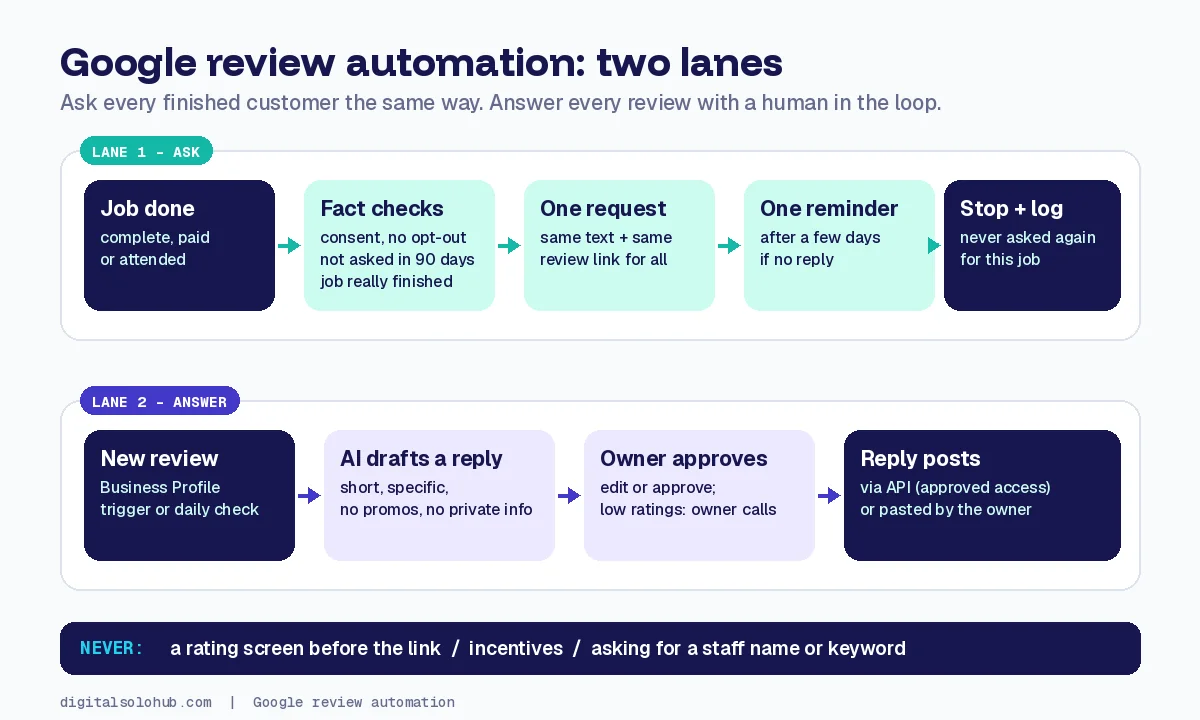
The workflow is the easy half. The words decide whether anyone taps the link.
3 Review Request Templates You Can Copy
Keep each one short. Don’t mention stars. Swap the [brackets].
SMS (with consent): Hi [first name], thanks for choosing [business] for your [service] today. An honest Google review helps others find us: [link]. Anything not right? Just reply here. Reply STOP to opt out.
Email: Subject: How was your [service]? / Hi [first name], thanks for trusting us with [job]. We’d value your honest Google review: [link]. Something not right? Reply and [owner name] will read it.
One reminder: Hi [first name], one last nudge from [business]. If you’d like to share your experience, here’s the link: [link]. No reminders after this one.
Pro tip: the “reply here” line goes to everyone, next to the link. It catches problems early without hiding the review option.
Requests bring reviews in. Replies are what future customers read next.
Automating Replies to Google Reviews (With Human Approval)
The safe pattern: a new review arrives, AI drafts a reply, the owner approves or edits, then it posts. Low ratings go straight to the owner with an alert.
- API access is gated. To read and reply to reviews through the Business Profile API, Google’s prerequisites require a verified profile active for 60+ days, a website on the profile and an approved access application. Plan for the wait.
- n8n has a node for it. The Google Business Profile node can get reviews and post replies once credentials work, and there’s a trigger node for new activity.
No API access yet? Run a manual lane: AI drafts emailed to the owner, who pastes the reply.
Give the AI Google’s reply advice in writing: short, specific, no promotions, no private details.
Which Tool to Build It In
First, check what the client already pays for. Many booking, POS and CRM tools include review requests. If theirs does, switch it on, write the messages and add the reply lane.
| Situation | Build it in | Why |
|---|---|---|
| Client’s booking or CRM tool has review requests | Their tool, plus a reply lane | Nothing new to host or pay for |
| Jobs live in a sheet or simple app | Zapier or Make | Quick to hand over; the client can read it |
| You need dedupe, waits and an approval step | n8n | Branching and logs without per-step fees |
Platform still unclear? See the Zapier vs Make vs n8n comparison.
How to Sell Google Review Automation to Local Businesses
Sell the outcome: “every customer asked, every review answered.”
Who to pitch: businesses with steady finished jobs and few recent reviews: clinics, salons, auto shops, home services.
The pitch that lands: ask how many jobs they finished last month, then count that month’s new reviews together. They’ll see the gap. Run the call with the discovery call checklist.
Scope it in writing: one location, trigger, checks, two channels, templates, reply lane, log, one round of edits. The automation scope of work template has the clauses.
Price it from your hours:
- Setup = build + test + handoff hours × your floor rate × 1.25.
- Monthly care = check-up and reply-lane hours a month × your floor rate.
- Example: 10 setup hours × $25 × 1.25 = $312.50, quoted as $315. Care: 1.5 hours × $25 = $37.50, quoted as $40 a month. Both are examples from the formula, not market rates.
Get your floor from the AI freelance rate calculator; the method is explained in how much to charge for an n8n automation.
Contrarian insight: never price per review gained. You can’t control what customers do, and it quietly pushes everyone toward gating.
Google Review Automation Mistakes (and the Fix for Each)
- Rating screen before the link. Fix: same link for everyone, plus a reply-to-us line.
- Three or four reminders. Fix: one reminder, then stop.
- AI replies posting on their own. Fix: human approval; low ratings go straight to the owner.
- Promising a review count. Fix: promise the system, not the result.
Frequently Asked Questions
Can you automate Google reviews?
You can automate the ask, one reminder, alerts and reply drafts. The reviews themselves must come from real customers.
Is review gating illegal?
Google’s policy bans selectively soliciting positive reviews. In the US, the FTC’s Endorsement Guides say inviting only very positive customers to post may be deceptive. This is not legal advice.
How do I get my Google review link?
In your Business Profile, use the option to ask for reviews and copy the short link or QR code. Test it on a signed-in phone.
Can AI reply to Google reviews automatically?
It can draft replies. Have the owner approve each one before it posts, and send low ratings straight to the owner.
Can I send Google review requests by text message?
Yes, if the customer agreed to texts from the business and every message has an opt-out. Otherwise use email.
How many review reminders should I send?
One. A first request plus one reminder a few days later, then stop.
Final Thoughts
Google review automation isn’t a trick for more stars. It’s a habit busy owners can’t keep, turned into a system that asks fairly and answers every time.
Ask everyone. Filter nothing. Answer everything.
Your next action:
- Get your floor from the rate calculator.
- Build the five steps on a test sheet today.
- Show the demo to five local owners this week.
When a client says yes, hand it over cleanly with the automation handoff checklist.
About the Author
Omar Yousaf
Founder of Digital Solo Hub
I help beginners build practical AI freelancing skills through structured learning, portfolio development, and realistic business strategies. My focus is on helping new freelancers create sustainable income by combining AI tools with professional execution rather than shortcuts or unrealistic promises.