
Most automation freelancers lose money on the discovery call.
Not because they can’t build the workflow. Because they quote before they know what “automate this” actually means.
The client says “we need Zapier for our leads.” You send a number. Week two, they mention the exceptions. Week three, the CRM fields. Week four, “can it also alert Slack when a deal stalls?” You said yes to a sentence. They heard a department.
The fix is an automation discovery call checklist you run before you quote.
This page gives you the exact one I’d use for Zapier, Make and n8n projects: a timed script, the automation-specific questions most freelancers skip, a scored go/no-go rubric, and a same-day recap email that feeds straight into your scope of work.
What this guide covers (and what it doesn’t): this page answers one question: what do you ask on an automation discovery call so you can decide whether to walk away, sell a paid audit, or propose a fixed build? It deliberately does not cover:
- How to write the scope after they say yes. Use the automation scope of work template.
- How to pitch the outcome. Use the AI freelance proposal templates.
- How to run the sales psychology of a close. That’s in How to Close Your First AI Freelance Client.
- Which platform to build on. Start with Zapier vs Make vs n8n for freelancers.
Key Takeaways
- Discovery is diagnosis, not a demo. If you named the tool before you mapped the trigger, you sold too early.
- Ask automation questions, not generic freelance ones. Volume, exceptions, credential ownership, error ownership and platform constraints decide the price.
- Score the call before you quote. A simple 0–15 rubric tells you: walk away, propose a paid audit, or send a fixed SOW.
- Send a same-day recap. The recap is the bridge into your scope of work template.
- Exclusions start on the call. Whatever you don’t write down will be assumed later.
- “Phase two” is a feature, not a dodge. It turns scope creep into your next project.
Table of Contents
- What is an automation discovery call?
- Why automation discovery is different
- Hard Truth
- The free discovery call checklist
- The go/no-go rubric
- Decision table
- Sample recap email
- Common mistakes
- 7-day plan
- FAQ
What Is an Automation Discovery Call?
An automation discovery call is a short, structured conversation where you map one workflow (trigger, steps, exceptions, systems, volume and ownership) so you can decide whether to walk away, sell a paid audit, or propose a fixed-scope build. It happens before you quote. Its job is diagnosis, not a product demo.
That’s the snippet answer. Here’s the practical one.
A bad discovery call sounds like: “Sure, we can do that in Zapier. I’ll send a quote tonight.”
A good one sounds like: “Walk me through what happens when a lead comes in today. Start at the form. Don’t skip the weird cases.” Then you leave with a scored note and a clear next step.
If you’re still finding people to talk to, step back to how to get your first AI freelance client. If you’re brand new to freelancing, start AI freelancing with no experience covers the setup. This page assumes someone is already willing to book time with you.
Why Automation Discovery Is Different
A discovery call for a logo or a landing page can stay high-level. Automation can’t. Four things break generic freelance scripts.
1. The deliverable keeps running after you leave.
A PDF doesn’t fail at 2 a.m. A workflow can. So you need to ask who gets the alert, who fixes it, and for how long you’re responsible on the call, not after the invoice.
2. It lives inside someone else’s accounts.
Your build touches their CRM, inbox, forms and payment tools. Ask whose Zapier, Make or n8n account it will run in, who pays the plan, and what access you’ll need. Default to least privilege: the minimum access required to do the job.
3. Usage costs money, and it’s not your money.
Zapier counts tasks (successful action steps; triggers don’t count). Make counts operations (each module run). n8n counts executions. Volume and steps-per-run change the client’s platform bill and your design. If you never ask “how many per month?”, you’re guessing.
4. Exceptions are where the cost lives.
The happy path is easy. The “always-different client,” the quarter-end report, the record that needs a human judgment. Those are the lines that turn a fixed fee into free consulting. Ask for them early.
Hard Truth: quoting from a sentence is how projects bleed.
Hard Truth: Quoting From a Sentence Is How Projects Bleed
“Can you automate our leads?” is not a brief.
If the lead process needs judgment, like sorting or scoring messages, that is often where an AI step fits. The six builds in AI agents for freelancers show which ones are easiest to scope on a first call.
It’s a wish.
If you price the wish, you own every exception the client forgot to mention. That’s not generosity. That’s unpaid architecture.
Contrarian Insight: the freelancers who look “picky” on discovery calls are the ones clients trust with retainers later. A long question list doesn’t scare good clients. It shows you’ve done this before. The clients who get impatient with questions are telling you where the project would have leaked.
The Free Automation Discovery Call Checklist (Timed Script)
Copy this into a notes doc. Keep the call to 45 minutes. Longer calls feel thorough and usually produce a fuzzy next step.
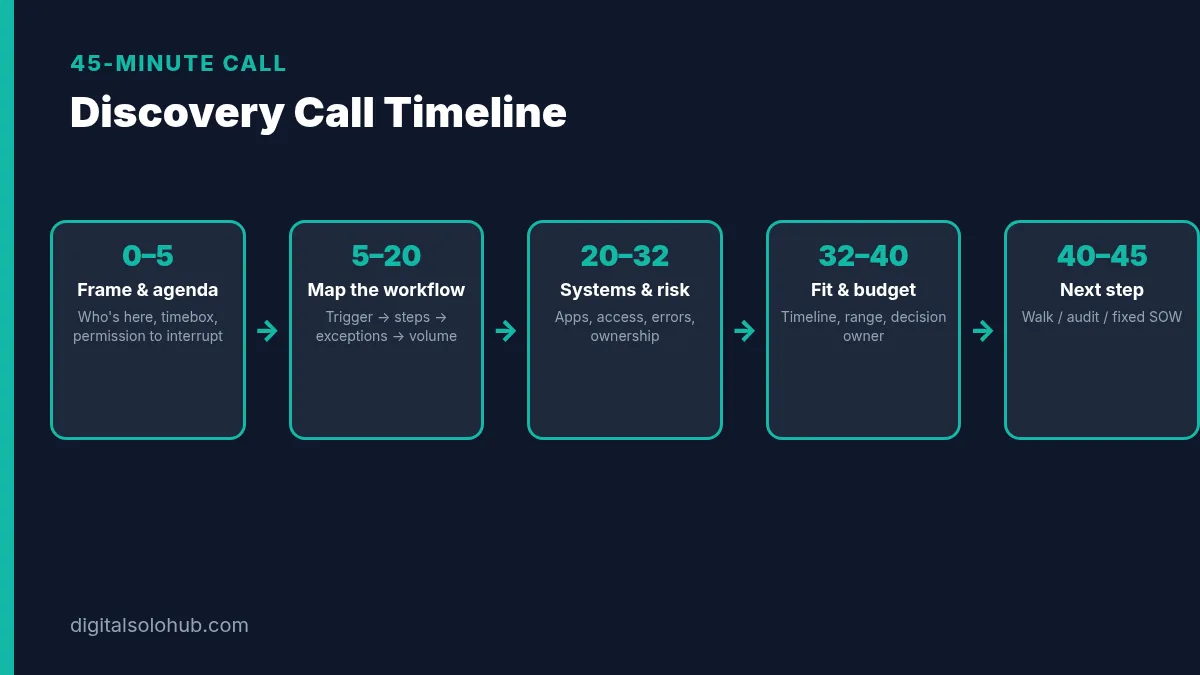
Before the Call (10 minutes of prep)
- [ ] Confirm attendees and who can approve budget
- [ ] Send a one-line agenda: “Map one workflow, decide the sensible next step”
- [ ] Ask them to bring: a plain description of one process, rough monthly volume, tools involved, known exceptions
- [ ] Open your notes doc with the sections below already pasted
- [ ] Decide your boundary: diagnose clearly, don’t design the whole system for free
Pro tip: ask them not to send production passwords, API keys or customer exports before an engagement exists. Describe the data. Don’t transfer it.
Segment 1: Frame (0–5 min)
Say this almost word for word:
“Thanks for the time. Here’s how I’d use 45 minutes: map one workflow end to end, catch the exceptions, check systems and ownership, then decide together whether the next step is a walk-away, a short paid audit, or a fixed-scope proposal. I’ll interrupt if we go deep on design. Discovery decides the shape; it doesn’t build the whole thing. Sound fair?”
Write down:
- Decision owner on the call: [name]
- Anyone missing who must approve: [name / none]
Segment 2: Map the Workflow (5–20 min)
This is the core. Share your screen and type while they talk.
Questions (ask in order):
- What should be different afterwards? Faster replies, fewer errors, less manual work, someone’s evening back. Name the one that matters most.
- Walk me through how it runs today. Start at the trigger. Don’t skip steps. Who touches it? Where does it sit? What takes the longest?
- What’s the trigger in one sentence? Form submit, new row, new email, new Stripe payment, webhook, schedule…
- What are the steps in plain English? Number them live: 1… 2… 3…
- What exists when it finishes? A CRM contact, an email sent, a Slack message, a sheet row…
- Which cases cannot follow the happy path? The always-different client, the incomplete form, the duplicate email, the VIP who needs a human.
- Rough volume and speed. Events per week or month. How fast does each need handling (minutes vs hours vs next day)?
Quick-Win Method: when they say “and then someone usually…”, stop. That “someone” is either a step you’re automating or a human-review line. Write down which.
Fill this block in your notes:
Workflow draft
Outcome: [one sentence the client would say to their boss]
Trigger: […]
Steps: [1. … 2. … 3. …]
Output: […]
Exceptions: […]
Volume assumption: about [X] runs / [month], about [Y] steps per run
Human review: [which step, or none]
Segment 3: Systems, Access & Risk (20–32 min)
Generic freelance checklists stop at “what tools do you use?” Automation needs more.
Questions:
- Which apps are involved, and which account owns each one? CRM, forms, email, Slack, sheets, payment tools…
- Whose automation platform will this run in? Client’s Zapier / Make / n8n (preferred) or yours (usually a trap)?
- Who pays the platform plan? Write the plan name if they know it.
- What access can you get, at what level? Prefer collaborator / least privilege over a master login.
- What could go wrong that matters? Customer emails sent wrongly, payments, deletions, personal data moving to the wrong place.
- Who gets the error alert? Email or Slack channel. If the answer is “nobody yet”, that’s a finding.
- Who owns the workflow after launch? Who approves changes. Who maintains it.
Cite the platform facts without inventing numbers:
- Zapier measures tasks as successful action steps; triggers don’t use tasks.
- Make counts operations per module run; bundles multiply downstream ops.
- Make’s error handlers and n8n error workflows exist so failures don’t stay silent. Ask who receives them.
Fill this block:
Systems draft
Platform: [Zapier / Make / n8n] in [client’s] account, paid by [client]
Connected apps: […]
Access needed: […]
Error owner: […]
Post-launch owner: […]
Risk notes: […]
Segment 4: Fit, Timeline & Budget (32–40 min)
Be direct. Vague answers are data.
Questions:
- What timeline were you thinking? Launch date vs “sometime this quarter.”
- What’s your budget range for phase one? Give bands if they freeze: e.g. under [X], [X–Y], above [Y]. Use ranges from your own rates guide, not invented promises.
- Who else has to say yes? Finance, IT, a co-founder.
- Have you tried automating this before? What broke?
- What would make this a bad idea to automate right now? Dirty data, no owner, process never run manually even once.
My strategy: if they can’t describe the workflow, don’t invent one for free. Sell a short paid discovery / audit that produces the map your SOW needs.
Segment 5: Close the Call (40–45 min)
Mirror what you heard, then pick a lane.
“Here’s what I’m hearing: [outcome], triggered by [trigger], through [2–3 steps], with exceptions around [X]. Volume looks like about [N]/month. Ownership after launch sits with [name]. Based on that, the sensible next step is [walk / paid audit / fixed SOW proposal]. I’ll send a written recap today. Decision date: when can you confirm?”
Write:
- Recommended next step: [walk / paid audit / fixed SOW]
- Decision date: [YYYY-MM-DD]
- Rubric score: [__/15] (see next section)
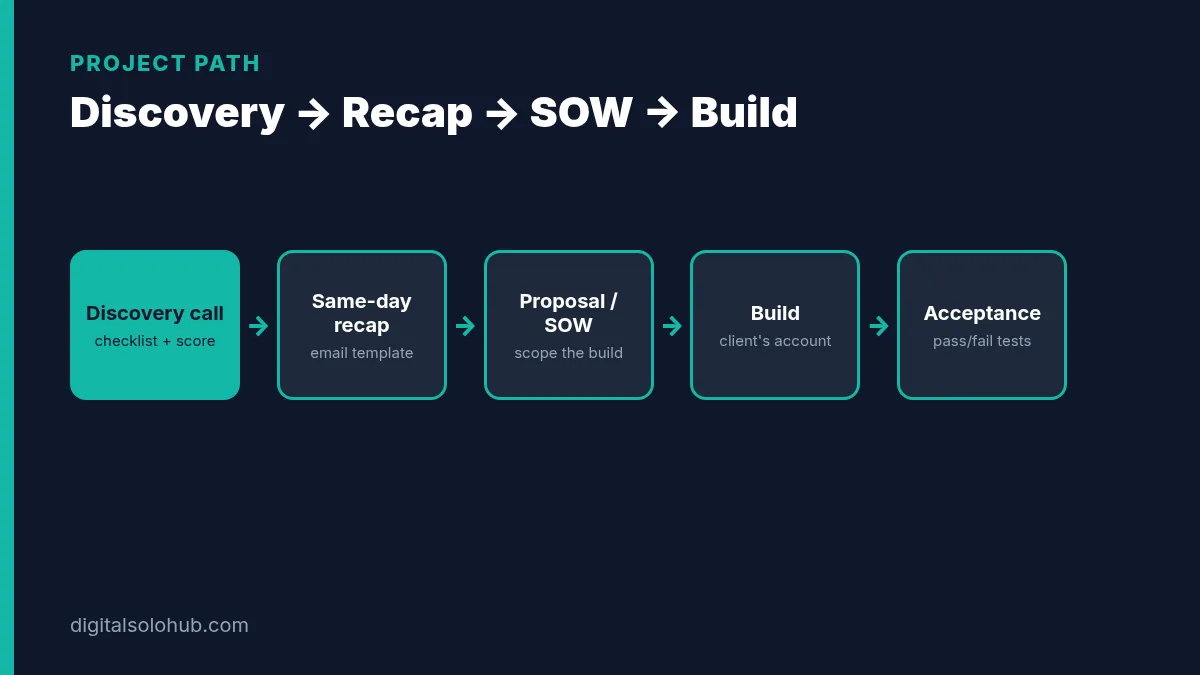
The Go/No-Go Rubric: Score Before You Quote
Score each row 0, 1 or 3. Total out of 15. Do this in the last five minutes or immediately after you hang up, while the call is still sharp.
| Criterion | 0 | 1 | 3 |
|---|---|---|---|
| Workflow clarity | Can’t describe trigger or steps | Happy path only | Trigger, steps, output and exceptions named |
| Decision owner present | Nobody who can approve | Influencer only | Approver on the call or named with date |
| Volume & speed known | Shrug | Rough guess | Stated volume + acceptable delay |
| Access realistic | Wants you in their master login / blocked IT | Unclear path | Collaborator access + least privilege possible |
| Fit with your offer | “Automate everything” / wrong niche | Stretch but doable | Matches a workflow you already know how to build |
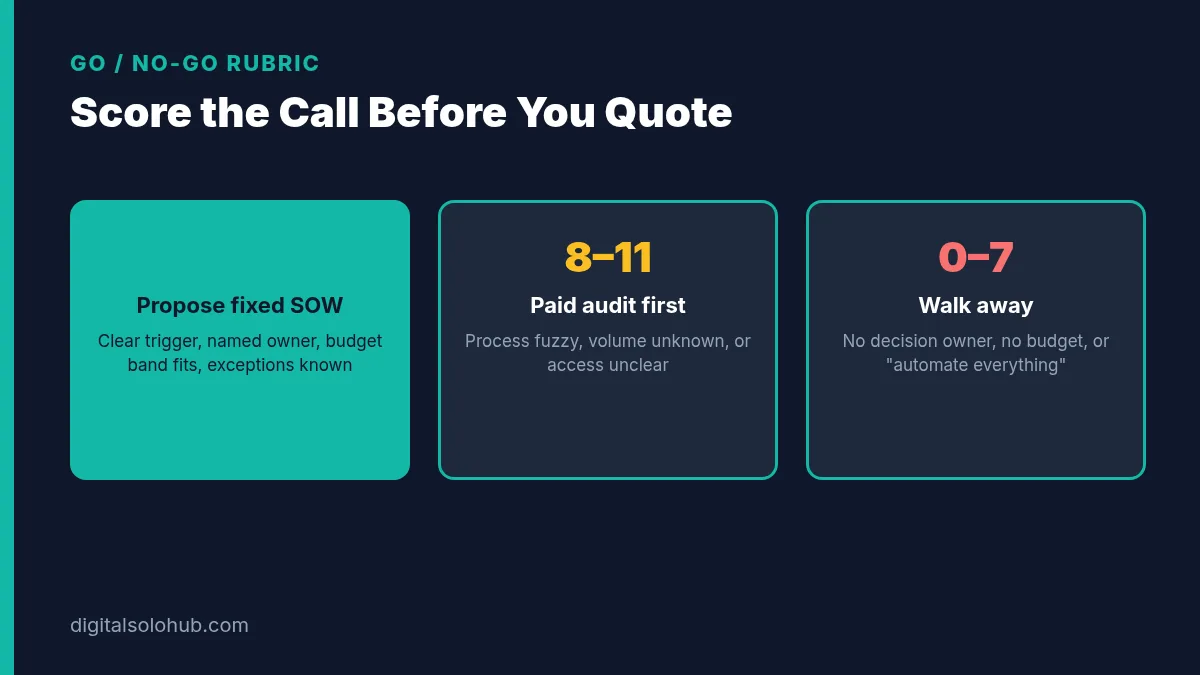
How to read the score:
- 12–15: Propose a fixed-scope build. Move to proposal + SOW.
- 8–11: Sell a paid audit / discovery sprint. You’re still missing clarity that a free call shouldn’t buy.
- 0–7: Walk away or defer. Be polite and specific about why.
Illustrative example (hypothetical, not a client story): a prospect wants “full CRM automation,” can’t name the trigger, has no budget owner on the call, and asks you to log in with the company password. Score lands around 3–5. The right move is a clear no, or a tiny paid process-mapping session if you still see upside. Not a fixed quote.
When to Walk Away vs Paid Audit vs Fixed SOW
| Signal from the call | Next step | Why |
|---|---|---|
| Clear trigger, known exceptions, named owner, budget band fits | Fixed SOW / proposal | You can define “done” without inventing the process |
| Process fuzzy, volume unknown, or apps unclear | Paid audit (1–2 weeks) | The audit is the product that produces the SOW inputs |
| No decision owner, no budget, “automate everything,” or never run manually | Walk away | You’re being hired as their unpaid ops team |
| High risk data (payments, health, large personal-data moves) and they want free scoping | Paid architecture first | Risk work isn’t a free discovery add-on |
| They already have a written workflow map and acceptance tests | Short proposal → SOW | Skip the long call; use proposal templates |
If you’re building toward an agency model later, the same discipline scales. See starting an AI automation agency. The discovery call is where agencies either protect margin or give it away.
The Same-Day Recap Email Template
Send this the same day. Same-day beats “I’ll send something next week.”
Subject: Recap + next step: [Workflow name]
Hi [Name],
Thanks for the call today. Here’s what I captured. Reply if I missed anything.
Outcome you want: [one sentence]
Current trigger: […]
Steps we mapped: [1. … 2. … 3. …]
Exceptions / human review: […]
Systems: [apps] · Platform: [Zapier/Make/n8n] in [client’s] account
Volume assumption: about [X] / [month]
Owner after launch: [name] · Error alerts to: […]
Out of scope for phase one (for now): [list 3–6 nearby asks]Recommended next step: [fixed-scope proposal / paid audit / pause]
What I’ll send by [date]: [proposal + draft SOW / audit plan]
What I need from you: [access list / sample redacted record / decision by DATE]If this matches what you heard, reply “looks good” and I’ll proceed.
[Your name]
Notice what this email does. It turns the call into SOW raw materials: outcome, workflow, systems, exclusions, owners. When you open the automation scope of work template, you’re copying, not inventing.
Common Discovery Call Mistakes (and the Fix for Each)
1. Demo-ing the tool before mapping the process.
Twenty minutes on Zapier, five on their workflow.
Fix: platform-neutral until volume and constraints make the tool choice obvious. Then hand them the Zapier vs Make vs n8n guide if they want homework.
2. Quoting on the call.
A number without a scope is a guess with a currency symbol.
Fix: “I’ll send a written next step today.” Always. Once the recap is agreed, price the scoped hours with the AI freelance pricing calculator so the number in your SOW comes from your real costs, not a guess.
3. Skipping exceptions.
Happy-path quotes explode on the 5% of cases.
Fix: ask “which cases cannot follow that path?” and write them down.
4. Ignoring whose account it runs in.
Building in your account is faster, and you become their host.
Fix: default to the client’s account; put it in the recap.
5. No error owner.
Silent failures become your reputation problem.
Fix: name the alert destination on the call. Point to how Make and n8n support explicit error paths.
6. Free architecture for a fuzzy process.
If they can’t describe it, designing it live is consulting you’re giving away.
Fix: sell a paid audit. Score 8–11 on the rubric.
7. No decision date.
Projects die in “we’ll think about it.”
Fix: ask for a confirmation date before you hang up. Put it in the recap.
The 7-Day Discovery Call Sprint
If you don’t have a discovery system yet, build one in a week.
- Day 1: Copy the timed script into a notes template. Add your business name and the recap email.
- Day 2: Write your standard exclusions starter list (nearby workflows, historical import, copy changes, platform fees, ongoing monitoring).
- Day 3: Fill a sample checklist for a fictional lead-intake workflow so the sections feel natural.
- Day 4: Build the go/no-go scorecard as a one-page sheet or Notion database.
- Day 5: Practice the opening frame out loud once. Time yourself. Cut anything that sounds like a pitch.
- Day 6: Save the recap email as a text snippet. Link it next to your SOW template.
- Day 7: Use the checklist on your next real call, even if it’s a warm lead. Score it. Send the recap same day.
Keep the fictional filled sample. It becomes a portfolio piece that shows prospects how you think, which often beats a flashy demo. If you need a realistic workflow to practise on, fill the checklist for a missed call text back setup at a local plumber: one trigger, one text, and plenty of exceptions to ask about.
Frequently Asked Questions
What should I ask on an automation discovery call?
Map one workflow end to end: the outcome, trigger, steps, output, exceptions, monthly volume and speed, connected apps, whose Zapier/Make/n8n account it will run in, who pays the plan, what access you need, who gets error alerts, who owns it after launch, timeline, budget band and decision owner. Then agree a next step: walk away, paid audit, or fixed-scope proposal.
How long should an automation discovery call be?
About 45 minutes is enough for one workflow. Longer calls often slide into free design. If the process is too fuzzy to map in 45 minutes, sell a paid audit instead of extending the free call.
Should I give a price on the discovery call?
Usually no. Quote in writing after the recap, once scope and exclusions are clear. A number without a scope is a guess. If the call scores low on clarity, sell a paid discovery or audit before any fixed fee.
When should I walk away from an automation project?
Walk away when there is no decision owner, no budget band, a request to ‘automate everything’, a process that has never been run manually, or pressure to use a master login before an engagement exists. A clear no on the call saves both sides weeks.
What’s the difference between a discovery call and a scope of work?
The discovery call diagnoses the workflow and decides the next commercial step. The scope of work defines the build after they say yes: inclusions, exclusions, acceptance tests and change control. Use discovery first, then the SOW template.
Should I build in my Zapier/Make/n8n account or the client’s?
Default to the client’s account. It keeps billing, plan limits and data ownership with them and makes handover simple. Write that choice into the recap and the SOW. Building in your account often turns you into unpaid hosting.
After the SOW and build, finish with the automation handoff checklist so ownership, credentials and acceptance land with the client before you close the project.
Final Thoughts
Automation projects rarely fail because the freelancer couldn’t connect the apps.
They fail because nobody asked the right questions before the quote.
An automation discovery call checklist fixes that in 45 minutes. You map the workflow, catch the exceptions, name the owners, score the fit, and send a recap that becomes your SOW. Clients feel safer. You stop bleeding hours into “quick” projects that were never quick.
Your next action:
- Copy the timed script into a doc today and fill the Before-the-Call checklist.
- Save the recap email as a snippet.
- Use both on your next discovery call, before you quote.
When the call scores 12–15, move to the automation scope of work template and the proposal templates. If you still need to win the conversation itself, close your first AI freelance client covers the follow-up.
Ask before you quote. Then build.
Sources
- Zapier Help Center: How is task usage measured in Zapier?
- Make Help Center: Operations
- Make Help Center: Error handlers
- n8n Docs: Handle errors gracefully
- NIST Computer Security Resource Center: Least privilege (glossary)
- Freelance Codex: Discovery Call Checklist (generic freelance further reading)
- Farasat Ali: Discovery Call Questions for Automation Projects (further reading)
Platform rules change. Check the sources above before you send a client quote. This checklist is a practical starting point, not legal advice.
About the Author
Omar Yousaf
Founder of Digital Solo Hub
I help beginners build practical AI freelancing skills through structured learning, portfolio development, and realistic business strategies. My focus is on helping new freelancers create sustainable income by combining AI tools with professional execution rather than shortcuts or unrealistic promises.