
To get AI automation jobs on Upwork, sell one narrow automation outcome, build a profile and three demo builds around it, spend Connects only on payment-verified posts that name their tools, and answer the brief with a phased fixed price. Start work only on a funded milestone, then keep repeat work on the platform.
Most beginners treat Upwork like a lottery.
It doesn’t work that way for automation.
Automation buyers hand you their tools, data and customers. They hire the freelancer who sounds safest, not smartest.
Quick answer: One outcome in your title. Three demo builds on fake data. Six checks before you spend a Connect. A proposal naming the first two workflows, account ownership and monthly costs. A funded milestone before you start.
Where this guide fits: it assumes you’ve already chosen Upwork. If you haven’t, read Fiverr vs Upwork vs LinkedIn for AI freelancers first. For copy-paste proposal wording across platforms, use the AI freelance proposal templates. This page covers the Upwork side: profile, job filter, pricing, Work Now and the rules.
Every dollar figure below is an example built from a stated formula. None is a market rate, an earnings claim or a promise.
Table of Contents
- What AI Automation Jobs on Upwork Ask For
- Step 1: Pick One Automation Outcome
- Step 2: Build a Profile Clients Can Search
- Step 3: Filter Jobs Before You Spend Connects
- Step 4: Write a Proposal That Answers the Brief
- Step 5: Price a Funded Fixed-Price Milestone
- Step 6: Use Work Now and the MCP Server Carefully
- Step 7: Deliver and Keep the Client on Upwork
- Mistakes (and the Fix for Each)
- Your First 14 Days
- Frequently Asked Questions
- Final Thoughts
What Do AI Automation Jobs on Upwork Actually Ask For?
Read the job post before the budget. One public AI automation post I read this week, from a logistics and real estate business, asked every applicant for the five things in the first column below. Nobody asked how many years you’ve used ChatGPT.
| What the post asks | What the client is really asking | What you send |
|---|---|---|
| Similar automations you’ve deployed | Have you done this before? | Two demo builds with a short screen recording |
| Platforms and why | Will I be locked in? | One platform choice, one sentence of reasoning |
| First two workflows + timeline | Do you understand my business? | Phase 1 and phase 2, in their words |
| Fixed price + monthly costs | Will this surprise me later? | One price for phase 1, usage costs listed separately |
| Our accounts, approval steps | Can I trust you with access? | “Built in your accounts. Nothing sends without your OK.” |
Step 1: Pick One Automation Outcome to Be Known For
A client typing “automate lead follow-up” is not searching for “AI developer”.
Pick one outcome you can show working, such as lead routing into a CRM or weekly reports sent, and name it in your title.
[Outcome] automation for [type of business] | [main tool], [second tool]
Example: “Lead follow-up automation for home service businesses | n8n, HubSpot”.
Hard truth: a broad title feels safer and wins less.
Step 2: Build a Profile Clients Can Search (and Trust)
- Overview, first two lines: the problem you fix and for whom.
- Skills: the exact tool names buyers type (n8n, Make, Zapier, HubSpot, Airtable, OpenAI API). Only tools you’ve actually used.
- Portfolio: three demo builds on fake data, each with a 60-second recording that includes a failure.
- Process line: “Map, build in your accounts, test, hand over with a runbook.”
No client work yet? Pick three builds from the AI automation projects for beginners list; each comes with a break test you can record. The AI freelancing portfolio guide shows how to present them.
Pro tip: a demo where bad input triggers an alert to the owner shows judgment a happy-path video can’t.
Step 3: Filter Jobs Before You Spend Connects
Connects are how you pay to apply. They cost $0.15 each, and the Connects help page says the number needed varies per job and is shown in the post. Connects aren’t returned if the client picks someone else or the job expires.
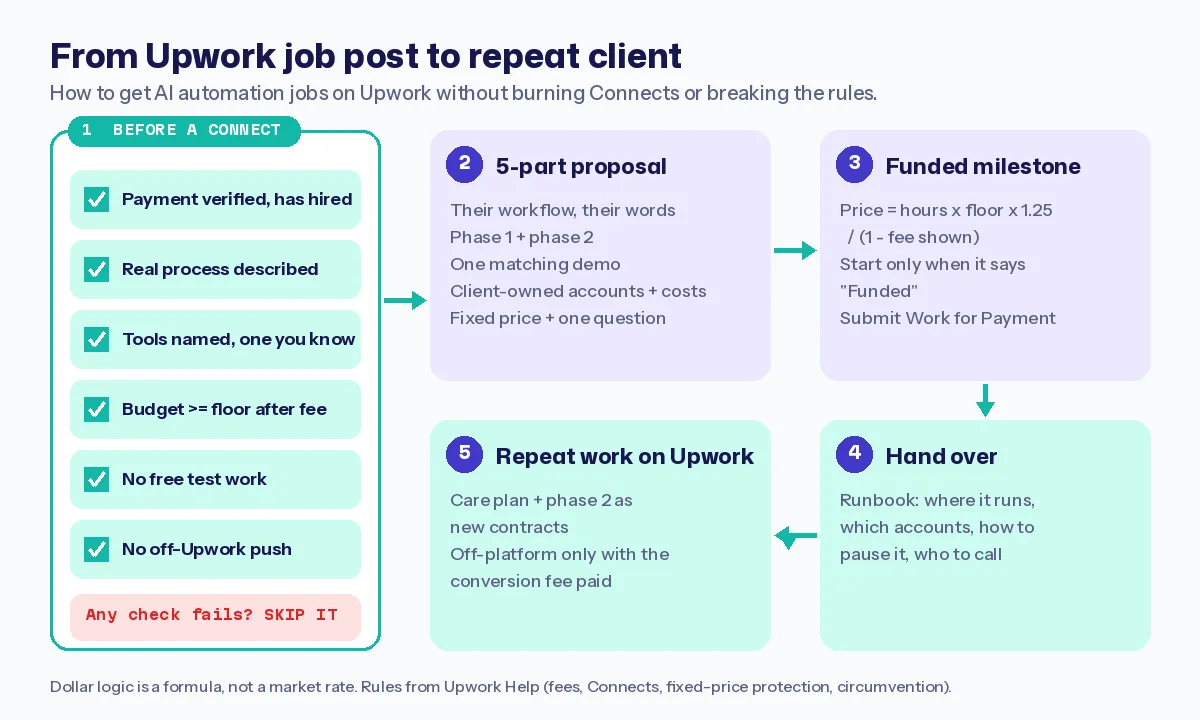
So run six checks first. Apply only if all six pass:
- Payment verified, with a hiring history on the client profile.
- A real process described: where the data starts, where it should end up.
- Tools named, and you’ve used at least one of them.
- Budget at or above your floor once Upwork’s fee is taken off.
- No free test work. Upwork’s red-flags guide flags free work requests as a possible scam.
- No push to move off Upwork before a contract starts. That breaks Upwork’s terms.
Example cost check: if a post asks for 12 Connects, that proposal costs 12 × $0.15 = $1.80. Small, until a scattershot week of 30 proposals teaches you nothing.
Log every proposal: Connects spent, reply, interview, hire. After 20, you’ll see which posts answer you.
Step 4: Write a Proposal That Answers the Brief
Keep it short and in the client’s order. Five parts:
- Their workflow in one sentence, using their words: “New leads from your form sit in a spreadsheet until someone copies them into HubSpot.”
- Phase 1 and phase 2: the first workflow you’d build, and the one after.
- Proof: one demo link that matches, not your whole portfolio.
- Accounts and costs: “I build in accounts you own. Tool and AI usage are billed to you directly; here’s the rough list.”
- Price and one question: a fixed price for phase 1, then one question about their data or approvals.
Answer the screening questions properly. Full wording for each part is in the proposal templates guide.
Contrarian insight: don’t promise a “fully autonomous” system. Saying where a human approves a step makes you sound more trustworthy.
If the client wants a call, use the automation discovery call checklist.
Step 5: Price the First Contract as a Funded Fixed-Price Milestone
Upwork takes a freelancer service fee of 0% to 15% per contract. You see the exact percentage before you submit, and it’s locked once the contract starts. Price with it built in:
- Phase 1 price = build hours × your floor rate × 1.25 for surprises ÷ (1 − the fee shown).
- Example: 10 hours × $25 × 1.25 = $312.50. With a 10% fee shown: $312.50 ÷ 0.90 ≈ $347. An example from the formula, not a market rate.
- Monthly usage (tools, AI, hosting) is billed to the client directly, never hidden inside your price.
Get your floor from the AI freelance rate calculator. Why the 1.25 buffer exists is explained in how much to charge for an n8n automation.
Then protect it. Upwork’s fixed-price protection applies when the milestone is funded before you start, you deliver through Submit Work for Payment, and the work matches the milestone. Look for the “Funded” label.
Step 6: Use Work Now and the Upwork MCP Server Carefully
Work Now (public beta)
Upwork announced Upwork Now on November 2, 2026. Clients can turn on “Hire Now” when posting; freelancers turn on “Work Now” to signal they can start right away. The Work Now help page adds the fine print:
- It’s being tested with a limited group, so you may not see it yet.
- Your session ends if you don’t answer a client invite or message within 5 minutes, or after 5 minutes of inactivity on web and mobile.
- Once hired, clients expect you to start the same day, and these contracts count toward your Job Success Score like any other.
My strategy: switch it on only when you could fix a broken Zap or stuck workflow the same day. Never for an unscoped build.
The Upwork MCP server
The Upwork MCP server connects Upwork to AI tools like Claude, ChatGPT and Cursor. You can search jobs and draft proposals inside the AI tool. Proposals stay drafts until you confirm, Connects are spent only then, and accepting an offer completes on upwork.com.
Use it to triage and draft. Read every proposal before you confirm it.
Step 7: Deliver, Hand Over and Keep the Client on Upwork
Deliver inside the milestone scope. If it grows, ask for a new milestone first.
Hand over with a runbook: where it runs, which accounts it uses, how to pause it, who to call. The automation handoff checklist has the full template.
Some guides tell you to move Upwork clients off the platform to skip fees. Read why you shouldn’t get paid outside Upwork first: doing it without paying the conversion fee is circumvention under Section 7 of the User Agreement, and it can get your account suspended.
Keep the care plan and phase 2 on Upwork. The fee is the price of the client you didn’t have to find.
Mistakes When Chasing AI Automation Jobs on Upwork (and the Fix for Each)
- “AI expert” as your title. Fix: one outcome plus the tools buyers type.
- Thirty proposals a week to anything with “AI” in it. Fix: the six checks, then a tracker.
- Starting before the milestone shows “Funded”. Fix: wait. Every time.
- Doing a free “test task”. Fix: offer a small paid phase 1 instead.
- Leaving Work Now on when you can’t start today. Fix: switch it off.
Your First 14 Days on Upwork
- Days 1-3: pick the outcome, rewrite your title and overview.
- Days 4-8: build and record three demos on fake data, each with a failure alert.
- Days 9-14: apply only to posts that pass all six checks, and log every proposal.
Frequently Asked Questions
How do I get AI automation jobs on Upwork with no experience?
Build three demo automations on fake data, record each working and failing safely, and pitch a small paid phase 1.
Are there AI automation jobs on Upwork?
Yes. Upwork lists Automation, Chatbot and ChatGPT among its AI and automation job categories. Filter for payment-verified clients who describe a real process.
How many Connects does an AI automation proposal cost?
It varies per job and is shown in the post. Connects cost $0.15 each and aren’t returned if the client hires someone else.
What is Upwork Work Now?
A beta toggle that shows clients you can start today. Your session ends after 5 minutes without a reply, and clients expect a same-day start.
Can I move an Upwork client off the platform?
Only if the Upwork Conversion Fee is paid. Moving a client you met on Upwork off the platform without it breaks the Terms of Service.
Should I use AI to write Upwork proposals?
Use it to draft and triage, then rewrite in your own words and check every claim before you submit.
Final Thoughts
Getting AI automation jobs on Upwork is less about volume and more about sounding safe: a clear outcome, watchable proof, a price with no surprises.
Answer the brief. Fund the milestone. Hand it over clean.
Your next action:
- Set your floor with the rate calculator.
- Record one demo build that shows a failure alert.
- Send three proposals this week to posts that pass all six checks.
Make your proposal the easy yes.
About the Author
Omar Yousaf
Founder of Digital Solo Hub
I help beginners build practical AI freelancing skills through structured learning, portfolio development, and realistic business strategies. My focus is on helping new freelancers create sustainable income by combining AI tools with professional execution rather than shortcuts or unrealistic promises.